Running on Empty? Learn How Fuel Costs Are Killing Your Bottom Line

Running on Empty? Learn How Fuel Costs Are Killing Your Bottom Line

| |

Yellow Hummer When you try to think of items that burn up a lot of gasoline, what first comes to mind?

SUVs. Lawnmowers. Generators. My yellow H2 Hummer (kidding). But seriously, all these things tend to burn more gas (and money) than their actual value to you.

But what about paper? It doesn’t really sound like something that would cause you to suddenly grab your wallet. But indeed, similar to my yellow H2 Hummer (still kidding), paper forms are actually one item that can significantly cost your business both time and money.

Read on below to learn how a single paper-based process can cost your business not only 100s of hours in lost efficiency, but also cause leakage on your bottom line.

CorollaMost common people are conscious about their mileage, how much they spend on gas and the fuel economy of the vehicle they purchase. This is probably why the economically designed Toyota Corolla is still the top-selling car of all-time.

But when it comes to running a business, the majority of people can’t haul loads or supplies in the backseat of their leather interior Corolla. This doesn’t mean though that we should simply throw all economic sense out of the window when it comes to managing a fleet of vehicles.

Most companies within the Field Service or Construction industries are, due to their work, forced into purchasing less fuel-efficient vans and trucks. This is the point at which most companies feel resigned to the fact that they will have to spend a ton to fill up those vehicles, because “that’s just what everyone else does”.  But this is just the point in time when companies should instead say, “What CAN we do to cut down on our costs, and where CAN we streamline our process?”.

So this begs the important question, how and where is money being lost in transit?

Remember that work vehicles are used for two primary purposes, driving to and from job sites. Every time they are on the road burning fuel, the company is slowly losing money.

Why are they on the road? 50% of the time it’s because they need to return paper forms back to the office, hauling their gas-guzzling fenders miles across town to do so. This is the critical correlation between paper forms and fuel dollars, and where a business hemorrhages money without truly realizing it.

But how much is it really costing your business? Let’s calculate below exactly how much a single paper form can cost your organization.

So, we’ve talked about how fuel inefficiency can increase costs within your business, but how does a single paper form effect those costs? By using paper forms you’re forcing each field tech and/or supervisor to manually fill out each report and return the contents back to HQ for processing. This means if your field tech is sent to a site 15 miles away, they’re going to be burning cash all the way back to the office in order to return those forms.

But we can break it down even further.

For example, say a field supervisor has 4 job sites to inspect every single day. At each of those job sites, he/she has to complete a detailed Job Safety Analysis (JSA) report, with the average distance from the main office to each site being 15 miles.

MoneyNow take into consideration the average mile per gallon range for a standard pickup or van is 15 to 20 mpg, with an average cost of a gallon of gas being $2.30. With a total of 50 standard work weeks in a year(accounting for vacation), that field supervisor will waste around 300 gallons of fuel traveling between the worksites and the main office. That alone will account for close to $700 in fuel dollars lost annually,  and that’s just for a single field supervisor!

But what about the actual process of filling out and collecting all the data on paper forms, how much time and money does that waste the field supervisors?

Take into consideration that the average paper report can take between 15 and 30 minutes to fully complete by hand. Why so long? Think about it. When it comes to a safety-related form like a JSA, or even something as simple as a timecard, detail is everything. And with paper, nothing can be pre-filled or auto-populated like it can with a mobile form.

Crumpled Paper You have to capture photos, signatures and even GPS coordinates for the report to be verified as accurate. When you use a platform like GoCanvas, all these features are built right into the mobile form. With paper, you are forced to bring extra pieces of equipment to capture these readings, and then take the time to compile them all together for a final report. This extra 30 minutes a day, across 4 sites, for 50 business weeks can cause that single field supervisor to waste between 200-300 hours every year! 

Not impressed by hours lost?

Add into the equation how much they are being paid, let’s say $17 per hour, and that equates to between $3,400 – $5,100 in lost productivity every year. Now multiply that number across all your supervisors and watch as the losses pile up!

Now that we’ve talked about the doom and gloom that paper forms can bring upon your business, it’s only right that we show you how to solve the issue!

A mobile form platform like GoCanvas is essentially built to negate all the negative traits that come with paper-based data collection.

GoCanvas Mobile With GoCanvas, your employees (including field supervisors) can reduce their drive time by 50% or more because of real-time data sharing. As soon as a report is completed onsite, all of the contents including GPS, Photos, Signatures, Barcodes, and more will be automatically sent to the GoCanvas cloud and available for immediate review by the main office.

Employees, like field supervisors, can also cut down on trips between sites by setting up safety inspection approvals with the GoCanvas Workflow feature. This allows for employees from other sites to complete inspections with detailed photos, and transmit that data directly to the field supervisor’s GoCanvas device for final review and approval. If any mistakes or issues are found, the field supervisor can reject the report and send a note back to the original submitter. This type of process can further cut down on unneeded mileage, and improve daily efficiency across multiple job sites!

Whether it be a timesheet, work order or site inspection – paper anywhere is dysfunction everywhere. By simply implementing the few simple changes outlined above, you could end up saving your business close to $4,000 per employee annually! 

About GoCanvas

GoCanvas® is on a mission to simplify inspections and maximize compliance. Our intuitive platform takes care of the administrative tasks, freeing our customers to focus on what truly matters – safeguarding their people, protecting their equipment, and delivering exceptional quality to their customers. 

Since 2008, thousands of companies have chosen GoCanvas as their go-to partner for seamless field operations.

Check out even more resources

A person sits at a desk holding their phone showing a graph, while their laptop sits on the desk showing more charts and graphs.

How TE3CO Leverages Data Analytics to Unlock Business Potential

TE3CO provides mission-critical pressure relief technology and services to customers across the oil and gas industry. They employ a highly trained and capable workforce of field technicians and engineers. Before working with GoCanvas, TE3CO relied on spreadsheets and emails to manage their ticketing process but found the system time-consuming and difficult to track.

Two men in hard hats look onto a tablet.

VIP Lighting Gains Business Efficiencies with GoCanvas

VIP Lighting is a retail lighting and electrical maintenance company that services retail chains across Australia and New Zealand. The business has been operating for 25 years and now services 10,000 retail sites across both countries. Prior to joining GoCanvas in 2018, the business had multiple systems running different aspects of their technician and contractor network.

Man in a hard hat inspecting HVAC vents.

Three HVAC Maintenance Checklists that will Reduce Errors and Grow Your Bottom Line

For HVAC technicians, so many errors within their daily tasks come from using outdated paper forms while completing a job. Using these HVAC inspection checklists will prevent issues before they happen, so your technicians can collect comprehensive and consistent data at every job.

Connect with an Expert Today.

We’ll help you put together the right solution for your needs.

4 Hidden Dangers in Oil and Gas Extraction

4 Hidden Dangers in Oil and Gas Extraction

| |

4 Hidden Dangers in Oil and Gas ExtractionOf course you want your oil and gas employees working out in the field to stay safe and healthy. But that can be difficult given the hidden hazards and oil and gas extraction dangers that exist — not to mention the known hazards that frequently aren’t properly assessed and can go undetected in oil and gas extraction.
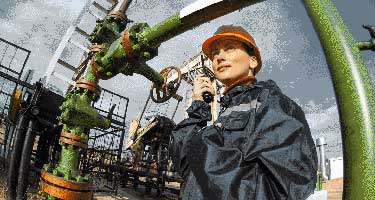

Here are four hidden dangers in oil and gas extraction to put on the radar of your oil companies, and some ways that you can harness the power of mobile technology to identify risk, measure exposure, and keep your workers safe from harm.

During oil drilling, fluids are circulated through the well and through systems that can be open, partially enclosed, or fully enclosed.

It’s well known that these fluids, when released into the environment, can cause groundwater contamination — so most companies have strict controls in place to prevent leaks. But these fluids, which often have trace amounts of hydrocarbons in them, can also cause health and safety issues among your workers.

Health effects from exposure to drilling fluids include dizziness, headaches, drowsiness, nausea, inflammation of the respiratory system, and even an increased risk of cancer.

Employees can be exposed while working in a shale shaker room, when over or around a fluids pit system, while on the drill floor, and more. But one of the most common ways workers are exposed to chemicals in drilling fluids is through contaminated and/or inappropriate protective gear. For example, fabric gloves that get soaked with hydrocarbons expose an employee to more contaminants than if he or she had not worn any gloves at all and had been splashed with fluid and wiped it off.

To keep workers safe from hazardous exposures, it’s important for oil companies to establish clear safety protocols for the handling of drilling and fracking fluids and to provide training for all members of the team. Then, use mobile forms to create and maintain safety checklists that your team members can use on a daily basis. Scrupulous use of such checklists will enable you to identify — and address — hazardous exposures before they lead to harm.

Inhaling silica dust can cause silicosis, a lung disease that causes shortness of breath, severe coughing, weakness, and possibly cancer or death.

OSHA and the National Institute for Occupational Safety and Health (NIOSH) have identified seven sources of silica dust exposure during hydraulic fracking:

  • Dust ejected from thief hatches (access ports) on top of the sand movers during refilling operations while the machines are running (hot loading)
  • Dust ejected and pulsed through open side fill ports on the sand movers during refilling operations
  • Dust generated by on-site vehicle traffic
  • Dust released from the transfer belt under the sand movers
  • Dust created as sand drops into, or is agitated in, the blender hopper and on transfer belts
  • Dust released from operations of transfer belts between the sand mover and the blender
  • Dust released from the top of the end of the sand transfer belt (dragon’s tail) on sand movers

You can take steps to control dust exposure by improving existing engineering controls and safe work practices. In addition, it’s required by law that you monitor the air to determine your workers’ exposure to silica, provide respiratory protection as needed, and offer training and information about the hazards of silica and other chemicals. For more information, see NIOSH’s “A Guide to Working Safely With Silica.”

The earth naturally contains small amounts of radioactive materials. Normally these concentrations are low and relatively harmless, but oil drilling activities can reveal or create higher concentrations. OSHA says that oil field production waters have high concentrations of radium, and that the scale inside pipes and tanks is where that radium builds up. Workers who handle pipes or work in gas processing facilities are at risk of NORM exposure. Water handling equipment has also been shown to have the highest levels of NORM contamination. While the radiation levels of even concentrated NORMs are fairly low, chronic exposure can cause cancer.

Because NORM exposure tends to be chronic, medical testing alone is not effective for protecting your workers. “Therefore, while medical surveillance is a standard strategy that is often used, it must be emphasized that source control, exposure monitoring, worker education and safe operating practices are the most important strategies for preventing significant worker exposures,” according to the International Association of Oil & Gas Producers.

Exhaust fumes aren’t unique to the oil and gas energy industry, but they are a hazard anywhere heavy equipment or diesel generators are used. Short-term exposure to exhaust can cause eye, nose, and throat irritation. Long-term issues include cardiovascular problems and cancer.

Engineering controls are the best strategy to control exposure to exhaust. Use low-sulfur fuels and, if possible, restrict the amount of diesel-powered equipment in a work area. Also, regular maintenance of your equipment will prevent it from running too rich, which can result in excessive emissions.

By tapping into technology — especially mobile forms — to provide your workers with everything from equipment inspections and hazardous substance self-inspections to safety checklists and more, you can keep your employees safe from these hidden hazards and oil and gas extraction dangers.

In many cases, OSHA or other energy regulation organizations have published energy standards relating to exposure levels of these hazards. So knowing the legal limits is a first step. Use these published energy guidelines (and other sources referenced here) to create training guides and mobile safety checklists that your workers can take right into the field with them. And consider using a mobile PPE checklist — a good practice no matter what hazards you are trying to mitigate.

You can also tap into the power of mobile forms to keep detailed records of samples taken to monitor air quality — vital information to have whether you are monitoring concentrations of diesel emissions or checking levels of airborne silica.

To see how GoCanvas can help you harness the power of mobile form to identify, monitor, and prevent hazardous exposure on your site and drilling rig, give GoCanvas a try today and download a free app from our Mining, Quarrying, Oil, Gas & Chemicals Application Store!

About GoCanvas

GoCanvas® is on a mission to simplify inspections and maximize compliance. Our intuitive platform takes care of the administrative tasks, freeing our customers to focus on what truly matters – safeguarding their people, protecting their equipment, and delivering exceptional quality to their customers. 

Since 2008, thousands of companies have chosen GoCanvas as their go-to partner for seamless field operations.

Check out even more resources

Manage Risk for Oil and Gas Companies With a Risk Assessment Checklist

Today, the challenges faced by the oil and gas industry are considerable. Effective business leaders and managers must thoroughly understand them to determine…

Solutions to Waste Management Issues For Oil & Gas Companies

Waste management compliance is important in every industry. The oil and gas industry, in particular, has a strong risk of waste emissions…

4 Ways Big Data is Transforming Oil and Gas

Oil and gas companies are getting smart about using the data they collect to gain insights and manage people, equipment, and worksites more effectively…

Connect with an Expert Today.

We’ll help you put together the right solution for your needs.

Ultimate Checklist for Effective Toolbox Talks

Ultimate Checklist for Effective Toolbox Talks

|

Just five to 10 minutes a day can make a significant difference in your construction or manufacturing company’s safety record. Holding regular toolbox talks — short, informal discussions that focus on one specific safety issue — can result in proven safety and cost benefits, including lower insurance rates, reduced turnover, and less damaged equipment. However, to make these talks successful, you must prepare, deliver, and document them the right way. Make sure you’re equipped to host effective safety briefings by following this checklist.

About GoCanvas

GoCanvas® is on a mission to simplify inspections and maximize compliance. Our intuitive platform takes care of the administrative tasks, freeing our customers to focus on what truly matters – safeguarding their people, protecting their equipment, and delivering exceptional quality to their customers. 

Since 2008, thousands of companies have chosen GoCanvas as their go-to partner for seamless field operations.

Check out even more resources

business people discussing project

Gown Your Business with GoCanvas Partner Program

Join our Partner Program and gain instant access to our global network of thought leaders and industry experts enjoying shared collaboration and collective success.

Forte Supply Chain Solutions Partner Video

Partner Snapshot: Forte Supply Chain Solutions

Explore how Forte Supply Chain Solutions partnered with GoCanvas, combining in-house industry expertise with our white-label mobile forms to revolutionize their processes.

Closeup of a handshake.

GoCanvas Integrations: Streamline your Workflow

Integrate with over 1,000 software applications. Enhance your GoCanvas experience by syncing real-time data to one or all of your business tools.

Connect with an Expert Today.

We’ll help you put together the right solution for your needs.

3 Benefits to Connecting Work Orders with your Accounting Systems

3 Benefits to Connecting Work Orders with your Accounting Systems

|

No one loves doing work orders, but they’ve become an essential part of the data collection process for many companies across the world (especially in the Construction industry).

While more and more companies every day are transitioning away from paper-based data collection methods, the fact still remains that the majority still complete work orders by hand. The issues with completing work orders by hand include:

  • Incomplete reports
  • Unreliable data
  • Inconsistent reporting times
  • Untrackable metrics

But the great thing about implementing a platform like GoCanvas is that it can be easily customized around the current business processes and systems that you already have in place. It also enables you to capture different types of data that you weren’t able to easily collect before with your paper-based work order process.

Features like Photo Capture, Barcode Scanning, GPS Location Verification and more allow you to leverage the power of your mobile device to collect the highest quality data, in real-time. But the best part is that all the data is automatically transferred to the GoCanvas secured cloud database where it can be easily organized and shared with your existing backend accounting and management software programs like Quickbooks.

About GoCanvas

GoCanvas® is on a mission to simplify inspections and maximize compliance. Our intuitive platform takes care of the administrative tasks, freeing our customers to focus on what truly matters – safeguarding their people, protecting their equipment, and delivering exceptional quality to their customers. 

Since 2008, thousands of companies have chosen GoCanvas as their go-to partner for seamless field operations.

Check out even more resources

business people discussing project

Gown Your Business with GoCanvas Partner Program

Join our Partner Program and gain instant access to our global network of thought leaders and industry experts enjoying shared collaboration and collective success.

Forte Supply Chain Solutions Partner Video

Partner Snapshot: Forte Supply Chain Solutions

Explore how Forte Supply Chain Solutions partnered with GoCanvas, combining in-house industry expertise with our white-label mobile forms to revolutionize their processes.

Closeup of a handshake.

GoCanvas Integrations: Streamline your Workflow

Integrate with over 1,000 software applications. Enhance your GoCanvas experience by syncing real-time data to one or all of your business tools.

Connect with an Expert Today.

We’ll help you put together the right solution for your needs.

Breaking Down OSHA’s Top 10 Most Cited Violations of 2017

Breaking Down OSHA’s Top 10 Most Cited Violations of 2017

| |

2017: OSHA Safety in Review

Where did all the time go? It seems like just yesterday we were posting the results of OSHA’s 2016 data findings, but here we are again.

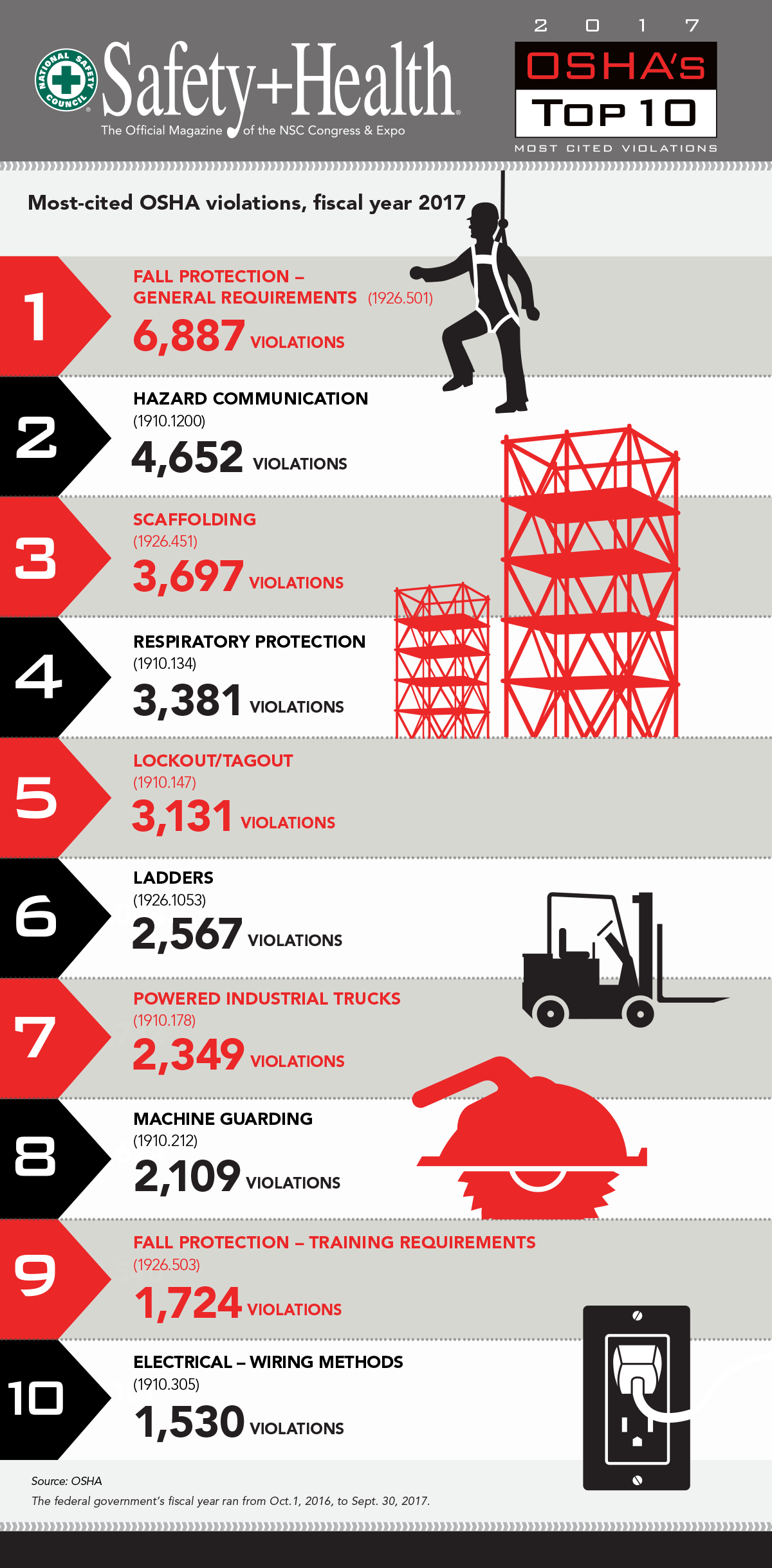
The reason why it feels like déjà vu is likely because the top 5 most cited violations of 2017 are the same as those from 2016.  Fall Protection – General Requirments, Hazard Communication, Scaffolding, Respiratory Protection, and Lockout/Tagout all come in at the top of the list for the 2nd consecutive year. All combined, the top 5 most cited categories through September of 2017 have accounted for approximately 21,748 violations.

The bottom 5 categories consist of Ladders, Powered Industrial Trucks, Machine Guarding, Fall Protection – Training Requirements, and Electrical Wiring Methods. In total, these have accounted for 10,279 violations, which combined equals 32,027 total violations reported in 2017 thus far.

This amount of violations seems like a lot (which it is), but the good news is that it’s a dramatic decrease from 2016. Last year 36,531 violations were reported in total, which accounts for an overall decrease of 12%! This decrease can be attributed to many things, but overall it shows that companies are finally starting to become serious about the safety of their employees and investing in the right methods/technologies to protect them.

But all the news isn’t positive.

Within the OSHA top 10 violation list, there was one new addition from 2016 to 2017, Fall Protection – Training Requirements. This type of violation revolves around the lack of proper safety training programs in high risk and dangerous environments. This is a common issue in today’s building construction environment as the pressure to complete projects faster increases and proper safety procedures get put by the wayside. Patrick Kapust, deputy director of OSHA’s Directorate of Enforcement Programs, puts it into perspective by telling Safety+Health Magazine that “Many of these violations were specifically related to training requirements and ensuring that a training program for each employee who may be exposed to fall hazards is established. Often, these violations occurred in the roofing, framing and residential modeling industries.

While progress is being made, there is still much work left to do. If you’re looking to become smarter about the way you collect, report, and track safety information on your project sites, GoCanavs can help! Our Application Store has over 100 different OSHA specific mobile form templates available to download and use in seconds. Toolbox Talks, JSAs, Accident Reports, and much more can be customized to fit your exact business needs.

Click here to request a quick demo!

Top 10 OSHA Violations of 2017

OSHA Infographic

About GoCanvas

GoCanvas® is on a mission to simplify inspections and maximize compliance. Our intuitive platform takes care of the administrative tasks, freeing our customers to focus on what truly matters – safeguarding their people, protecting their equipment, and delivering exceptional quality to their customers. 

Since 2008, thousands of companies have chosen GoCanvas as their go-to partner for seamless field operations.

Check out even more resources

Three people in hard hats looking at a tablet.

Smarter, Faster, Safer: Improving Safety Compliance with Mobile Technology

Compliance, there are many ways we talk about it. A necessary evil, a chore, a struggle, or a critically important part of business. We all know how crucial it is, helping save…

Woman reviewing information on a tablet.

Your Guide to Waiver Forms — Examples and Templates

Waiver forms are a type of legal protection used by businesses to reduce their liability and risk. This type of agreement between a business and its customers is used…

Closeup of a handshake.

Duotank Transforms Business Processes with GoCanvas

Duotank is a bag-in-tank alternative to the traditional keg beer system. The aseptic tank environment enables breweries to maintain the quality of their beer after it leaves…

Connect with an Expert Today.

We’ll help you put together the right solution for your needs.

3 Easy Ways to Create the Perfect Mobile Punch List

3 Easy Ways to Create the Perfect Mobile Punch List

| |

Paper forms are used today as a quick way to collect information on a project site but don’t give much flexibility in the types of information that can be collected.

A Construction Punch List is often meant to be a run through of outstanding items to be completed on a project, but these forms can be found in different formats depending on the size and scope of the particular project.

The issue with paper Punch Lists is that they offer ZERO flexibility in the way they are filled out and completed. You’re restricted to staying between the lines on the piece of paper and aren’t able to deviate or add anything outside of that paper rectangle. This runs in complete conflict with the Construction industry where data is constantly changing and personnel is in need of real-time information. This is why mobile forms, especially mobile Punch Lists, make sense.

Creating the perfect mobile form or app is about incorporating the right features that fit your data collection goals.

When filling out a Punch List the primary goal is to inspect a list of outstanding construction items, update their current status and add current or estimated completion dates. But for companies looking to dive even deeper into their data, solutions like GoCanvas allow them to enhance their Punch Lists with three important features.

Check out the three features below that you can incorporate into your GoCanvas mobile Punch Lists to increase your data quality and efficiency!

Attach Site Photos with Image Capture – Punch Lists are useful for the person who is physically filling them out onsite, but what about the employees in the back-office? The ability to collect and attach site photos allow Punch Lists to become instantly more valuable and give supervisors real-time insight into the progress of project sites. The annotation feature of GoCanvas also allows users who capture photos to highlight and draw on top of the images that they capture with their mobile device. This makes it possible for them to point out aspects of each line item and ensure that nothing is mistakenly forgotten during the follow-up tasks.

Editing Images on GoCanvas

We suggest using the Image Capture feature along with Conditional Logic. This allows you to have an Image Capture field show up only if a particular value is selected. For example, if a line item in the Punch List is marked “Finished”, an Image Capture field would then appear for the user to snap a photo of the completed item for verification. This is an easy way of ensuring you collect the data you need without making the form dramatically longer or more complicated to complete.

Auto-populating Items with Reference Data –  One of the most time-consuming parts of filling out a paper Punch List is having to manually write in each item you are reviewing. Not only are you trying to rush to inspect each item in a timely fashion, but you’re also attempting to be thorough in your inspection as well. Usually, this type of pace leads to horrible handwriting and less than thorough note-taking.

Punchlist on GoCanvas

With GoCanvas and the Reference Data functionality, you can pre-load into your Punch List rows of items that are in need of review. It’s simple as creating an Excel spreadsheet, uploading that into your GoCanvas account, and connecting it to your mobile Punch List form. Now you’ll have every item you need to inspect right in front of you and can even add items on the spot if need be. Each item you load with Reference Data can also be loaded with corresponding “Due Dates”, so that when the user is filling out the Punch List app they will know if the item they are inspecting in on track or past due for completion.  This auto-filling of data in the mobile form will easily save you 10 – 20 minutes per report completed.

Automating Reviews & Approvals with Workflow – The biggest complaint with using paper, across the board, is the time it takes to receive the reports from the field. This delay often makes the data out-dated by the time it finally reaches the back office for analysis. With Punch Lists, in particular, it’s important that the data be collected and REVIEWED in a timely manner so that real-time decisions can be made to keep the project on track.

Workflow on GoCanvas

The Workflow feature of GoCanvas is perfect for Punch Lists because it allows for the user filling out the report to instantly send the data to his or her supervisor’s device for immediate review. The supervisor can review all of the data and photos that the employee captured previously with GoCanvas and then even add notes to the report before submitting the record to the cloud for final review. If the supervisor were to find something that didn’t look right, he or she would have the ability to reject the Punch List and send it back to the original submitter with the reason why it was rejected. The great thing is that this Workflow process can be customized to fit your organization’s process. So if you want the Punch List to not go to a supervisor but instead go to a general contractor who will review and complete any outstanding items, you can!

About GoCanvas

GoCanvas® is on a mission to simplify inspections and maximize compliance. Our intuitive platform takes care of the administrative tasks, freeing our customers to focus on what truly matters – safeguarding their people, protecting their equipment, and delivering exceptional quality to their customers. 

Since 2008, thousands of companies have chosen GoCanvas as their go-to partner for seamless field operations.

Check out even more resources

Three inspection workers on job site.

The Ultimate Guide to Quality Control Inspections

Managing a construction project is a complex and stressful process. Among other things, you have to coordinate project team members, materials, and equipment and ensure that contractors are not afflicted by the potential risks and hazards present at the construction site. That said, quality means different things to different people which is why you should…

A man using GoCanvas for the digital transformation of his workflow.

Constructions Digital Transformation

Your competition is finding faster ways to capture data and get critical insights from the field into their existing systems. In short, they’re not going bigger, they’re getting smarter. In this 15-minute broadcast on the construction industry’s digital transformation, find out why the trend is to modernize workflows – and how you can stay ahead of the curve…

A electrician inspecting equipment.

See how VIP Lighting optimized efficiency with GoCanvas

VIP Lighting is a retail lighting and electrical maintenance business that services over 10,000 retail locations all over Australia and New Zealand. Before GoCanvas, VIP Lighting had two separate systems that were impossible to integrate, leading to inefficiencies. GoCanvas made it easy to integrate their systems into single, centralized platform…

Connect with an Expert Today.

We’ll help you put together the right solution for your needs.

Online Reviews and Your Business: By the Numbers

Online Reviews and Your Business: By the Numbers

If you’re in the hospitality industry, one dissatisfied customer may seem like a minor issue. But if that customer posts about his or her bad experience online, it can impact all your potential future customers — making it a major challenge. In this infographic, learn how online reviews can affect hotel and restaurant profits and what matters most to online reviewers. test.

About GoCanvas

GoCanvas® is on a mission to simplify inspections and maximize compliance. Our intuitive platform takes care of the administrative tasks, freeing our customers to focus on what truly matters – safeguarding their people, protecting their equipment, and delivering exceptional quality to their customers. 

Since 2008, thousands of companies have chosen GoCanvas as their go-to partner for seamless field operations.

Check out even more resources

Woman looking at tablet inside a large vehicle machine.

Centurian Transport saves $100k every year with GoCanvas

Centurion is the largest heavy haulage provider in Australia. They deliver national supply chain solutions to the resources, energy, construction & retail sectors…

Image of two men in front of kegs on tablet.

Duotank Transforms Business Processes with GoCanvas

Duotank is a bag-in-tank alternative to the traditional keg beer system. The aseptic tank environment enables breweries to maintain the quality of their beer…

Image of Two Men and a Truck looking at tablet.

TWO MEN AND A TRUCK® used GoCanvas to increase data visibility & compliance

With a workforce that primarily works out in the field, many of the TWO MEN AND A TRUCK® locations found that paperwork was hindering…

Connect with an Expert Today.

We’ll help you put together the right solution for your needs.

5 Mobile Forms Every QA/QC Inspector Should Be Using

5 Mobile Forms Every QA/QC Inspector Should Be Using

|

The act of performing inspections is almost always a tedious task, especially when paper forms are involved.

For Quality Assurance and Quality Control inspectors in various industries, but especially in construction, the process of completing their project reports can be a daunting task. This multi-form, multi-step process can quickly become disorganized and unmanageable if the proper processes are not in place. The negative effects of not properly completing these reports include delays in project development and major decreases in worker productivity.

So how can these issues be avoided? By using a single platform for the collection, sharing, and reporting of all QA/QC forms. This is what GoCanvas provides.

A typical QA/QC engineer or inspector will typically have to carry and fill out 5 to 10 different types of paper forms for a typical project. This doesn’t include all the additional documents like drawings and photos that the inspector will need to print out and attach separately. Add this to the pain of having to carry around these paper reports and transporting them all the way back to the office for reporting, this can add up to 100’s of hours being wasted every month due to paperwork inefficiencies.

With a platform like GoCanvas, these inefficiencies are entirely eliminated. All the forms an inspector needs can be found directly on their mobile device, and are accessible whether offline or online. These mobile forms can be customized to include easy to use drop-down menus and check boxes, as well as more specialized fields like GPS, Image Capture, Sketching, Time Stamps, Signature Capture, and more! You can also easily organize your forms on your mobile device into convenient folders for easy retrieval based on project and/or location.

But the best part is that as soon a report is completed, the data is synced to the cloud and available for the office staff to begin reviewing in real-time. This can instantly save hours that were previously lost to manual data re-entry and lost paperwork.

Now it’s time to see which mobile forms could begin saving your business hundreds of hours in lost efficiency!

GoCanvas doesn’t just give you a code-free form builder to create and customize your very own mobile forms and documents, but it also provides you with over 20,000 pre-built mobile form templates to choose from and download in seconds.

Below are 5 mobile form templates that every Quality Assurance/Quality Control inspector and engineer should download and customize to fit their particular needs. Click on any of the templates below to get started!

RFI mobile form
Material Order Form Mobile App
Engineer inspection request mobile form
Daily construction project report mobile form
Subcontractor agreement

About GoCanvas

GoCanvas® is on a mission to simplify inspections and maximize compliance. Our intuitive platform takes care of the administrative tasks, freeing our customers to focus on what truly matters – safeguarding their people, protecting their equipment, and delivering exceptional quality to their customers. 

Since 2008, thousands of companies have chosen GoCanvas as their go-to partner for seamless field operations.

Check out even more resources

Three people in hard hats looking at a tablet.

Smarter, Faster, Safer: Improving Safety Compliance with Mobile Technology

Compliance, there are many ways we talk about it. A necessary evil, a chore, a struggle, or a critically important part of business. We all know how crucial it is, helping save…

Woman reviewing information on a tablet.

Your Guide to Waiver Forms — Examples and Templates

Waiver forms are a type of legal protection used by businesses to reduce their liability and risk. This type of agreement between a business and its customers is used…

Closeup of a handshake.

Duotank Transforms Business Processes with GoCanvas

Duotank is a bag-in-tank alternative to the traditional keg beer system. The aseptic tank environment enables breweries to maintain the quality of their beer after it leaves…

Connect with an Expert Today.

We’ll help you put together the right solution for your needs.

The New GoCanvas is Here!

GoCanvas

The New GoCanvas is Here!

The Law of Three

The popular saying is that good things comes in threes. The American Constitution promises: Life, Liberty and the Pursuit of Happiness. Even the planet we live on is the third from the Sun!

If last week is any measure, three events made it an awesome seven days for us.

First, we took a bold move to rebrand from Canvas to GoCanvas. While it may seem like a small change, it actually has a big impact. Most of our customers already know us best from our web site, which from beginning has been GoCanvas.com. So it makes good sense to harmonize the brand name and make us even easier to find.

Being empathetic to the challenges our subscribers face to run and grow their business, GoCanvas is also a great description of their journey with us. We help our customers Go somewhere that is new and different, with the confidence that Canvas is a destination where you can do something great for your company.

This week also saw the 9th major update of our platform. Improving the way our customers engage with GoCanvas is always a cause for celebration. But when we completely refresh our look and feel, it really stands out. GoCanvas 9 has now gone live, delivering a more fluid and intuitive customer experience on the web site. So, whether creating a digital version of a simple document or rewriting the way work is dispatched to field teams, it’s now even easier to collect important business information and automate your business processes.

Now to the third great thing that happened last week.

Hearing from our customers is how our inspiration begins. We firmly believe that shared knowledge is what sparks innovation. What was originally planned as a round table with 5 or so customers giving us feedback on new features, had to be rapidly rethought.. over 100 wanted to attend!

We decided to hold our first user conference: Transform.

It was exciting to hear people sharing how GoCanvas is the solution to their everyday operational headaches. Our thanks go out to Ed from Post Brands and Fran from Apex – each took the stage to give awesome presentations, showing the practical and impactful ways that GoCanvas helps them run and grow their business. It was real team effort at our HQ in Reston to bring everything together and heartening to receive the great feedback from the customers who attended. We look forward to holding Transform 2018 and will definitely need a bigger venue!

The brand name may have changed and the web site refreshed, but not our passion for innovating and creating impact for our customers. We are continually finding new ways not just to automate paperwork but go much farther, delivering moments that surprise, delight and help drive better results. We have some amazing things planned for 2018.

Welcome to the new GoCanvas!

About GoCanvas

GoCanvas® is on a mission to simplify inspections and maximize compliance. Our intuitive platform takes care of the administrative tasks, freeing our customers to focus on what truly matters – safeguarding their people, protecting their equipment, and delivering exceptional quality to their customers. 

Since 2008, thousands of companies have chosen GoCanvas as their go-to partner for seamless field operations.

Check out even more resources

business people discussing project

Gown Your Business with GoCanvas Partner Program

Join our Partner Program and gain instant access to our global network of thought leaders and industry experts enjoying shared collaboration and collective success.

Forte Supply Chain Solutions Partner Video

Partner Snapshot: Forte Supply Chain Solutions

Explore how Forte Supply Chain Solutions partnered with GoCanvas, combining in-house industry expertise with our white-label mobile forms to revolutionize their processes.

Closeup of a handshake.

GoCanvas Integrations: Streamline your Workflow

Integrate with over 1,000 software applications. Enhance your GoCanvas experience by syncing real-time data to one or all of your business tools.

Connect with an Expert Today.

We’ll help you put together the right solution for your needs.

Keeping Hotel Labor Costs in Check:  How Mobile Inspection Apps Can Help

Keeping Hotel Labor Costs in Check:  How Mobile Inspection Apps Can Help

| |

When guests visit a hotel, they expect a clean room, of course, but beyond that, they expect service. They assume a concierge will greet them at the front desk, a cleaning crew will tidy their room each day, and a whole host of staff members will be on call to meet their every need.

Service is an essential part of the hotel experience — so essential, in fact, that labor is one of the largest costs for hotels, accounting for 45 percent of total expenses.

And it will likely only get more expensive. As the unemployment rate in the U.S. drops, hotels must increasingly compete for talent by offering higher pay. And in some states, such as California and Washington, there’s been pressure to increase the minimum wage and pay hotel staff more.
To keep guests happy, hotels can’t skimp on service. They must continue to hire quality staff who can meet the needs of customers. But they also can’t succeed if profit margins get too thin. So as labor costs rise, hotels need to figure out how to increase staff efficiency to stay profitable and keep guests happy.

Here are a few ways hotels can improve employee efficiency:

To keep labor costs low, your cleaning staff must be efficient; the more rooms your employees can clean in less time, the higher your profit margins. At the same time, you can’t sacrifice quality for the sake of efficiency. If your cleaning staff rushes through the cleaning process and misses important tasks, your guests will probably notice — and those issues will likely end up in a negative online review that could hurt your business.

Mobile inspection apps can help speed up the cleaning process while keeping quality high. For example, staff members can document each room they clean with photos within the app rather than by writing lengthy explanations. And by using an app, the information for each room is immediately available to supervisors, eliminating the need to collect papers and return to the back office. Plus, staff members can quickly reference a checklist for the tasks they need to complete, so they don’t miss any critical steps in the cleaning process.

Maintenance costs can get out of hand if you have to keep addressing the same issues over and over again. Maybe the same toilet overflows every couple of days so you have to send an employee to fix it. Or maybe your staff has a habit of forgetting to empty the trash under the bathroom sinks, which means a team member has to routinely double back empty it, slowing down the cleaning process (and inviting guest complaints).

Having an efficient way to spot and track patterns is key to managing labor costs. If your staff is documenting tasks and inspections on paper (or not at all), it’s impossible to get a big picture of where recurring problems appear or which employees seem to be involved in high numbers of them. Mobile inspection apps allow you to identify areas of weakness, address challenges proactively, and be more efficient overall. You also get real-time access to your data, and the ability to easily create summaries that can show trends for future planning.

When you have new employees at your hotel, you probably require them to shadow a more senior staff member for a few weeks until they’re capable of performing their responsibilities without supervision. While that can make for effective training, it can also significantly slow down your cleaning teams until the new employees are up to speed. And when you consider the high turnover rate in the hospitality industry — 72.9 percent in 2016 — that less-than-efficient training time can add up.

Finding ways to train your new employees faster is key to keeping your labor costs down. For example, you can use mobile inspection apps to give your employees easy-to-follow checklists that are accessible on their own mobile devices. Employees are quick to train, more compliant, and have an easier time completing necessary forms using mobile inspection apps since they can choose from drop-down menus and common fields can be pre-populated.

Maximizing your team’s efficiency can help keep your labor costs low — but that’s only part of running a successful hotel. Get more tips for keeping your rooms full and guests satisfied in our interactive eBook, “Fresh and Clean: How Mobile Inspections Save Hospitality Industry Reputations.”

About GoCanvas

GoCanvas® is on a mission to simplify inspections and maximize compliance. Our intuitive platform takes care of the administrative tasks, freeing our customers to focus on what truly matters – safeguarding their people, protecting their equipment, and delivering exceptional quality to their customers. 

Since 2008, thousands of companies have chosen GoCanvas as their go-to partner for seamless field operations.

Check out even more resources

Two people in an office looking at a tablet.

Improving Your Operations with Field Service Management Software

Whether you have two or 200 employees, your business’ success depends on their hard work. Passionate, motivated team players are the difference between…

Two people in hard hats looking off camera.

Should You Connect Field Service Management Software with QuickBooks?

Field service management software has shown to increase productivity both for employees in the field and operations teams in the office. You may be wondering how field service…

Person in safety vest smiling.

How the Best Field Services Businesses Use Mobile Apps

Mobility and field service: the talk has been happening forever. The idea that real-time information improves customer service and boosts technician productivity is changing…

Connect with an Expert Today.

We’ll help you put together the right solution for your needs.