Best Construction Work Log & Time Tracking Software

Best Construction Work Log & Time Tracking Software

| |

In any business, delivering quality work on schedule can make or break your professional reputation. This is particularly true in the construction industry where planning and tracking a project is paramount to a well-run build. It’s important for a construction manager to

  • Work efficiently to save money and time
  • Follow daily reminders and a To-Do list
  • Track workers’ productivity and progress
  • Create documentation for clients and lenders
  • Accurately log billable hours
Construction Work Log Apps

The heart of a well-designed construction build is a Construction Project Management (CPM) plan. Created during the bidding for the job, this plan breaks down the significant stages of a build and provides a methodology to implement them. This plan helps win the bid and must be followed throughout the build. Every strong CPM clarifies each section of a build and then breaks down the activity by expense and time. By working with manageable tasks, the project will run smoothly. Needless to say, a poorly designed CPM will result in change orders, additional costs, extended timelines and safety risks.

CPM scheduling has many facets, and these are difficult to track during a build using paper-based processes. A construction management software for business will help a manager from the first groundbreaking to the final walk-through. Digital templates track the progress of a CPM plan, making it easier to stay in compliance with a timeline and maintain a current payment schedule.

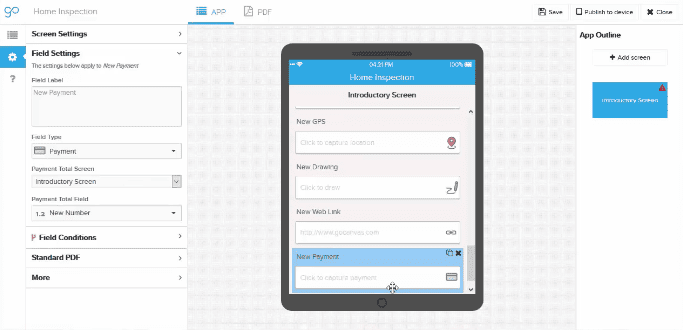
The highly-rated GoCanvas mobile app for logging work is the obvious choice for construction professionals such as general contractors, contractors, and project managers who design and implement a project. This affordable digital tool provides the flexibility to customize a template with drop-and-drag features. Foremen can dispatch their goals directly to project leaders and group supervisors who are leading teams of carpenters, truck drivers, welders, and other trade specialists. This creates stronger communication channels throughout the build.

At GoCanvas, we provide construction companies with pre-built templates that can be easily customized to meet your companies or even a project’s specific requirements. Our high-productivity software is designed for on-the-job people, not coders. A user can quickly learn how to use GoCanvas construction apps, and they can be accessed as a desktop app or from the convenience of multiple mobile devices, such as an iPhone, tablet or Android. Here are some key features that people love about our work tracking apps:

  • Records construction progress with photos
  • Converts data to a PDF or Excel document
  • Captures relevant signatures
  • Expedites communication with Dispatch and Workflow features

One of the strengths of CPM scheduling is the identification of the Critical Path that contains sequential activities, which are dependent upon the completion of earlier activities, and parallel tasks, which can be performed simultaneously. This first-class, work-tracking construction management software will monitor these different tasks, increase productivity and help you move forward with an effective to-do list.

The benefits of a construction time tracking software include:

  • Holistic view of a project’s tasks and progress
  • Identify bottlenecks and potential delays 

Once the Critical Path is identified, the plan schedules time for delays since construction is dependent upon uncontrollable factors, such as permit issuance, and labor and material shortages. For this reason, a strong CPM pads each stage with “float” time. If this additional cushion of time is used, it will not affect the final completion date. Weather is a common reason for delays on a construction project, so this best-selling app emphasizes the progress of the project, as well as temperature and precipitation.

Management loves this mobile app because of its ability to:

  • Provide critical inputs to the project’s schedule
  • Implement strong inventory tracking

Since building projects require a high level of multitasking, construction professionals always appreciate extra help. Organization is the name of the game with these mobile construction management forms for business. Managers and employees alike enjoy this digital tool that replaces tedious paper timesheets.

Additional benefits include:

  • Organization of Day-to-Day Details, Including Contractor and Sub-Contractor Work
  • Track Material and Equipment Deliveries
  • Track Inspections
  • Note Issues and Special Events

Construction Timesheet App

After tasks have been delegated, the employee time tracking software can monitor a workers’ progress. This enhanced feedback will improve budget-keeping, timeline updates, and project reporting. Making it easier to measure a team’s productivity by tracking their work habits.

This construction management app provides:

  • Tracks Employee Time by Project and by Day
  • Automatically Tabulates Weekly Totals
  • Employee can Email Daily and Weekly Timecards Directly to the Office

Whether you run a local construction company or are a national outfit, these construction time tracking apps are key to improving project management, controlling costs and reducing lags in data from the field to the office. GoCanvas outshines its competitors by offering many pre-built, easy-to-use templates designed specifically for construction companies.

About GoCanvas

GoCanvas® is on a mission to simplify inspections and maximize compliance. Our intuitive platform takes care of the administrative tasks, freeing our customers to focus on what truly matters – safeguarding their people, protecting their equipment, and delivering exceptional quality to their customers. 

Since 2008, thousands of companies have chosen GoCanvas as their go-to partner for seamless field operations.

Check out even more resources

Three inspection workers on job site.

The Ultimate Guide to Quality Control Inspections

Managing a construction project is a complex and stressful process. Among other things, you have to coordinate project team members, materials, and equipment and ensure that contractors are not afflicted by the potential risks and hazards present at the construction site. That said, quality means different things to different people which is why you should…

A man using GoCanvas for the digital transformation of his workflow.

Constructions Digital Transformation

Your competition is finding faster ways to capture data and get critical insights from the field into their existing systems. In short, they’re not going bigger, they’re getting smarter. In this 15-minute broadcast on the construction industry’s digital transformation, find out why the trend is to modernize workflows – and how you can stay ahead of the curve…

A electrician inspecting equipment.

See how VIP Lighting optimized efficiency with GoCanvas

VIP Lighting is a retail lighting and electrical maintenance business that services over 10,000 retail locations all over Australia and New Zealand. Before GoCanvas, VIP Lighting had two separate systems that were impossible to integrate, leading to inefficiencies. GoCanvas made it easy to integrate their systems into single, centralized platform…

Connect with an Expert Today.

We’ll help you put together the right solution for your needs.

5 Things to Consider when Choosing a Data Collection App

5 Things to Consider when Choosing a Data Collection App

|

Mobile data collection can revolutionize your business model and advance your information processing to new heights. With access to the data you need to adequately inform your internal and external practices, there is no limit to what your business can do with the support of mobile data collection. However, finding the right data collection app is not always easy. Here are five considerations that will help you select the right data collection app. 

The partnership between data collection and data analytics offers the complete package you need toacquire data-driven insights. The data-fueled benefits for your business are stunted when you do not have the tools you need to understand and act on the information it provides. Partnering with a data collection app that has internal analytic capabilities will help you turn your data into actionable insights. With the help of analytics, you can spot trends in your business, create alerts for negative trends or outliers, and run your business on data-driven decisions vs. hunches or anecdotal evidence. 

Does the data collection app you are considering offer templates that align with your specific business needs? This can help you save time on building out new forms, and gives you a starting point. From there, you should be able to customize and adapt the templates. Check out these pre-built templates for an idea of how data collection templates might serve your industry:

This is just a brief look into how a mobile application (and the templates it encompasses) can benefit your company’s data collection processes. 

Beyond the extent of templates, your data collection app should be able to expand in scope and offer the ability to customize it – on your own – without needing to know coding. This capability allows you to tailor data input fields in order to capture the information that is more relevant to your business. There is no limit to what your business can do with dynamic, custom capabilities in a data collection application.

With a mobile data collection app, you can access your company’s data from almost anywhere. However, this accessibility is only beneficial if the app is easy for you and your workers to adopt and use. Partner with a system that has an intuitive configuration, attentive customer support, and an abundant amount of resources for you to use. An easy-to-use system will also make it less painful to get workers and staff to embrace the new technology.  

Highly advanced features within your data collection app can widen the scope of data you can collect. With mobile data collection, you can access features such as dispatch, workflow, image capture, signature capture, mobile payments and more. 

Try GoCanvas for free today! This data collection app includes all of these top industry templates, robust features, and so much more. Digitally convert your paper processes to save your business both time and money. Sign up for free today to get started!

About GoCanvas

GoCanvas® is on a mission to simplify inspections and maximize compliance. Our intuitive platform takes care of the administrative tasks, freeing our customers to focus on what truly matters – safeguarding their people, protecting their equipment, and delivering exceptional quality to their customers. 

Since 2008, thousands of companies have chosen GoCanvas as their go-to partner for seamless field operations.

Check out even more resources

Two people in an office looking at a tablet.

Improving Your Operations with Field Service Management Software

Whether you have two or 200 employees, your business’ success depends on their hard work. Passionate, motivated team players are the difference between…

Two people in hard hats looking off camera.

Should You Connect Field Service Management Software with QuickBooks?

Field service management software has shown to increase productivity both for employees in the field and operations teams in the office. You may be wondering how field service…

Person in safety vest smiling.

How the Best Field Services Businesses Use Mobile Apps

Mobility and field service: the talk has been happening forever. The idea that real-time information improves customer service and boosts technician productivity is changing…

Connect with an Expert Today.

We’ll help you put together the right solution for your needs.

Why Use a Mobile Forms App for your Construction Business

Why Use a Mobile Forms App for your Construction Business

| |

The construction industry is competitive, but with the right productivity tools, you can help your company stay ahead. With the current construction trend of rapidly adopting digital processes, a mobile forms app may be the digital boost that your construction business is missing. Learn more here about how a mobile forms app can help your construction company thrive. 

Eliminate the communication gap that exists between your employees in the office and those in the field. Using a mobile forms app, you can easily dispatch important information and forms such as work/service/repair orders, as well as other documents to and from the office, directly to your field tech’s mobile device. This ease of communication makes your team more efficient and can improve your company’s overall productivity. It also means your techs spend a lot less time driving to and from the office. 

Bring your documents with you wherever you go without the fear that they may be lost or damaged on the job site. This includes your audits, work orders, bids, estimates, checklists, proposals, FLHA’s and more – all of which are available right from your mobile device.  With digital processing and mobile sharing, you never have to worry about another misplaced form again. 

Are you looking for a better way to document your work on the job site? By enabling photo capture on your mobile forms app, you can add images directly onto your document. Your descriptions can now be accompanied by an internal picture, helping you better describe construction achievements, progress, issues, and more. Attach an image directly to your forms for reference and clarity to eliminate the time spent on questions and confusion.

Getting contract signatures has never been easier with a mobile forms app. These apps allow you and the client to sign and save directly through the program. Whether you are working with a subcontractor, a third party entity, or directly with the customer, you can get your forms and documents signed and saved through your mobile device. 

Mobile form conversion can help you keep track of the files and paperwork that your construction company produces. You will never again lose or damage important paperwork in the shuffle of a high-paced construction job. This digital conversion also helps you eliminate clarity issues that messy handwriting can cause. Easily keep track of new and old customers and manage your growing business with ease when you take advantage of the organizational capacity that mobile forms provide. 

You can also easily organize your internal processes with construction checklists. Systemize your tasks and your team’s workload with team-wide calendars. This can help you streamline your workflow and ensure nothing important gets forgotten. 

Safety audits are a lengthy but important element of the construction process. With mobile forms, audits such as the popular Safety Inspection – Lockout and Tagout App can be quickly filled out right from a mobile device, edited, saved, and shared with all necessary parties. If a problem is spotted, the inspection can include photos, GPS location, detailed notes and sent immediately to the person or group responsible. This eliminates the trouble that paper safety audits can create such as lost, illegible or incomplete documentation. Since all documentation is stored in the cloud, should an OSHA inspector stop by, you can quickly retrieve and present your safety audits (and more). 

If your construction business has a hard time sorting through the managerial tasks that a thriving company requires, a mobile forms app can help you streamline these processes. For example, a Time and Materials Log App can be completed right on your mobile device to ensure you are getting paid appropriately. IT Help is not required in this simple streamlining of digital processes for your construction business. Instead, a mobile form app makes it easy for you and your team members to do these tasks on your own. 

If you need an easy-to-implement mobile forms app that can help promote efficiency in your construction company, GoCanvas is here for you! Try GoCanvas and all of its features with a free trial – no credit card required. Sign up today to get started! 

About GoCanvas

GoCanvas® is on a mission to simplify inspections and maximize compliance. Our intuitive platform takes care of the administrative tasks, freeing our customers to focus on what truly matters – safeguarding their people, protecting their equipment, and delivering exceptional quality to their customers. 

Since 2008, thousands of companies have chosen GoCanvas as their go-to partner for seamless field operations.

Check out even more resources

Three inspection workers on job site.

The Ultimate Guide to Quality Control Inspections

Managing a construction project is a complex and stressful process. Among other things, you have to coordinate project team members, materials, and equipment and ensure that contractors are not afflicted by the potential risks and hazards present at the construction site. That said, quality means different things to different people which is why you should…

A man using GoCanvas for the digital transformation of his workflow.

Constructions Digital Transformation

Your competition is finding faster ways to capture data and get critical insights from the field into their existing systems. In short, they’re not going bigger, they’re getting smarter. In this 15-minute broadcast on the construction industry’s digital transformation, find out why the trend is to modernize workflows – and how you can stay ahead of the curve…

A electrician inspecting equipment.

See how VIP Lighting optimized efficiency with GoCanvas

VIP Lighting is a retail lighting and electrical maintenance business that services over 10,000 retail locations all over Australia and New Zealand. Before GoCanvas, VIP Lighting had two separate systems that were impossible to integrate, leading to inefficiencies. GoCanvas made it easy to integrate their systems into single, centralized platform…

Connect with an Expert Today.

We’ll help you put together the right solution for your needs.

Create your own Android mobile app with digitial signature capture in 5 minutes

Create your own Android mobile app with digitial signature capture in 5 minutes

| |

How to Build an App in 5 Minutes!

GoCanvas allows you to easily create your own apps for Android, iOS, and Windows PC.  Today, I wanted to walk through a quick and simple example of how to do this in 5 minutes. This app will allow you to capture a digital signature on your mobile device in just seconds. Below, you can see what the result looks like on Android mobile device.  We already have over 20,000 pre-built data collection mobile apps in our .  Each of these can be customized, but in this article we are focusing on how to create one from scratch that can capture digital signatures.

The goal of this article will be to walk through signing up for GoCanvas, building a simple mobile app which captures some simple information (first name and last name) and a digital signature, fill out the app on an Android device and view the results as a PDF document.

Step 1 – Sign up for GoCanvas

If you aren’t already a GoCanvas customer, sign up for free GoCanvas account.

Step 2 – Install GoCanvas

Once you sign up for GoCanvas you should receive an e-mail with a download link for your device.  If you didn’t get the email, you can go to https://beta.gocanvas.com/m to download GoCanvas.

Step 3 – Login to the GoCanvas website using your desktop computer

Login to the GoCanvas website with your new login on your desktop computer to begin building your digital signature capture mobile app.

Step 4 – Build your GoCanvas signature capture application

On the ‘Apps’ tab in the GoCanvas website, click ‘Create New App’.  Below, you’ll see the button to click inside the blue box:

Enter a name for the new app, let’s call it “Sample Signature Capture.”  Click ‘Save and launch app builder’.

Drag a ‘Signature’ control from the left-hand palette.  In the popup for the text input, enter ‘Please sign your name’.

The outline of your ‘Sample Signature Capture’ GoCanvas mobile application should look like the below screenshot.

To add additional fields to your new signature app drag a ‘Text box’ from the left-hand palette.  In the popup for the text box, enter ‘First Name’. Drag another ‘Text Box’ control from the right-hand palette. In the popup for the text input, enter ‘Last Name’.

Step 5 – Save and publish your GoCanvas signature capture application

At the top of the GoCanvas app builder, click ‘Save’ and select ‘Save and publish’.  Once the GoCanvas app builder has finished saving, you will be prompted what users should have access to the new application.  Make sure to check your login and click ‘Publish’.

Step 6 – Start GoCanvas on your Android and login

Start GoCanvas on your Android device and log in using your e-mail and password that you registered with.

Step 7 – Fill out the ‘Sample Signature Capture’ app

Fill out the ‘Sample Signature Capture’  mobile app and once done, click ‘Yes’ to upload your submission.

Click on the signature field, and sign with your finger or stylist.

After the signature is captured you will see the box turn green as shown below.

Step 8 – View your data online

If you logged out of the GoCanvas website, log in again and click on the ‘Submissions’ tab.  You will find the data you just filled out on your Android.  You can now view it online, download it as a PDF, export it as a CSV/Excel file, or integrate it into a backend system.

Wrap Up

Hopefully the above example demonstrated how easy it is to go paperless with GoCanvas.  All of the applications created with GoCanvas work across all of the mobile devices we support. These include Android, Windows PC, iPhone and iPad. You can get rid of filing and data entry and save your business time and money.

About GoCanvas

GoCanvas® is on a mission to simplify inspections and maximize compliance. Our intuitive platform takes care of the administrative tasks, freeing our customers to focus on what truly matters – safeguarding their people, protecting their equipment, and delivering exceptional quality to their customers. 

Since 2008, thousands of companies have chosen GoCanvas as their go-to partner for seamless field operations.

Check out even more resources

business people discussing project

Gown Your Business with GoCanvas Partner Program

Join our Partner Program and gain instant access to our global network of thought leaders and industry experts enjoying shared collaboration and collective success.

Forte Supply Chain Solutions Partner Video

Partner Snapshot: Forte Supply Chain Solutions

Explore how Forte Supply Chain Solutions partnered with GoCanvas, combining in-house industry expertise with our white-label mobile forms to revolutionize their processes.

Closeup of a handshake.

GoCanvas Integrations: Streamline your Workflow

Integrate with over 1,000 software applications. Enhance your GoCanvas experience by syncing real-time data to one or all of your business tools.

Connect with an Expert Today.

We’ll help you put together the right solution for your needs.

Fire Inspection Apps for iPad, iPhone, Android and Apple Mobile Devices

Fire Inspection Apps for iPad, iPhone, Android and Apple Mobile Devices

| |

Fire inspection apps for iPads, iPhones, Android, and Apple mobile devices are powerful tools to help streamline any business doing safety and routine inspections ranging from simple fire extinguishers and alarms to robust fire protection systems. Fire alarm inspection apps, fire extinguisher inspection apps, fire safety inspection apps and more are all common uses of the GoCanvas platform. The major benefits of these apps include:

Time savings – With fire inspection apps, you can insert pictures, notes and signatures at the time of inspection. This saves fire inspectors tons of time because GoCanvas will  generate the reports automatically instead of taking time later manually add photos to your reports and forms and manually send them out to customers.

Improved data accuracy – With paper fire inspection forms, data can often be inaccurate do to a variety of factors, such as skipped fields, illegible data or doing calculations incorrectly. Or worse, the form gets lost and someone has to redo the inspection. With GoCanvas, you can set up your inspection forms so that certain fields are required and can’t be skipped. And since you aren’t dealing with paper, your reports can be instantly shared back to the office when they’re complete.

Since the very beginning here at GoCanvas, fire inspectors have consistently come to us for fire inspection apps and fire system installation apps. They also use GoCanvas for fire inspection app, service ticket apps, checklist apps and more.

GoCanvas allows them to replace every paper form in their clipboard with a mobile form on their iPad, iPhone, Android, or Apple device. They simply pull out their device, launch GoCanvas, and select the particular GoCanvas app they need to fill out.  The data is placed into a PDF document that can be emailed directly to customers and colleagues who need the data. The completed forms are stored on the GoCanvas servers and are accessible anytime via our website.

GoCanvas apps can be customized online using our powerful app builder. You can edit apps found in our application store or build your own from scratch. You can build fire inspection, sprinkler systems and fire safety apps that match the paper forms you’re using today and include some of the great features that paper just can’t match!

Time-Saving Features

GoCanvas apps can be customized online using our powerful app builder. You can edit apps found in our application store or build your own from scratch. You can build fire inspection and fire safety apps that match the paper forms you’re using today and include some of the great features that paper just can’t match!

Signature Capture – Signature capture apps are also popular here at GoCanvas. Signature capture on iPads, iPhones, Android, and Apple devices is done easily with GoCanvas.  Employees or customers can sign right on the screen with their fingers or a styllus.

Insert Pictures/Images – Taking pictures and inserting them into your documents is also very popular. There is nothing worse than spending hours pulling images off of your mobile device or digital camera and then inserting them into a Word document.  GoCanvas allows you to insert them right during the job at the time you capture them.

Barcode Scanning – Barcode apps are also something we see a lot of here at GoCanvas. You could place a barcode on all of the fire extinguishers in a building, for example. When you come to inspect it you just scan the barcode and all the data about that extinguisher auto-populates for the inspector (serial number, model, size, etc.).

GPS – You can ensure that your inspectors were actually on site when they complete their inspections. Your customers don’t want to think that your reports were filled out at the local fast food joint with fake data!

Dispatch – You can queue up jobs for your inspectors using our dispatch feature. Or you can dispatch jobs on a one-off basis as your customers call in needing service. Using a work order app or service ticket app you can fill in the jobsite information and customer contact information and the nature of the problem reported and you inspector or technician can fill in the rest and send it back to you.


Now you can easily modernize the way you are collecting data. Whether you are looking to improve your data handling processes or advance reporting, we hope you consider using GoCanvas as your data collection tool. Sign up for GoCanvas free and give our platform a try today!

Interested in learning more? Check out our eBook on The Power of Data: How to Turn Numbers into Business Insights. 

About GoCanvas

GoCanvas® is on a mission to simplify inspections and maximize compliance. Our intuitive platform takes care of the administrative tasks, freeing our customers to focus on what truly matters – safeguarding their people, protecting their equipment, and delivering exceptional quality to their customers. 

Since 2008, thousands of companies have chosen GoCanvas as their go-to partner for seamless field operations.

Check out even more resources

Woman looking at tablet inside a large vehicle machine.

Centurian Transport saves $100k every year with GoCanvas

Centurion is the largest heavy haulage provider in Australia. They deliver national supply chain solutions to the resources, energy, construction & retail sectors…

Image of two men in front of kegs on tablet.

Duotank Transforms Business Processes with GoCanvas

Duotank is a bag-in-tank alternative to the traditional keg beer system. The aseptic tank environment enables breweries to maintain the quality of their beer…

Image of Two Men and a Truck looking at tablet.

TWO MEN AND A TRUCK® used GoCanvas to increase data visibility & compliance

With a workforce that primarily works out in the field, many of the TWO MEN AND A TRUCK® locations found that paperwork was hindering…

Connect with an Expert Today.

We’ll help you put together the right solution for your needs.

Three Mobile Forms That Every Commercial Paving Company Needs to Have

Three Mobile Forms That Every Commercial Paving Company Needs to Have

| |

Whether it be commercial, private or infrastructure based – the construction industry continues to grow along with the size of projects. And as the scale and complexity of construction projects continue to increase, the need for efficient document/data management has become critical to the success of any given construction project.

This is the primary reason today that you see many of the top tier construction companies ($100M+ revenue) moving towards ‘enterprise’ construction software, and removing paper-based documentation from their project sites.

But, what about the small and mid-sized firms? And what about the contractors who support these firms and their projects? In many cases, this group is the lifeblood of the Construction industry.

The issue? The majority of these firms are still collecting and sharing data the same way they did it 50+ years ago.

The reason? They feel like they can’t see the ROI in the multi-thousand dollar investment in an enterprise level solution. And this is the reason why GoCanvas was created.

With GoCanvas, you can now create a mobile form platform that fits your budget and data collection needs. This type of flexibility is perfect for people like Sandee Pierce,  Admin Director at Sierra National Asphalt, who was looking to streamline her crew’s daily reports and time sheets.


Since fully ditching their paperwork for GoCanvas, Sandee stated that Sierra National Asphalt loves GoCanvas because “Supervisors do not have to go to job sites to track down and collect time sheets (anymore). The reference data and validation tables have reduced the errors that previously caused corrections by the supervisors and office staff”. 

For small to mid-size construction contractors like Sandee Pierce, GoCanvas has become the go-to solution for companies looking to replace their outdated paper processes without blowing the budget.

If your exploring going paperless with your daily operations process, we have the perfect forms for you!

The specific mobile forms below are handpicked for the Asphalt/Paving industry and are as simple as “Click and Submit” to use. But also keep in mind that all our mobile forms are completely customizable using the GoCanvas App Builder, and can easily be tweaked to fit your existing data collection processes! You can even change the entire look and feel of the output PDF report using the PDF Designer. 

None of these Paving mobile forms a perfect fit? No worries! We have over 20,000 mobile forms in our App Store to fit any use case and/or industry!

For some businesses, their operations are so complex that starting from a mobile form template wouldn’t make sense.

In instances like this, GoCanvas has a special ‘white glove’ program called ‘Send Us Your Form’. This service allows you to scan and email a copy of the current form that you are using today, and we will convert it into a mobile version!

That means that you won’t have to search through our Application Store to find a mobile form that matches your existing process, or take the time to build it out from scratch using the App Builder. We take on the work of digitizing your current paper-based process for you!

About GoCanvas

GoCanvas® is on a mission to simplify inspections and maximize compliance. Our intuitive platform takes care of the administrative tasks, freeing our customers to focus on what truly matters – safeguarding their people, protecting their equipment, and delivering exceptional quality to their customers. 

Since 2008, thousands of companies have chosen GoCanvas as their go-to partner for seamless field operations.

Check out even more resources

Three inspection workers on job site.

The Ultimate Guide to Quality Control Inspections

Managing a construction project is a complex and stressful process. Among other things, you have to coordinate project team members, materials, and equipment and ensure that contractors are not afflicted by the potential risks and hazards present at the construction site. That said, quality means different things to different people which is why you should…

A man using GoCanvas for the digital transformation of his workflow.

Constructions Digital Transformation

Your competition is finding faster ways to capture data and get critical insights from the field into their existing systems. In short, they’re not going bigger, they’re getting smarter. In this 15-minute broadcast on the construction industry’s digital transformation, find out why the trend is to modernize workflows – and how you can stay ahead of the curve…

A electrician inspecting equipment.

See how VIP Lighting optimized efficiency with GoCanvas

VIP Lighting is a retail lighting and electrical maintenance business that services over 10,000 retail locations all over Australia and New Zealand. Before GoCanvas, VIP Lighting had two separate systems that were impossible to integrate, leading to inefficiencies. GoCanvas made it easy to integrate their systems into single, centralized platform…

Connect with an Expert Today.

We’ll help you put together the right solution for your needs.

Running on Empty? Learn How Fuel Costs Are Killing Your Bottom Line

Running on Empty? Learn How Fuel Costs Are Killing Your Bottom Line

| |

Yellow Hummer When you try to think of items that burn up a lot of gasoline, what first comes to mind?

SUVs. Lawnmowers. Generators. My yellow H2 Hummer (kidding). But seriously, all these things tend to burn more gas (and money) than their actual value to you.

But what about paper? It doesn’t really sound like something that would cause you to suddenly grab your wallet. But indeed, similar to my yellow H2 Hummer (still kidding), paper forms are actually one item that can significantly cost your business both time and money.

Read on below to learn how a single paper-based process can cost your business not only 100s of hours in lost efficiency, but also cause leakage on your bottom line.

CorollaMost common people are conscious about their mileage, how much they spend on gas and the fuel economy of the vehicle they purchase. This is probably why the economically designed Toyota Corolla is still the top-selling car of all-time.

But when it comes to running a business, the majority of people can’t haul loads or supplies in the backseat of their leather interior Corolla. This doesn’t mean though that we should simply throw all economic sense out of the window when it comes to managing a fleet of vehicles.

Most companies within the Field Service or Construction industries are, due to their work, forced into purchasing less fuel-efficient vans and trucks. This is the point at which most companies feel resigned to the fact that they will have to spend a ton to fill up those vehicles, because “that’s just what everyone else does”.  But this is just the point in time when companies should instead say, “What CAN we do to cut down on our costs, and where CAN we streamline our process?”.

So this begs the important question, how and where is money being lost in transit?

Remember that work vehicles are used for two primary purposes, driving to and from job sites. Every time they are on the road burning fuel, the company is slowly losing money.

Why are they on the road? 50% of the time it’s because they need to return paper forms back to the office, hauling their gas-guzzling fenders miles across town to do so. This is the critical correlation between paper forms and fuel dollars, and where a business hemorrhages money without truly realizing it.

But how much is it really costing your business? Let’s calculate below exactly how much a single paper form can cost your organization.

So, we’ve talked about how fuel inefficiency can increase costs within your business, but how does a single paper form effect those costs? By using paper forms you’re forcing each field tech and/or supervisor to manually fill out each report and return the contents back to HQ for processing. This means if your field tech is sent to a site 15 miles away, they’re going to be burning cash all the way back to the office in order to return those forms.

But we can break it down even further.

For example, say a field supervisor has 4 job sites to inspect every single day. At each of those job sites, he/she has to complete a detailed Job Safety Analysis (JSA) report, with the average distance from the main office to each site being 15 miles.

MoneyNow take into consideration the average mile per gallon range for a standard pickup or van is 15 to 20 mpg, with an average cost of a gallon of gas being $2.30. With a total of 50 standard work weeks in a year(accounting for vacation), that field supervisor will waste around 300 gallons of fuel traveling between the worksites and the main office. That alone will account for close to $700 in fuel dollars lost annually,  and that’s just for a single field supervisor!

But what about the actual process of filling out and collecting all the data on paper forms, how much time and money does that waste the field supervisors?

Take into consideration that the average paper report can take between 15 and 30 minutes to fully complete by hand. Why so long? Think about it. When it comes to a safety-related form like a JSA, or even something as simple as a timecard, detail is everything. And with paper, nothing can be pre-filled or auto-populated like it can with a mobile form.

Crumpled Paper You have to capture photos, signatures and even GPS coordinates for the report to be verified as accurate. When you use a platform like GoCanvas, all these features are built right into the mobile form. With paper, you are forced to bring extra pieces of equipment to capture these readings, and then take the time to compile them all together for a final report. This extra 30 minutes a day, across 4 sites, for 50 business weeks can cause that single field supervisor to waste between 200-300 hours every year! 

Not impressed by hours lost?

Add into the equation how much they are being paid, let’s say $17 per hour, and that equates to between $3,400 – $5,100 in lost productivity every year. Now multiply that number across all your supervisors and watch as the losses pile up!

Now that we’ve talked about the doom and gloom that paper forms can bring upon your business, it’s only right that we show you how to solve the issue!

A mobile form platform like GoCanvas is essentially built to negate all the negative traits that come with paper-based data collection.

GoCanvas Mobile With GoCanvas, your employees (including field supervisors) can reduce their drive time by 50% or more because of real-time data sharing. As soon as a report is completed onsite, all of the contents including GPS, Photos, Signatures, Barcodes, and more will be automatically sent to the GoCanvas cloud and available for immediate review by the main office.

Employees, like field supervisors, can also cut down on trips between sites by setting up safety inspection approvals with the GoCanvas Workflow feature. This allows for employees from other sites to complete inspections with detailed photos, and transmit that data directly to the field supervisor’s GoCanvas device for final review and approval. If any mistakes or issues are found, the field supervisor can reject the report and send a note back to the original submitter. This type of process can further cut down on unneeded mileage, and improve daily efficiency across multiple job sites!

Whether it be a timesheet, work order or site inspection – paper anywhere is dysfunction everywhere. By simply implementing the few simple changes outlined above, you could end up saving your business close to $4,000 per employee annually! 

About GoCanvas

GoCanvas® is on a mission to simplify inspections and maximize compliance. Our intuitive platform takes care of the administrative tasks, freeing our customers to focus on what truly matters – safeguarding their people, protecting their equipment, and delivering exceptional quality to their customers. 

Since 2008, thousands of companies have chosen GoCanvas as their go-to partner for seamless field operations.

Check out even more resources

A person sits at a desk holding their phone showing a graph, while their laptop sits on the desk showing more charts and graphs.

How TE3CO Leverages Data Analytics to Unlock Business Potential

TE3CO provides mission-critical pressure relief technology and services to customers across the oil and gas industry. They employ a highly trained and capable workforce of field technicians and engineers. Before working with GoCanvas, TE3CO relied on spreadsheets and emails to manage their ticketing process but found the system time-consuming and difficult to track.

Two men in hard hats look onto a tablet.

VIP Lighting Gains Business Efficiencies with GoCanvas

VIP Lighting is a retail lighting and electrical maintenance company that services retail chains across Australia and New Zealand. The business has been operating for 25 years and now services 10,000 retail sites across both countries. Prior to joining GoCanvas in 2018, the business had multiple systems running different aspects of their technician and contractor network.

Man in a hard hat inspecting HVAC vents.

Three HVAC Maintenance Checklists that will Reduce Errors and Grow Your Bottom Line

For HVAC technicians, so many errors within their daily tasks come from using outdated paper forms while completing a job. Using these HVAC inspection checklists will prevent issues before they happen, so your technicians can collect comprehensive and consistent data at every job.

Connect with an Expert Today.

We’ll help you put together the right solution for your needs.

Ultimate Checklist for Effective Toolbox Talks

Ultimate Checklist for Effective Toolbox Talks

|

Just five to 10 minutes a day can make a significant difference in your construction or manufacturing company’s safety record. Holding regular toolbox talks — short, informal discussions that focus on one specific safety issue — can result in proven safety and cost benefits, including lower insurance rates, reduced turnover, and less damaged equipment. However, to make these talks successful, you must prepare, deliver, and document them the right way. Make sure you’re equipped to host effective safety briefings by following this checklist.

About GoCanvas

GoCanvas® is on a mission to simplify inspections and maximize compliance. Our intuitive platform takes care of the administrative tasks, freeing our customers to focus on what truly matters – safeguarding their people, protecting their equipment, and delivering exceptional quality to their customers. 

Since 2008, thousands of companies have chosen GoCanvas as their go-to partner for seamless field operations.

Check out even more resources

business people discussing project

Gown Your Business with GoCanvas Partner Program

Join our Partner Program and gain instant access to our global network of thought leaders and industry experts enjoying shared collaboration and collective success.

Forte Supply Chain Solutions Partner Video

Partner Snapshot: Forte Supply Chain Solutions

Explore how Forte Supply Chain Solutions partnered with GoCanvas, combining in-house industry expertise with our white-label mobile forms to revolutionize their processes.

Closeup of a handshake.

GoCanvas Integrations: Streamline your Workflow

Integrate with over 1,000 software applications. Enhance your GoCanvas experience by syncing real-time data to one or all of your business tools.

Connect with an Expert Today.

We’ll help you put together the right solution for your needs.

3 Benefits to Connecting Work Orders with your Accounting Systems

3 Benefits to Connecting Work Orders with your Accounting Systems

|

No one loves doing work orders, but they’ve become an essential part of the data collection process for many companies across the world (especially in the Construction industry).

While more and more companies every day are transitioning away from paper-based data collection methods, the fact still remains that the majority still complete work orders by hand. The issues with completing work orders by hand include:

  • Incomplete reports
  • Unreliable data
  • Inconsistent reporting times
  • Untrackable metrics

But the great thing about implementing a platform like GoCanvas is that it can be easily customized around the current business processes and systems that you already have in place. It also enables you to capture different types of data that you weren’t able to easily collect before with your paper-based work order process.

Features like Photo Capture, Barcode Scanning, GPS Location Verification and more allow you to leverage the power of your mobile device to collect the highest quality data, in real-time. But the best part is that all the data is automatically transferred to the GoCanvas secured cloud database where it can be easily organized and shared with your existing backend accounting and management software programs like Quickbooks.

About GoCanvas

GoCanvas® is on a mission to simplify inspections and maximize compliance. Our intuitive platform takes care of the administrative tasks, freeing our customers to focus on what truly matters – safeguarding their people, protecting their equipment, and delivering exceptional quality to their customers. 

Since 2008, thousands of companies have chosen GoCanvas as their go-to partner for seamless field operations.

Check out even more resources

business people discussing project

Gown Your Business with GoCanvas Partner Program

Join our Partner Program and gain instant access to our global network of thought leaders and industry experts enjoying shared collaboration and collective success.

Forte Supply Chain Solutions Partner Video

Partner Snapshot: Forte Supply Chain Solutions

Explore how Forte Supply Chain Solutions partnered with GoCanvas, combining in-house industry expertise with our white-label mobile forms to revolutionize their processes.

Closeup of a handshake.

GoCanvas Integrations: Streamline your Workflow

Integrate with over 1,000 software applications. Enhance your GoCanvas experience by syncing real-time data to one or all of your business tools.

Connect with an Expert Today.

We’ll help you put together the right solution for your needs.

Breaking Down OSHA’s Top 10 Most Cited Violations of 2017

Breaking Down OSHA’s Top 10 Most Cited Violations of 2017

| |

2017: OSHA Safety in Review

Where did all the time go? It seems like just yesterday we were posting the results of OSHA’s 2016 data findings, but here we are again.

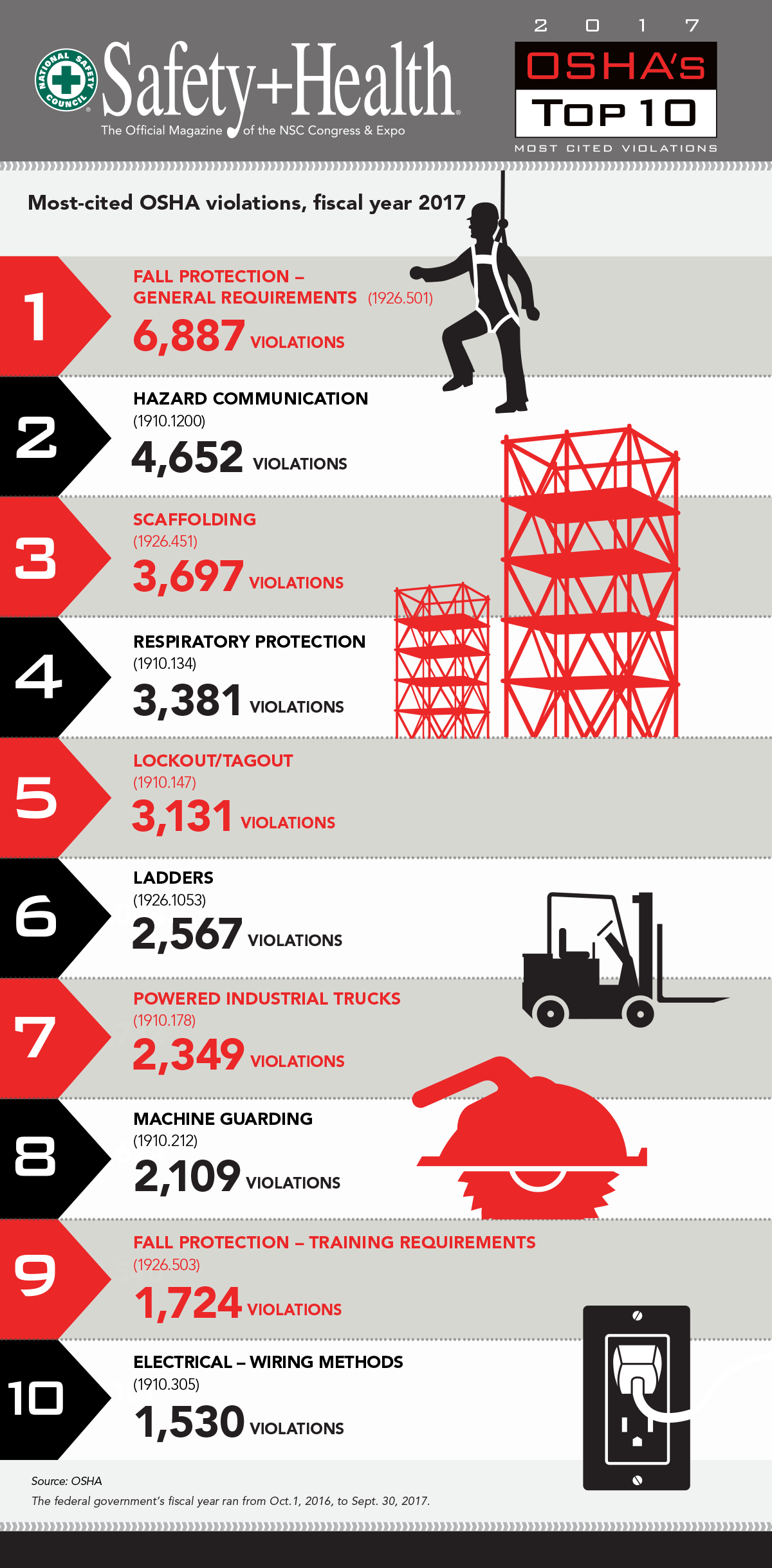
The reason why it feels like déjà vu is likely because the top 5 most cited violations of 2017 are the same as those from 2016.  Fall Protection – General Requirments, Hazard Communication, Scaffolding, Respiratory Protection, and Lockout/Tagout all come in at the top of the list for the 2nd consecutive year. All combined, the top 5 most cited categories through September of 2017 have accounted for approximately 21,748 violations.

The bottom 5 categories consist of Ladders, Powered Industrial Trucks, Machine Guarding, Fall Protection – Training Requirements, and Electrical Wiring Methods. In total, these have accounted for 10,279 violations, which combined equals 32,027 total violations reported in 2017 thus far.

This amount of violations seems like a lot (which it is), but the good news is that it’s a dramatic decrease from 2016. Last year 36,531 violations were reported in total, which accounts for an overall decrease of 12%! This decrease can be attributed to many things, but overall it shows that companies are finally starting to become serious about the safety of their employees and investing in the right methods/technologies to protect them.

But all the news isn’t positive.

Within the OSHA top 10 violation list, there was one new addition from 2016 to 2017, Fall Protection – Training Requirements. This type of violation revolves around the lack of proper safety training programs in high risk and dangerous environments. This is a common issue in today’s building construction environment as the pressure to complete projects faster increases and proper safety procedures get put by the wayside. Patrick Kapust, deputy director of OSHA’s Directorate of Enforcement Programs, puts it into perspective by telling Safety+Health Magazine that “Many of these violations were specifically related to training requirements and ensuring that a training program for each employee who may be exposed to fall hazards is established. Often, these violations occurred in the roofing, framing and residential modeling industries.

While progress is being made, there is still much work left to do. If you’re looking to become smarter about the way you collect, report, and track safety information on your project sites, GoCanavs can help! Our Application Store has over 100 different OSHA specific mobile form templates available to download and use in seconds. Toolbox Talks, JSAs, Accident Reports, and much more can be customized to fit your exact business needs.

Click here to request a quick demo!

Top 10 OSHA Violations of 2017

OSHA Infographic

About GoCanvas

GoCanvas® is on a mission to simplify inspections and maximize compliance. Our intuitive platform takes care of the administrative tasks, freeing our customers to focus on what truly matters – safeguarding their people, protecting their equipment, and delivering exceptional quality to their customers. 

Since 2008, thousands of companies have chosen GoCanvas as their go-to partner for seamless field operations.

Check out even more resources

Three people in hard hats looking at a tablet.

Smarter, Faster, Safer: Improving Safety Compliance with Mobile Technology

Compliance, there are many ways we talk about it. A necessary evil, a chore, a struggle, or a critically important part of business. We all know how crucial it is, helping save…

Woman reviewing information on a tablet.

Your Guide to Waiver Forms — Examples and Templates

Waiver forms are a type of legal protection used by businesses to reduce their liability and risk. This type of agreement between a business and its customers is used…

Closeup of a handshake.

Duotank Transforms Business Processes with GoCanvas

Duotank is a bag-in-tank alternative to the traditional keg beer system. The aseptic tank environment enables breweries to maintain the quality of their beer after it leaves…

Connect with an Expert Today.

We’ll help you put together the right solution for your needs.

>