3 Easy Ways to Create the Perfect Mobile Punch List

3 Easy Ways to Create the Perfect Mobile Punch List

| |

Paper forms are used today as a quick way to collect information on a project site but don’t give much flexibility in the types of information that can be collected.

A Construction Punch List is often meant to be a run through of outstanding items to be completed on a project, but these forms can be found in different formats depending on the size and scope of the particular project.

The issue with paper Punch Lists is that they offer ZERO flexibility in the way they are filled out and completed. You’re restricted to staying between the lines on the piece of paper and aren’t able to deviate or add anything outside of that paper rectangle. This runs in complete conflict with the Construction industry where data is constantly changing and personnel is in need of real-time information. This is why mobile forms, especially mobile Punch Lists, make sense.

Creating the perfect mobile form or app is about incorporating the right features that fit your data collection goals.

When filling out a Punch List the primary goal is to inspect a list of outstanding construction items, update their current status and add current or estimated completion dates. But for companies looking to dive even deeper into their data, solutions like GoCanvas allow them to enhance their Punch Lists with three important features.

Check out the three features below that you can incorporate into your GoCanvas mobile Punch Lists to increase your data quality and efficiency!

Attach Site Photos with Image Capture – Punch Lists are useful for the person who is physically filling them out onsite, but what about the employees in the back-office? The ability to collect and attach site photos allow Punch Lists to become instantly more valuable and give supervisors real-time insight into the progress of project sites. The annotation feature of GoCanvas also allows users who capture photos to highlight and draw on top of the images that they capture with their mobile device. This makes it possible for them to point out aspects of each line item and ensure that nothing is mistakenly forgotten during the follow-up tasks.

Editing Images on GoCanvas

We suggest using the Image Capture feature along with Conditional Logic. This allows you to have an Image Capture field show up only if a particular value is selected. For example, if a line item in the Punch List is marked “Finished”, an Image Capture field would then appear for the user to snap a photo of the completed item for verification. This is an easy way of ensuring you collect the data you need without making the form dramatically longer or more complicated to complete.

Auto-populating Items with Reference Data –  One of the most time-consuming parts of filling out a paper Punch List is having to manually write in each item you are reviewing. Not only are you trying to rush to inspect each item in a timely fashion, but you’re also attempting to be thorough in your inspection as well. Usually, this type of pace leads to horrible handwriting and less than thorough note-taking.

Punchlist on GoCanvas

With GoCanvas and the Reference Data functionality, you can pre-load into your Punch List rows of items that are in need of review. It’s simple as creating an Excel spreadsheet, uploading that into your GoCanvas account, and connecting it to your mobile Punch List form. Now you’ll have every item you need to inspect right in front of you and can even add items on the spot if need be. Each item you load with Reference Data can also be loaded with corresponding “Due Dates”, so that when the user is filling out the Punch List app they will know if the item they are inspecting in on track or past due for completion.  This auto-filling of data in the mobile form will easily save you 10 – 20 minutes per report completed.

Automating Reviews & Approvals with Workflow – The biggest complaint with using paper, across the board, is the time it takes to receive the reports from the field. This delay often makes the data out-dated by the time it finally reaches the back office for analysis. With Punch Lists, in particular, it’s important that the data be collected and REVIEWED in a timely manner so that real-time decisions can be made to keep the project on track.

Workflow on GoCanvas

The Workflow feature of GoCanvas is perfect for Punch Lists because it allows for the user filling out the report to instantly send the data to his or her supervisor’s device for immediate review. The supervisor can review all of the data and photos that the employee captured previously with GoCanvas and then even add notes to the report before submitting the record to the cloud for final review. If the supervisor were to find something that didn’t look right, he or she would have the ability to reject the Punch List and send it back to the original submitter with the reason why it was rejected. The great thing is that this Workflow process can be customized to fit your organization’s process. So if you want the Punch List to not go to a supervisor but instead go to a general contractor who will review and complete any outstanding items, you can!

About GoCanvas

GoCanvas® is on a mission to simplify inspections and maximize compliance. Our intuitive platform takes care of the administrative tasks, freeing our customers to focus on what truly matters – safeguarding their people, protecting their equipment, and delivering exceptional quality to their customers. 

Since 2008, thousands of companies have chosen GoCanvas as their go-to partner for seamless field operations.

Check out even more resources

Three inspection workers on job site.

The Ultimate Guide to Quality Control Inspections

Managing a construction project is a complex and stressful process. Among other things, you have to coordinate project team members, materials, and equipment and ensure that contractors are not afflicted by the potential risks and hazards present at the construction site. That said, quality means different things to different people which is why you should…

A man using GoCanvas for the digital transformation of his workflow.

Constructions Digital Transformation

Your competition is finding faster ways to capture data and get critical insights from the field into their existing systems. In short, they’re not going bigger, they’re getting smarter. In this 15-minute broadcast on the construction industry’s digital transformation, find out why the trend is to modernize workflows – and how you can stay ahead of the curve…

A electrician inspecting equipment.

See how VIP Lighting optimized efficiency with GoCanvas

VIP Lighting is a retail lighting and electrical maintenance business that services over 10,000 retail locations all over Australia and New Zealand. Before GoCanvas, VIP Lighting had two separate systems that were impossible to integrate, leading to inefficiencies. GoCanvas made it easy to integrate their systems into single, centralized platform…

Connect with an Expert Today.

We’ll help you put together the right solution for your needs.

5 Mobile Forms Every QA/QC Inspector Should Be Using

5 Mobile Forms Every QA/QC Inspector Should Be Using

|

The act of performing inspections is almost always a tedious task, especially when paper forms are involved.

For Quality Assurance and Quality Control inspectors in various industries, but especially in construction, the process of completing their project reports can be a daunting task. This multi-form, multi-step process can quickly become disorganized and unmanageable if the proper processes are not in place. The negative effects of not properly completing these reports include delays in project development and major decreases in worker productivity.

So how can these issues be avoided? By using a single platform for the collection, sharing, and reporting of all QA/QC forms. This is what GoCanvas provides.

A typical QA/QC engineer or inspector will typically have to carry and fill out 5 to 10 different types of paper forms for a typical project. This doesn’t include all the additional documents like drawings and photos that the inspector will need to print out and attach separately. Add this to the pain of having to carry around these paper reports and transporting them all the way back to the office for reporting, this can add up to 100’s of hours being wasted every month due to paperwork inefficiencies.

With a platform like GoCanvas, these inefficiencies are entirely eliminated. All the forms an inspector needs can be found directly on their mobile device, and are accessible whether offline or online. These mobile forms can be customized to include easy to use drop-down menus and check boxes, as well as more specialized fields like GPS, Image Capture, Sketching, Time Stamps, Signature Capture, and more! You can also easily organize your forms on your mobile device into convenient folders for easy retrieval based on project and/or location.

But the best part is that as soon a report is completed, the data is synced to the cloud and available for the office staff to begin reviewing in real-time. This can instantly save hours that were previously lost to manual data re-entry and lost paperwork.

Now it’s time to see which mobile forms could begin saving your business hundreds of hours in lost efficiency!

GoCanvas doesn’t just give you a code-free form builder to create and customize your very own mobile forms and documents, but it also provides you with over 20,000 pre-built mobile form templates to choose from and download in seconds.

Below are 5 mobile form templates that every Quality Assurance/Quality Control inspector and engineer should download and customize to fit their particular needs. Click on any of the templates below to get started!

RFI mobile form
Material Order Form Mobile App
Engineer inspection request mobile form
Daily construction project report mobile form
Subcontractor agreement

About GoCanvas

GoCanvas® is on a mission to simplify inspections and maximize compliance. Our intuitive platform takes care of the administrative tasks, freeing our customers to focus on what truly matters – safeguarding their people, protecting their equipment, and delivering exceptional quality to their customers. 

Since 2008, thousands of companies have chosen GoCanvas as their go-to partner for seamless field operations.

Check out even more resources

Three people in hard hats looking at a tablet.

Smarter, Faster, Safer: Improving Safety Compliance with Mobile Technology

Compliance, there are many ways we talk about it. A necessary evil, a chore, a struggle, or a critically important part of business. We all know how crucial it is, helping save…

Woman reviewing information on a tablet.

Your Guide to Waiver Forms — Examples and Templates

Waiver forms are a type of legal protection used by businesses to reduce their liability and risk. This type of agreement between a business and its customers is used…

Closeup of a handshake.

Duotank Transforms Business Processes with GoCanvas

Duotank is a bag-in-tank alternative to the traditional keg beer system. The aseptic tank environment enables breweries to maintain the quality of their beer after it leaves…

Connect with an Expert Today.

We’ll help you put together the right solution for your needs.

Reduce Data Entry & Billing Errors with Automated Calculations from GoCanvas

Reduce Data Entry & Billing Errors with Automated Calculations from GoCanvas

| |

Math is hard. Yes, I’ve finally said it. I still use the calculator on my phone to even conduct the simplest of calculations because I’m afraid of making the slightest error (and I simply write content all day)! Imagine the pressure that field users deal with when they are trying to put together estimates or invoices for materials that cost more than I could ever imagine.

Having to look up material or service costs from a catalog, transport that information to a paper form, and then manual calculate it all up is a process that is extremely open to error. 

This is why GoCanvas has the Calculation field!

This “quick-calc” field essentially allows your field users to input any sets of numbers into their mobile form and have those values run through the formula you have pre-created, which then results in an accurate final total. There is no need for calculators or doing math in your head, GoCanvas does the work for you instantly!

And if you’re using the Reference Data feature of GoCanvas, you can have all of your company’s materials and price lists be pre-populated into your mobile form as well! This means no more catalogs and no more manual calculations!

The best part about using the Calculation field in GoCanvas is that it’s incredibly flexible to use within many different processes. The Calculation field allows you to create formulas using any combination of Addition, Subtraction, Multiplication, and Division.

Canvas App Builder

With these different mathematical rules, you are able to create calculations using a variety of different form fields including Number, Time, and Date. 

This means you have the option to create simple or complex calculation formulas for determining everything including:

  • Quantity
  • Cost
  • Time
  • Days

If you are going down the path of using mobile forms, then you should definitely be using Calculation fields.

You will immediately realize the time (and reduced headache) benefits that come from taking the calculator out of your field users’ hands and letting the smart device do what it was meant to do.

Some of the additional benefits that you will realize include:

  • 25% Less time spent reviewing reports
  • 25% Increase in data collection speed
  • 50% Increase in data accuracy
  • 100% Less time honing your math skills

Also, remember that if you are using an inspection-type form that you can create built-in scoring using Reference Data and the Calculation field! This essentially means that you can have each question on your mobile form have an assigned point value based on each individual response. Once the mobile form has been filled out, each question’s point value can then be automatically calculated to give the report a final score! This is an amazing way to give you, your users, and even your customers instant insight into their performance! You can click here to learn more about setting up scoring!

About GoCanvas

GoCanvas® is on a mission to simplify inspections and maximize compliance. Our intuitive platform takes care of the administrative tasks, freeing our customers to focus on what truly matters – safeguarding their people, protecting their equipment, and delivering exceptional quality to their customers. 

Since 2008, thousands of companies have chosen GoCanvas as their go-to partner for seamless field operations.

Check out even more resources

business people discussing project

Gown Your Business with GoCanvas Partner Program

Join our Partner Program and gain instant access to our global network of thought leaders and industry experts enjoying shared collaboration and collective success.

Forte Supply Chain Solutions Partner Video

Partner Snapshot: Forte Supply Chain Solutions

Explore how Forte Supply Chain Solutions partnered with GoCanvas, combining in-house industry expertise with our white-label mobile forms to revolutionize their processes.

Closeup of a handshake.

GoCanvas Integrations: Streamline your Workflow

Integrate with over 1,000 software applications. Enhance your GoCanvas experience by syncing real-time data to one or all of your business tools.

Connect with an Expert Today.

We’ll help you put together the right solution for your needs.

3 Easy Steps to Create & Deploy Mobile Toolbox Talks

3 Easy Steps to Create & Deploy Mobile Toolbox Talks

| |
Workers using mobile forms

Over the course of a labor intensive 8 to 12-hour shift on a construction jobsite site, safety procedures commonly go by the wayside. The reason for this lapse in safe judgment is more times than none caused by the lack of proper routine safety training. Luckily this is an issue that can be easily solved and is why more safety supervisors across many different industries require Toolbox Talks to be conducted on every job site.

Toolbox Talks are an amazing way for safety managers to re-engage with field workers who may not always be performing their daily duties in the safest possible manner. Toolbox Talks are an easy way to get everyone together on the project site to discuss a relevant job topic like ladder or harness safety, answer any questions they may have about the particular subject or task, and also have each employee sign-off/acknowledge that they were present for the meeting. This documentation process is not only important for possible liability in the case of a worker injury, but it also gives you a clear record of when and where these critical safety sessions are being conducted.

Today, many companies conduct Toolbox Talks very informally with a packet of paper and a pen. The issue is that it’s really easy to forget, misplace, or damage this important packet of paperwork since it’s being transported constantly between multiple job sites and the main office.

These issues often lead to inconsistencies in proper safety procedures and documentation. Paper-based Toolbox Talks are extremely hard to verify for completion on a daily basis unless you are physically there to witness the collection of signatures. With mobile Toolbox Talks, you’re able to instantly eliminate the need for manual data verification, transportation, and reporting.

Conducting Toolbox Talks with a platform like GoCanvas allows you to conveniently store all your daily, weekly, and monthly OHSA related safety curriculum right on your smart device. This means that no matter where you are, you have the power to conduct a thorough safety lesson to your field employees. You can also conveniently collect signatures of your crew members in attendance, along with digital time, date, and location stamps for further data validation. This makes not only collecting the information a breeze, but back-office reporting is now made effortless since all the data is now automatically stored in the cloud for real-time analysis and/or data export.

Canvas Mobile Toolbox Talks

Transitioning your process from paper to a mobile platform like GoCanvas is not as difficult as it seems. All it truly takes is a spreadsheet, a laptop, and a smart device!

The first step is to organize the weekly or monthly content of your Toolbox Talks into a .CSV file (Excel).  Your spreadsheet can be as simple as two columns named “Topic” and “Description”. This file will be used as Reference Data and connected to your GoCanvas account and mobile form. This file should contain the content that you wish to populate within your mobile Toolbox Talks form. You can source Toolbox Talks content from a variety of sources as well, including www.oshatraining.com that contains content for every month of the year!

The second step, after you have created and uploaded the Reference Data file, is to begin the creation of your own Toolbox Talks mobile form. The creation of this mobile form can be as simple or as complex as you want it to be by customizing it with the GoCanvas App Builder. We suggest including Signature, Time, Date, and GPS fields to assist with data reporting. But if you’d prefer to not create a mobile Toolbox Talks form from scratch, download pre-built templates from our template library and customize the fields to fit your company’s needs!

Once you’re finally happy with the layout of your mobile form, the final step is to make sure you connect your Reference Data file to it. This will ensure that the specific safety topic that you select to discuss with your crew populates within the mobile form automatically. And if you need any assistance in connecting your Reference Data file to your mobile form.

Now you are well on your way to a safer work site with GoCanvas!

Mobile Form Templates

About GoCanvas

GoCanvas® is on a mission to simplify inspections and maximize compliance. Our intuitive platform takes care of the administrative tasks, freeing our customers to focus on what truly matters – safeguarding their people, protecting their equipment, and delivering exceptional quality to their customers. 

Since 2008, thousands of companies have chosen GoCanvas as their go-to partner for seamless field operations.

Check out even more resources

Three inspection workers on job site.

The Ultimate Guide to Quality Control Inspections

Managing a construction project is a complex and stressful process. Among other things, you have to coordinate project team members, materials, and equipment and ensure that contractors are not afflicted by the potential risks and hazards present at the construction site. That said, quality means different things to different people which is why you should…

A man using GoCanvas for the digital transformation of his workflow.

Constructions Digital Transformation

Your competition is finding faster ways to capture data and get critical insights from the field into their existing systems. In short, they’re not going bigger, they’re getting smarter. In this 15-minute broadcast on the construction industry’s digital transformation, find out why the trend is to modernize workflows – and how you can stay ahead of the curve…

A electrician inspecting equipment.

See how VIP Lighting optimized efficiency with GoCanvas

VIP Lighting is a retail lighting and electrical maintenance business that services over 10,000 retail locations all over Australia and New Zealand. Before GoCanvas, VIP Lighting had two separate systems that were impossible to integrate, leading to inefficiencies. GoCanvas made it easy to integrate their systems into single, centralized platform…

Connect with an Expert Today.

We’ll help you put together the right solution for your needs.

3 Mobile Features that Every Field Service Company Needs to Succeed

3 Mobile Features that Every Field Service Company Needs to Succeed

|
Tool box and mobile apps

There are many factors that go into making a field service company successful. But one of the biggest contributors in determining the success of a business, field service or not, is the quality of the company’s daily data collection process. If a company is not adequately able to collect, share and analyze the data from their jobs in a timely manner, it’s very likely that they’re not able to make data-informed decisions versus a company who has real-time information available. This inability to make informed, real-time decisions can negatively affect a company’s bottom line and become a huge anchor to a Field Service company’s potential productivity and overall efficiency.

One reason more small and medium-sized businesses are moving away from paper-based data collecting is because the cost of implementing technology has become so low. Smart phones and tablets can now be easily purchased for under $100, and software like GoCanvas can turn these devices into mobile platforms capable of doing more than just simple data collection.

GoCanvas appBy deploying smart devices with a mobile platform like GoCanvas, you are instantly transforming your data collection process into something that is fluid and dynamic. Forms can now be completed accurately and in less time with the assistance of integrated customer, parts, and material lists. Documentation like photos, GPS, and Time Stamps can now be captured without the need to carry around expensive pieces of equipment. And all this information is now able to be centrally captured from your mobile device, compiled into a custom PDF report, and shared instantly with the client and office.

The GoCanvas platform is the foundation for increasing efficiency within your business, but below are the ways that Field Service companies can significantly benefit.

While going paperless is a great first step in improving your daily data collection processes, there are specific features that can help your business gain maximum efficiency. Take a look below at how you can customize your GoCanvas mobile forms to increase productivity within your Field Service business.

Credit card and smart device

#1 – Mobile Payments: A majority of Field Service companies want or have the need to collect on-site payments from the clients they are servicing. By doing this, you’re ensuring on-time payment and avoiding the anguish of having to track down clients who never pay. With GoCanvas and its partnership with Square, you can easily setup and capture payments with your mobile forms with a few simple clicks and a swipe. No more having to worry about lost, missing, or late payments! Say goodbye to waiting weeks for payment! With Square and GoCanvas, collecting payments is as easy as a swipe of a credit card.

#2 – Reference Data: What can speed up, as well as increase the accuracy, of filling out Field Service forms? Integrated data lists! With Reference Data, you are able to take the data that resides in the spreadsheets on your computers and import them directly into your GoCanvas mobile forms. Now instead of technicians having to call into the office for a part number or carry around a heavy paper catalog of materials, all this data is now accessible via the dynamic drop-down lists inside the GoCanvas mobile forms.

But the best part is that if a technician selects “Part A” from a drop-down list in a mobile form, the corresponding details including “Part #”, “Price”, and “Description” will automatically be pre-populated within the mobile form. No more guessing or having to manually type in information. This feature instantly eliminates manual data entry mistakes and can increase data collection time by at least 25%!

GoCanvas dispatch calendar

#3 – Dispatch Calendar: The last key part of improving efficiency within your Field Service business is to ensure that tasks are able to be organized and properly tracked without the need for significant manual data input.

The GoCanvas Dispatch Calendar enables your office staff to create, assign and track the completion of service tasks from an all-in-one calendar view. There is no need to install or purchase a separate scheduling software. With GoCanvas Dispatch Calendar, all the tasks created can be automatically synced with your technicians’ personal or business calendar so that they never miss another appointment again! The Dispatch Calendar can eliminate the need for redundant text messages, emails, or calls related to the jobs. This can help your staff recover 100’s of hours is lost productivity every month!

Field Service Banner

About GoCanvas

GoCanvas® is on a mission to simplify inspections and maximize compliance. Our intuitive platform takes care of the administrative tasks, freeing our customers to focus on what truly matters – safeguarding their people, protecting their equipment, and delivering exceptional quality to their customers. 

Since 2008, thousands of companies have chosen GoCanvas as their go-to partner for seamless field operations.

Check out even more resources

Two people in an office looking at a tablet.

Improving Your Operations with Field Service Management Software

Whether you have two or 200 employees, your business’ success depends on their hard work. Passionate, motivated team players are the difference between…

Two people in hard hats looking off camera.

Should You Connect Field Service Management Software with QuickBooks?

Field service management software has shown to increase productivity both for employees in the field and operations teams in the office. You may be wondering how field service…

Person in safety vest smiling.

How the Best Field Services Businesses Use Mobile Apps

Mobility and field service: the talk has been happening forever. The idea that real-time information improves customer service and boosts technician productivity is changing…

Connect with an Expert Today.

We’ll help you put together the right solution for your needs.

Feature Focus: Capture and Verify Employee Locations with GPS Stamps

Feature Focus: Capture and Verify Employee Locations with GPS Stamps

| |

Work Order Image

When you go paperless with GoCanvas, the benefits of reducing manual data entry and increasing data visibility will be immediately realized. While these are great benefits, there are also other critical parts of your data collection process that you should be mindful of when building out your GoCanvas mobile forms.

The biggest part, no matter if it is a paper or mobile-based data collection process, is how can the data be validated for accuracy. With a typical paper form, you have literally no measures or safeguards that you can put into place to increase the accuracy of the data being collected. The only real action that can be taken is for someone to manually review each paper form and look for glaring mistakes including:

  • Missing or blank fields
  • Misspellings
  • Incorrect calculations
  • Illegible hand writing

This extremely tedious process can cost your company 1-2 hours in productivity every single day. With GoCanvas, we leverage the power of your mobile devices so that you don’t have to worry about these mistakes any longer and aren’t forced to review each report by hand.

The amount and speed of the data you collect are only as good as the accuracy of it. This means that you can implement GoCanvas and increase your data collection times by 5x, but if you don’t implement the proper data validation steps then the data might as well have been collected on paper.

The GoCanvas platform gives you a variety of easy to implement features and settings that can help ensure the data being collected by your employees is valid and accurate. A couple of these features include Reference Data, Auto Calculations, Time & Date Stamps, and Pre-populated Drop Down Menus. But the most essential of all these data validation features is GPS.

Canvas App builder

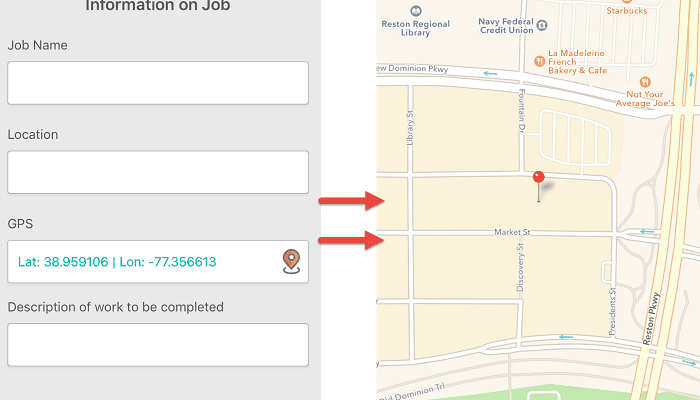
The GPS feature of GoCanvas allows for business owners and supervisors to verify not only when reports were captured, but also WHERE the data was collected. This functionality can be easily added to any of your current mobile forms using the drag and drop app builder.  And by marking the field as “required”, you can ensure that every time someone fills out the mobile form, the user will be forced to record their location. Additional field settings for the GPS field include accuracy and selecting how the coordinates collected are displayed on the final PDF report (map, lat/long, web link).

GoCanvas’s GPS functionality is a great compliment to many of the mobile forms and features that you’re already using today.

Canvas Mobile GPS

The GPS functionality gives your team even greater detail and insight into your data, as well as providing you validation of job completion. This data is also great for communicating with customers to verify proof of service or delivery. You can now easily avoid the “he said/she said” scenarios that happen when a customer says a technician didn’t show up on site or didn’t complete the service at the correct location. This alone can save you hours in time, frustration, and headaches! The GPS coordinates that are collected can also help with on-site accident reporting and the creation of custom reports to find out where the most injuries are occurring. This can help your business become more proactive with site safety, and reduce costs when it comes to future employee injury claims.

Overall, the GoCanvas GPS feature is most commonly implemented in mobile forms that are capturing field service data that is both time and location sensitive.

Examples include:

  • Crew Daily Time Sheets
  • Job Safety Analysis
  • Accident Report
  • Proof of Delivery Report
  • Daily Work Order
  • Facility Walkthrough Checklist
  • And more!

While these are just a few examples of how the GoCanvas GPS functionality can be integrated with many of the mobile forms you already use today, the ability to increase data accuracy within your business is just a few clicks away!

Try GoCanvas Free

About GoCanvas

GoCanvas® is on a mission to simplify inspections and maximize compliance. Our intuitive platform takes care of the administrative tasks, freeing our customers to focus on what truly matters – safeguarding their people, protecting their equipment, and delivering exceptional quality to their customers. 

Since 2008, thousands of companies have chosen GoCanvas as their go-to partner for seamless field operations.

Check out even more resources

Three inspection workers on job site.

The Ultimate Guide to Quality Control Inspections

Managing a construction project is a complex and stressful process. Among other things, you have to coordinate project team members, materials, and equipment and ensure that contractors are not afflicted by the potential risks and hazards present at the construction site. That said, quality means different things to different people which is why you should…

A man using GoCanvas for the digital transformation of his workflow.

Constructions Digital Transformation

Your competition is finding faster ways to capture data and get critical insights from the field into their existing systems. In short, they’re not going bigger, they’re getting smarter. In this 15-minute broadcast on the construction industry’s digital transformation, find out why the trend is to modernize workflows – and how you can stay ahead of the curve…

A electrician inspecting equipment.

See how VIP Lighting optimized efficiency with GoCanvas

VIP Lighting is a retail lighting and electrical maintenance business that services over 10,000 retail locations all over Australia and New Zealand. Before GoCanvas, VIP Lighting had two separate systems that were impossible to integrate, leading to inefficiencies. GoCanvas made it easy to integrate their systems into single, centralized platform…

Connect with an Expert Today.

We’ll help you put together the right solution for your needs.

3 Ways to Automate Data Approvals & Increase Accountability with Workflow

3 Ways to Automate Data Approvals & Increase Accountability with Workflow

| |
Workflow with Canvas

Collecting data is an essential part of every business on the planet, but it’s only half of the equation.

Sharing data with the right people, at the right time, is often more important than just simply writing it down. But often when companies collect data with paper forms, it can take hours, days, and sometimes weeks for the information to reach its final destination! This isn’t even taking into account the other complexities that can make the paper-based data collection process even more difficult including multi-department approvals, out-of-state projects, and more!

Workflow with Canvas

Read below how mobile process improvement platforms like GoCanvas are changing the way that companies look at the collection and transmission of their data, and how a simple changes like using Workflow could help your business recover 100’s of hours in productivity every year. 

The GoCanvas platform is not only a great way to combine all your paper forms into a single mobile app, but it’s also a means of controlling how and when your company’s data is collected.  Read below to learn about three popular use cases for the mobile Workflow feature of GoCanvas and what kind of impact it could have on your business.

Review & Approve Timesheets: Collecting employee daily or weekly timesheets is always a pain, but with GoCanvas it can almost become a pleasure. Instead of your crews having to fill out a piece of paper on every job site at the end of the day or week, they will instead simply log their time right on their phone. Once complete, those times will be sent automatically to their site supervisor who will receive a notification on his or her GoCanvas mobile device. The supervisor can then access and check each employee’s time, add comments, and reject if necessary. If everything looks good, the supervisor can sign off on the timesheet and send it to the company’s cloud database so that it can be digitally filed and processed by the office accounting team.

Safety Violation Tracking: For the Construction, Field Service and Manufacturing industries, employee safety is always a top priority. Due to the nature of work that is involved in these industries, having an efficient system for reporting and reviewing safety violations is essential.

By using Workflow with GoCanvas, a safety supervisor can now do his/her rounds at each project site, fill out the safety reports, and send the results to the office manager for review in real-time. The best part is that reports can be conditionally triggered to be sent for review if, such as, an item is marked as “Failed” or “Requires Correction”. This ensures that the office is only being sent notifications about the most critical reports, which allows them to focus on implementing real-time corrective actions to improve specific site safety situations.

Multi-step Construction Tasks: No matter what you are building or producing, it usually takes a group of people to get the job done. With paper forms, this involves each person who works on a particular task filling out a report. This usually leads to there being folders and upon folders worth of unorganized paper documentation.

With Workflow from GoCanvas, the data collected from start to finish of each task is kept neatly together in a single report. Once “John Doe” completes his part of the task, he can pass or “hand-off” the digital report to “Jane Johnson” so that she can complete her part of the report and continue this process in a dynamic chain of data collection until the report is complete! There will be no more swimming through filing cabinets to find that report from last year since now every completed report will be stored neatly in the cloud for you to easily search through using a simple keyword search. You can even track the status of “in-progress” reports to see why a certain report hasn’t be turned in yet!

And remember, each workflow can be easily setup and customized based on the different types of work processes being conducted, no matter the length. If you’d like to learn more, check out this amazing Workflow eBook on how real companies are making the switch from paper forms to GoCanvas!

About GoCanvas

GoCanvas® is on a mission to simplify inspections and maximize compliance. Our intuitive platform takes care of the administrative tasks, freeing our customers to focus on what truly matters – safeguarding their people, protecting their equipment, and delivering exceptional quality to their customers. 

Since 2008, thousands of companies have chosen GoCanvas as their go-to partner for seamless field operations.

Check out even more resources

Three people in hard hats looking at a tablet.

Smarter, Faster, Safer: Improving Safety Compliance with Mobile Technology

Compliance, there are many ways we talk about it. A necessary evil, a chore, a struggle, or a critically important part of business. We all know how crucial it is, helping save…

Woman reviewing information on a tablet.

Your Guide to Waiver Forms — Examples and Templates

Waiver forms are a type of legal protection used by businesses to reduce their liability and risk. This type of agreement between a business and its customers is used…

Closeup of a handshake.

Duotank Transforms Business Processes with GoCanvas

Duotank is a bag-in-tank alternative to the traditional keg beer system. The aseptic tank environment enables breweries to maintain the quality of their beer after it leaves…

Connect with an Expert Today.

We’ll help you put together the right solution for your needs.

4 Features to Improve the Way You Perform Daily Inspections

4 Features to Improve the Way You Perform Daily Inspections

|

In almost every industry and business today you will find some sort of inspection process. From home construction to retail merchandising, being able to quickly capture, complete and share inspection reports is critical to running a successful business.

A typical paper-based inspection process can be broken down into three parts.

The first part is observation and collection. This is the process of going through all the items on the form and reviewing each section in order to properly fill out the inspection. This may include filling out checkboxes, taking photos with a digital camera, tracking down people for signatures, and much more. This portion can be extremely time-consuming since not only do you have to fill out each part of the inspection by hand (usually more than 2 pages), but also having to use external pieces of equipment including cameras to capture critical pieces of information.

The second part is the transportation of the data. With paper inspections, since they are usually composed of two or more pages of manually entered notes and photos, it is almost a requirement that they are manually driven back to the office for collection. This means that inspections can take hours, if not days, to reach their final destination within the office. This delay can cause backups in your daily reporting and leave huge blind spots in terms of your company’s data visibility.

The third and final part of the process is the analysis of the inspection reports. As we mentioned previously, having to manually transport inspections back to the office can take a substantial amount of time. Once these reports are finally returned, the data must be then manually transcribed into the company’s backend database. This process of manually retyping each form into a spreadsheet or backend database can take up to 15 minutes per form! This can be a real strain on both your employees as well as your ability to make real-time data based decisions.

We all assume that filling out forms on a mobile device is faster than using paper, but how exactly?

Read below for the exact ways that GoCanvas mobile inspections will not only make your daily data collection more efficient but will also increase your business’ overall data quality.

Since inspections are so common among businesses, they are often utilized in many different ways within organizations.  Vehicle, equipment, and safety are all generic examples of how a single business could use an inspection form. So in order to help organize both your employees and their data, we created Folders.

Folders is a unique feature in that it affects both the mobile and web side of the GoCanvas platform. For example, say you create three folders on the website called “Home Inspections”, “Site Inspections”, and “Safety Inspections”. Whichever mobile forms you place in these folders will now be reflected on your user’s mobile devices. Now there will be no confusion over which form they fill out when they are completing their inspection activities. But the best part is, that the data from these forms are now organized within these folders. So all the data from the “Home Inspection” forms can now be found in the Submissions section of the website within the “Home Inspection” folder.

Have you ever worried about if your employees actually completed the inspection at the actual job site that they said they did? Worried about investing thousands of dollars into fleet or device management solutions that only solve one of your many needs?

With the GPS feature of GoCanvas, you can require that every inspection that is filled out by one of your employees is stamped with exact coordinates of where they were located while filling out the report. These coordinates cannot be modified by the employee, and can even be accompanied by a time stamp on the same page. This information can help you confirm the accuracy of the reports being turned in, as well increasing internal accountability without investing in expensive 3rd party software systems.

TOC is a feature that gives anyone filling out an inspection form the ability to quickly navigate to the section of the report that they need without having to thumb through numerous pages. This feature is great because as anyone who has ever had to fill out an inspection knows, no form is filled out in the exact same order every single time. TOC also gives your employees the flexibility of knowing what sections they have already filled out and which sections they have yet to complete. The easy to use navigation will display red or green notification alerts to let the employee know if all inspection requirements have been met or not.

With TOC, never carry around a bulky, multi-page inspection packet ever again.

With GoCanvas, you can setup similar data tables that you would see with a paper form but without the mess of trying to fill them out with a pen and clipboard.

The Grid functionality of GoCanvas allows you to setup static or dynamic tables of information for your users. This could be a table of inspection items to mark off as “Pass” or “Fails”, or it could as simple as a standard punch list of items to complete. The real beauty of the Grid feature is that within each item of your inspection, you can easily take or upload photos to attach to each item. So if an item in the table was marked as “Fail”, you could add a column for photos and simply capture an image with your device camera to attach to the report.

This integrated process of being able to capture photos and have them automatically embed into the final report will ultimately eliminate 3/4’s of the time that was previously spent by the back office compiling paper reports.

About GoCanvas

GoCanvas® is on a mission to simplify inspections and maximize compliance. Our intuitive platform takes care of the administrative tasks, freeing our customers to focus on what truly matters – safeguarding their people, protecting their equipment, and delivering exceptional quality to their customers. 

Since 2008, thousands of companies have chosen GoCanvas as their go-to partner for seamless field operations.

Check out even more resources

Man inputting digital work order into a tablet from a work site.

How Digital Work Orders Impact Your Key Business Outcomes

Is your company still using paper sheets to manage work orders? The drawbacks of using paper forms are often hidden, making it difficult to understand the true impact of paper forms on a business…

Woman reviewing data via her mobile phone.

See How Centurion Got Amazing ROI from GoCanvas

Centurion is the largest heavy haulage provider in Australia. They deliver national supply chain solutions to the resources, energy, construction & retail sectors throughout Western Australia, Queensland & the Northern Territory…

A man reviewing data on tablet collected by GoCanvas solutions.

5 Tips to Improve How Your Business Collects Data

Companies rely on collecting data in order to operate. In a fast-changing world, companies that focus on streamlining and improving their data collection processes will be able to do more. The good news is that it’s become easier than ever for businesses of all… 

Connect with an Expert Today.

We’ll help you put together the right solution for your needs.

National Safety Month: 3 Ways to Create the Perfect Paperless JSA Report

National Safety Month: 3 Ways to Create the Perfect Paperless JSA Report

| |

When it comes to properly reporting and tracking safety data, there are many important processes that come into play.

One standard practice that is completed across thousands of worksites on a daily basis is a Job Safety Analysis. This procedure helps companies both large and small interconnect their health and safety principles to the tasks that their employees are completing. The JSA process, sometimes also known as a Job Hazard Analysis (JHA), is most often associated with tasks that involve the potential for injury or accident. JSAs are often modified and assigned to specific types of work processes, but ultimately the data being collected is focused on identifying and reviewing all the necessary steps to ensure safe work procedures are met before any job is performed.

With the good that comes from the Job Safety Analysis process, also comes the bad. When a JSA is filled out on a piece of paper like it is done within many companies today, the data that is collected is only as good as how it was captured and when it was turned in.  But what does this really mean?

The basic premise of filling out a JSA is to capture the basic steps of a job or task, the potential risks of performing it, and the actions that can be taken to mitigate the potential danger as well as increase safety. The problem with filling out a JSA on a piece of paper is that the process begins to take on the negative attributes of paper data collection.

The functionality that is missing from a paper-based process and makes it so inefficient includes:

  • No advanced data collection fields including Photos, GPS, Integrated Drop-Down Menus, Time Stamps, and more
  • No automated review or approval workflow functionality
  • No real-time data reporting or storage in your backend database systems
  • No data field requirements to ensure fully completed JSA reports

As you can see from the list above, paper JSAs are likely only being half as effective as they should. With a mobile form platform like GoCanvas, you can transform your JSA or JHA process into something that runs in real-time and collects data that includes dynamic info like site photos and GPS stamps. The data that your field personnel collects with GoCanvas instantly becomes actionable data that you can use to make decisions, instead of having to wait hours or days to receive paper-based forms.

The ability to make proactive decisions about safety is often the difference between an accident being prevented versus it actually happening.

The process of getting started with your own mobile JSAs for your various worksite projects is not difficult at all!

Our Application Store is a great resource to get started. With over 23,000+ pre-built mobile form templates including JSAs and JHAs, you’ll be sure to find something you can download into your account and start using right away! These templates can even be edited to fit better into your current process using the GoCanvas App Builder.

JSA Mobile Apps

Another great option for you is to take a picture of the paper JSA or JHA that you use today and we will convert it into a mobile form for free! Simply click here to upload a photo or a copy of your JSA and we will have it converted within 24 – 48 hours! That means that you’ll be able to start seeing the benefits of a mobile JSA versus a paper form within just a day!

Convert paper form to mobile form

About GoCanvas

GoCanvas® is on a mission to simplify inspections and maximize compliance. Our intuitive platform takes care of the administrative tasks, freeing our customers to focus on what truly matters – safeguarding their people, protecting their equipment, and delivering exceptional quality to their customers. 

Since 2008, thousands of companies have chosen GoCanvas as their go-to partner for seamless field operations.

Check out even more resources

Three inspection workers on job site.

The Ultimate Guide to Quality Control Inspections

Managing a construction project is a complex and stressful process. Among other things, you have to coordinate project team members, materials, and equipment and ensure that contractors are not afflicted by the potential risks and hazards present at the construction site. That said, quality means different things to different people which is why you should…

A man using GoCanvas for the digital transformation of his workflow.

Constructions Digital Transformation

Your competition is finding faster ways to capture data and get critical insights from the field into their existing systems. In short, they’re not going bigger, they’re getting smarter. In this 15-minute broadcast on the construction industry’s digital transformation, find out why the trend is to modernize workflows – and how you can stay ahead of the curve…

A electrician inspecting equipment.

See how VIP Lighting optimized efficiency with GoCanvas

VIP Lighting is a retail lighting and electrical maintenance business that services over 10,000 retail locations all over Australia and New Zealand. Before GoCanvas, VIP Lighting had two separate systems that were impossible to integrate, leading to inefficiencies. GoCanvas made it easy to integrate their systems into single, centralized platform…

Connect with an Expert Today.

We’ll help you put together the right solution for your needs.

Feature Focus: Create, Assign & Manage Tasks More Efficiently with Dispatch Calendar

Feature Focus: Create, Assign & Manage Tasks More Efficiently with Dispatch Calendar

| |

In many businesses today, the daily organization and management of a mobile workforce can be extremely time-consuming.  It often involves the creation of complex spreadsheets and/or using of multiple calendars in order to accurately track assignments. The organization of these tasks can easily take 1-2 hours per day and result in the office staff having to work overtime in order to ensure the proper completion of every activity.  In addition, Office Dispatchers often have to deal with manual processes including: 

  • The creation, printing, and distribution of daily dispatch schedules
  • Call, texting, or emailing of tasks to field employees
  • Creation of spreadsheets and reports to measure productivity

Does this kind of inefficiency sound familiar within your company? If so, you need Dispatch Calendar!

With the release of the brand-new Dispatch Calendar, GoCanvas users now have the ability to quickly create, manage, and assign 100’s of weekly tasks from a single screen. There is no more navigating between different screens, software programs or employee calendars; Dispatch Calendar conveniently places every task right at your fingertips. 

When evaluating whether your company should implement Dispatch Calendar, you should first take a look at how you process and assign daily tasks today.

Dispatch Calendar Animation

Does your office staff have to manually write out the details of daily or weekly appointments? Do they have to reproduce these details across various systems? Do you have to wait until the end of the day or week to receive reports and view whether or not all appointments and tasks have been completed?

If you answered “YES” to any of the above questions, then Dispatch Calendar is a feature that could have a major impact on the daily productivity of your business. It is as simple as using Google Calendar but with the additional benefits that come with using a mobile data collection platform. You are now able to easily manage a single calendar of all your employees’ tasks that connects to both your data collection solution (GoCanvas) as well as their personal calendar programs (Gmail, Outlook, etc). 

This is also a feature that can work across various use cases and is not just for those who already utilize dispatching software.  Additional industries that could benefit from this feature include:

  • Field Service – Electricians, Plumbers, HVAC technicians
  • Moving / Shipping / Logistics
  • Inspection
  • General Contracting
  • And more!

It is super simple to enable Dispatch Calendar for your GoCanvas account!

Anyone on a GoCanvas free trial will instantly have access to the feature and simply needs to navigate to the “Dispatch/Workflow” section of their account. By simply clicking “Enable” on the banner, the old GoCanvas Dispatch tool will be transformed into the more intuitive, Google-like Dispatch Calendar.  An example of the banner message you will see is below. 

For paid GoCanvas subscribers, the process works the same way. If you’re a current GoCanvas subscriber on the Professional subscription plan, this feature is readily available and can be enabled the same way. If you are not on the Profession Plan, but would still like to try out Dispatch Calendar.

About GoCanvas

GoCanvas® is on a mission to simplify inspections and maximize compliance. Our intuitive platform takes care of the administrative tasks, freeing our customers to focus on what truly matters – safeguarding their people, protecting their equipment, and delivering exceptional quality to their customers. 

Since 2008, thousands of companies have chosen GoCanvas as their go-to partner for seamless field operations.

Check out even more resources

business people discussing project

Gown Your Business with GoCanvas Partner Program

Join our Partner Program and gain instant access to our global network of thought leaders and industry experts enjoying shared collaboration and collective success.

Forte Supply Chain Solutions Partner Video

Partner Snapshot: Forte Supply Chain Solutions

Explore how Forte Supply Chain Solutions partnered with GoCanvas, combining in-house industry expertise with our white-label mobile forms to revolutionize their processes.

Closeup of a handshake.

GoCanvas Integrations: Streamline your Workflow

Integrate with over 1,000 software applications. Enhance your GoCanvas experience by syncing real-time data to one or all of your business tools.

Connect with an Expert Today.

We’ll help you put together the right solution for your needs.

>