GoCanvas Appoints Nicholas Mirisis as New Chief Marketing Officer

GoCanvas Appoints Nicholas Mirisis as New Chief Marketing Officer

RESTON, Va.–GoCanvas, whose products simplify how companies collect, process and analyze information today announced that it has named seasoned marketer Nick Mirisis as its new chief marketing officer.

Mirisis brings two decades of experience in cultivating highly-targeted, results-driven marketing and growth strategies to the GoCanvas executive team. Mirisis’ background and experience of integrating sales and marketing for hyper-scalable B2B SaaS companies like GoCanvas will be integral to helping the company achieve revenue targets and complete strategic acquisitions over the coming years. Previously, he led the marketing team for SaaS-based company Dude Solutions, shepherding growth from $1M to over $100M in Annual Recurring Revenue (ARR).

“As we reflect on the last 12 months of significant growth, market recognition and customer satisfaction, we welcome Nick Mirisis to our leadership team to build on that success,” said GoCanvas founder and CEO, James Quigley. “Nick has a proven track record with effective marketing, analytics, sales and growth strategies to deliver against aggressive goals. We are looking forward to his contributions as we continue to grow and serve our customers.”

“GoCanvas has a bold and unique way of simplifying its customer’s workflow challenges and I see great opportunity as the company and product evolves,” said Mirisis. “I am excited to be a part of its accelerated growth at such a pivotal time.”

About GoCanvas

GoCanvas’s passion is building mobile products that enable businesses to digitize information and be more responsive to their customers. The cloud-based, customizable app works on smartphones and tablets, empowering SMB customers to digitally collect data and realize its value in improving workflow, communications, and operational processes.

GoCanvas is trusted by thousands of businesses throughout 70 countries, automating millions of workplace activities, making it one of the fastest growing mobile platforms in the world. Most recently, the company has been named as a “Best Place to Work” by Washingtonian Magazine, Washington Business Journal, and Inc. Magazine and has landed on the Deloitte Fast500 list in 2017 and 2018. To learn more, visit beta.gocanvas.com.

About GoCanvas

GoCanvas® is on a mission to simplify inspections and maximize compliance. Our intuitive platform takes care of the administrative tasks, freeing our customers to focus on what truly matters – safeguarding their people, protecting their equipment, and delivering exceptional quality to their customers. 

Since 2008, thousands of companies have chosen GoCanvas as their go-to partner for seamless field operations.

Check out even more resources

business people discussing project

Gown Your Business with GoCanvas Partner Program

Join our Partner Program and gain instant access to our global network of thought leaders and industry experts enjoying shared collaboration and collective success.

Forte Supply Chain Solutions Partner Video

Partner Snapshot: Forte Supply Chain Solutions

Explore how Forte Supply Chain Solutions partnered with GoCanvas, combining in-house industry expertise with our white-label mobile forms to revolutionize their processes.

Closeup of a handshake.

GoCanvas Integrations: Streamline your Workflow

Integrate with over 1,000 software applications. Enhance your GoCanvas experience by syncing real-time data to one or all of your business tools.

Connect with an Expert Today.

We’ll help you put together the right solution for your needs.

GoCanvas is one of Inc. Magazine’s Best Workplaces 2019

GoCanvas is one of Inc. Magazine’s Best Workplaces 2019

GoCanvas is one of the highest-scoring businesses, with standout employee engagement

Reston, VA (May 16, 2019) – GoCanvas, whose products simplify how companies collect, process and analyze information, has been named one of Inc. magazine’s Best Workplaces for 2019, the fourth annual ranking in the fast-growing private company sector.

Hitting newsstands May 28 in the June 2019 issue, and as part of a prominent Inc.com feature, the list is the result of a wide-ranging and comprehensive measurement of private American companies that have created exceptional workplaces through vibrant cultures, deep employee engagement, and stellar benefits. Collecting data on nearly 2,000 submissions, Inc. singled out 346 finalists.

Each nominated company took part in an employee survey, conducted by Omaha’s Quantum Workplace, on topics including trust, management effectiveness, perks, and confidence in the future. Inc. gathered, analyzed, and audited the data. Then we ranked all the employers using a composite score of survey results. This year, 74.2 percent of surveyed employees were engaged by their work—besting last year’s 72.1 percent.

The strongest engagement scores came from companies that prioritize the most human elements of work. These companies are leading the way in employee recognition, performance management, and diversity. It’s a different playbook from a decade ago, when too many firms used the same template: free food, open work environments, and artifacts of “fun.”

“It is incredibly rewarding to see our work on building a culture of innovation through empathy recognized by both our employees and the industry,” said James Quigley, CEO and Founder of GoCanvas. “This recognition on a national scale shows that we are on the right track in realizing our goals of being an employer of choice that is able to employ a talented workforce ready to solve customer challenges with digitizing manual workflow.”

All companies had to have a minimum of 10 employees and be U.S.-based, privately held, and independent—that is, not subsidiaries or divisions of other companies.

While researching the finalists, Inc. and Quantum saw distinct themes:

  • 99 percent provide health insurance—and some cover the cost.
  • 49 percent allow employees to bring pets to work.
  • 65 percent take employees to offsite retreats to relax and recharge.
  • 16 percent offer paid sabbaticals to reward length of service.

“With today’s tight labor market, building a great corporate culture is more important than ever,” says Inc. magazine editor in chief James Ledbetter. “The companies on Inc.’s Best Workplaces list are setting an example that the whole country can learn from.”

GoCanvas’s passion is building mobile products that enable businesses to digitize information and be more responsive to their customers. The cloud-based, customizable app works on smartphones and tablets, empowering SMB customers to digitally collect data and realize its value in improving workflow, communications, and operational processes.

GoCanvas is trusted by thousands of businesses throughout 70 countries, automating millions of workplace activities, making it one of the fastest growing mobile platforms in the world. Most recently, the company has been named as a “Best Place to Work” by Washingtonian Magazine, Washington Business Journal, and Inc. Magazine and has landed on the Deloitte Fast500 list in 2017 and 2018. To learn more, visit beta.gocanvas.com.

Founded in 1979 and acquired in 2005 by Mansueto Ventures, Inc. is the only major brand dedicated exclusively to owners and managers of growing private companies, with the aim to deliver real solutions for today’s innovative company builders. Winner of Advertising Age’s “A-List” in January 2015, and a National Magazine Award for General Excellence in both 2014 and 2012, Inc. has a monthly audience reach that’s grown from two million in 2010 to more than 20 million today. For more information, visit Inc.com.

Quantum Workplace is an HR technology company that serves organizations through employee engagement surveys, action-planning tools, exit surveys, peer-to-peer recognition, performance evaluations, goal tracking, and leadership assessment. For more information, visit QuantumWorkplace.com.

About GoCanvas

GoCanvas® is on a mission to simplify inspections and maximize compliance. Our intuitive platform takes care of the administrative tasks, freeing our customers to focus on what truly matters – safeguarding their people, protecting their equipment, and delivering exceptional quality to their customers. 

Since 2008, thousands of companies have chosen GoCanvas as their go-to partner for seamless field operations.

Check out even more resources

business people discussing project

Gown Your Business with GoCanvas Partner Program

Join our Partner Program and gain instant access to our global network of thought leaders and industry experts enjoying shared collaboration and collective success.

Forte Supply Chain Solutions Partner Video

Partner Snapshot: Forte Supply Chain Solutions

Explore how Forte Supply Chain Solutions partnered with GoCanvas, combining in-house industry expertise with our white-label mobile forms to revolutionize their processes.

Closeup of a handshake.

GoCanvas Integrations: Streamline your Workflow

Integrate with over 1,000 software applications. Enhance your GoCanvas experience by syncing real-time data to one or all of your business tools.

Connect with an Expert Today.

We’ll help you put together the right solution for your needs.

GoCanvas Named on Washingtonian Magazine’s Best Places to Work List

GoCanvas Named on Washingtonian Magazine’s Best Places to Work List

Washington, D.C., April 19, 2019 – GoCanvas, Inc., whose products simplify how companies collect, process and analyze information today announced it has been named to Washingtonian Magazine’s Best Places to Work list for 2019. This list is compiled every other year to include companies of all sizes that offer generous pay and benefits, interesting and meaningful work, great work/life balance, opportunities to learn and grow, commitment to charity and community, and recognition and respect given to employees. Editors review applications and the results on anonymous employee surveys and combine the company input and employee scores to determine the 50 winning workplaces.

“GoCanvas’s corporate culture centers around the concept of empathy,” said James Quigley, CEO and Founder of GoCanvas. “Our recognition by Washingtonian illustrates that building a company around empathy, from understanding customers’ frustration using paper forms and outdated processes to listening to employees and adapting the company based on their input, results in innovation and business success.”

GoCanvas provides a flexible, customizable mobile platform that makes it simple for businesses to automate how work is done, eliminating barriers to productivity, such as filling out forms by hand, relying on inefficient manual workflows and having to engage in time-consuming data entry. Companies using GoCanvas’s platform span a variety of industries and include Sprint, Red Bull, Post Consumer Brands, LendLease, The Co-operative Group, and the Mirvac Group, as well as thousands of other domestic and global organizations.

Among their efforts in the community is the company’s philanthropic initiative, Ante-Up. The program empowers employees to choose a non-profit for GoCanvas to donate its product and pays for employees to support the non-profit’s mission, anywhere in the world, as long as the employee will “ante-up” and commit. Organizations supported to date include Doctors Without Borders, Australian charities that give homeless babies a safe home, and the Venezuela Election Committee who secured exit poll data using the platform.

About GoCanvas

GoCanvas’s passion is building mobile products that enable businesses to digitize information and be more responsive to their customers. The cloud-based, customizable app works on smartphones and tablets, empowering SMB customers to digitally collect data and realize its value in improving workflow, communications, and operational processes.

GoCanvas is trusted by thousands of businesses throughout 70 countries, automating millions of workplace activities, making it one of the fastest growing mobile platforms in the world. Most recently, the company has been named as a “Best Place to Work” by Washingtonian Magazine, Washington Business Journal, and Inc. Magazine and has landed on the Deloitte Fast500 list in 2017 and 2018. To learn more, visit beta.gocanvas.com.


About GoCanvas

GoCanvas® is on a mission to simplify inspections and maximize compliance. Our intuitive platform takes care of the administrative tasks, freeing our customers to focus on what truly matters – safeguarding their people, protecting their equipment, and delivering exceptional quality to their customers. 

Since 2008, thousands of companies have chosen GoCanvas as their go-to partner for seamless field operations.

Check out even more resources

business people discussing project

Gown Your Business with GoCanvas Partner Program

Join our Partner Program and gain instant access to our global network of thought leaders and industry experts enjoying shared collaboration and collective success.

Forte Supply Chain Solutions Partner Video

Partner Snapshot: Forte Supply Chain Solutions

Explore how Forte Supply Chain Solutions partnered with GoCanvas, combining in-house industry expertise with our white-label mobile forms to revolutionize their processes.

Closeup of a handshake.

GoCanvas Integrations: Streamline your Workflow

Integrate with over 1,000 software applications. Enhance your GoCanvas experience by syncing real-time data to one or all of your business tools.

Connect with an Expert Today.

We’ll help you put together the right solution for your needs.

Release Notes: required checkboxes, new iOS and Android features including 7-day view of Dispatches, Square enhancements, and more

Release Notes: required checkboxes, new iOS and Android features including 7-day view of Dispatches, Square enhancements, and more

Hello all! We have just released new versions of the GoCanvas mobile app for both Android and Apple devices. This release features updates that we think you’re going to love, so keep reading to see what’s new! Our focus this time around was making it easier to see the information you need. Thank you, as always, for your feedback on how we can make your experience using GoCanvas more powerful.

You’ve asked for the ability to make a Checkbox field required just like your other field types, so we’ve added the ability to do just that. Use this feature to prevent moving onto the next screen without a checked box, like when you need someone to check that they have read and agree your Terms and Conditions.

When a Handoff is assigned to you, you can now see who handed it off — meaning you don’t have to hunt for it in the App or on the GoCanvas website anymore!

If your Submission has a Submission Name, it will now be visible on the Workflow screen. This should help provide better context around what you’ve just been assigned.

Dispatch users will be happy to know that with this update, users can see their upcoming dispatches up to seven days out from the current date. Having access to this information ahead of time can make it easier to plan out routes, tools needed for the job, and mental preparation.

  • Future Dispatches can only be viewed, and not filled out ahead of time
  • This feature is turned off by default — contact support to turn it on for you
  • Not currently suggested for accounts sending 100+ dispatches to their users at once

We’ve made it easier to reconcile your transactions in Square by bringing in the Submission ID (the unique ID in the footer of your PDF) as a note on the transaction.

This update to the iOS mobile app reflects the existing functionality that the Android mobile app already has. A small but convenient change — when entering content into a Number field, your number keyboard will pop up instead of your full keyboard.

About GoCanvas

GoCanvas® is on a mission to simplify inspections and maximize compliance. Our intuitive platform takes care of the administrative tasks, freeing our customers to focus on what truly matters – safeguarding their people, protecting their equipment, and delivering exceptional quality to their customers. 

Since 2008, thousands of companies have chosen GoCanvas as their go-to partner for seamless field operations.

Check out even more resources

business people discussing project

Gown Your Business with GoCanvas Partner Program

Join our Partner Program and gain instant access to our global network of thought leaders and industry experts enjoying shared collaboration and collective success.

Forte Supply Chain Solutions Partner Video

Partner Snapshot: Forte Supply Chain Solutions

Explore how Forte Supply Chain Solutions partnered with GoCanvas, combining in-house industry expertise with our white-label mobile forms to revolutionize their processes.

Closeup of a handshake.

GoCanvas Integrations: Streamline your Workflow

Integrate with over 1,000 software applications. Enhance your GoCanvas experience by syncing real-time data to one or all of your business tools.

Connect with an Expert Today.

We’ll help you put together the right solution for your needs.

GoCanvas Now Accepts Square Mobile Payments

GoCanvas Now Accepts Square Mobile Payments

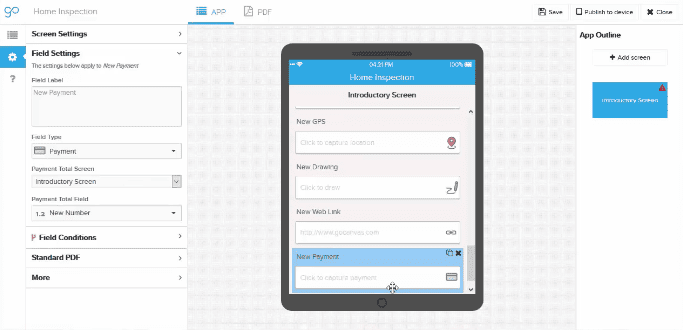
GoCanvas and Square now make it easier to get paid faster.  GoCanvas Admins and Designers can now easily drag-and-drop a Payments field into any GoCanvas form to allow your staff to accept credit card payments onsite, using the popular Square mobile payments service. With any GoCanvas form capable of accepting Square, the integration between your business and finance operation can now be more streamlined than ever before.  Of course, if you don’t already have a Square account, you can register for Square from within the GoCanvas App Builder.  Here’s a link to help you set up Square in GoCanvas.

Getting paid faster and reducing bad debt by ensuring payment before your employees leave the worksite might just be reason enough to update your GoCanvas forms to include Square.  GoCanvas customers asked for Square by name, which is not surprising considering all of the paperwork that can be eliminated with this new payment option.

New Square users are eligible for a free Square magstripe reader (headset jack or Lightning connector versions). Another benefit is that you can permanently link payments collected via Square directly to your customers’ unique projects captured in GoCanvas. So, not only are your employees off the hook for filling out paper-based estimates, invoices, and other work documents, they are freed of having to connect a customer’s check or cash payment to the corresponding paperwork — a headache that occurs sometimes months after the actual work product is delivered.

Interested in learning a bit more?  Check out this , we think you’ll find it self-explanatory.

Wait! What? We had you at “…make it easier to get paid faster?”

About GoCanvas

GoCanvas® is on a mission to simplify inspections and maximize compliance. Our intuitive platform takes care of the administrative tasks, freeing our customers to focus on what truly matters – safeguarding their people, protecting their equipment, and delivering exceptional quality to their customers. 

Since 2008, thousands of companies have chosen GoCanvas as their go-to partner for seamless field operations.

Check out even more resources

business people discussing project

Gown Your Business with GoCanvas Partner Program

Join our Partner Program and gain instant access to our global network of thought leaders and industry experts enjoying shared collaboration and collective success.

Forte Supply Chain Solutions Partner Video

Partner Snapshot: Forte Supply Chain Solutions

Explore how Forte Supply Chain Solutions partnered with GoCanvas, combining in-house industry expertise with our white-label mobile forms to revolutionize their processes.

Closeup of a handshake.

GoCanvas Integrations: Streamline your Workflow

Integrate with over 1,000 software applications. Enhance your GoCanvas experience by syncing real-time data to one or all of your business tools.

Connect with an Expert Today.

We’ll help you put together the right solution for your needs.

Maintaining your Duty of Care under the UK Corporate Manslaughter Act

Maintaining your Duty of Care under the UK Corporate Manslaughter Act

| |

More than a quarter of all motor vehicle accidents involve a driver that is driving under the circumstances of their employment. Health and safety laws apply to work-related activities that occur on the road in the same way as they do in the workplace. The UKCorporate Manslaughter and Corporate Homicide Act holds companies and employers liable where serious failures in the management of health and safety have resulted in a fatality. Juries in such cases will consider how the work-related motor vehicle activities are managed – such as any systems or processes which are in place to help manage safety and how those were operated in practice.  Companies found guilty will be liable to unlimited fines and may have to publicly declare their conviction and financial penalty.

Companies have a legal duty to adequately inspect their vehicles and put in place suitable arrangements to manage health and safety. Vehicle inspections must ensure (among other concerns) that vehicles are fit for the purpose for which they are used, that vehicles are maintained in a safe and fit condition, and that drivers’ health, and possibly safety, is not being put at risk.

Vehicle inspections do not stop at ensuring that the vehicle itself is safe, however. For example, companies must ensure that the drivers themselves are safe. Inspections must ensure that drivers are competent and capable, that the drivers are properly trained, that drivers have clear safety instructions, that drivers are fit and healthy, and that as an employer, you understand your duties under health and safety laws when hiring contractors and subcontractors. Inspections must also cover the driver’s journey, covering issues like the thoroughness of route plans, whether work schedules are realistic, is enough time allotted to complete drives safely, and are weather conditions considered when planning journeys. There is an immense amount for companies to cover.

If one of your employees is killed while driving for work, and there is evidence that serious management failures resulted in a ‘gross breach of a relevant duty of care,’ your company could be at risk of being prosecuted under the Corporate Manslaughter and Corporate Homicide Act. It is therefore essential for employers to diligently compile safety reports when doing inspections to avoid liability. The more an employer can document the inspections they do, the more efficient the inspections will be, the safer employees are, and the more protected the company is from costly litigation. However, risk assessment is about identifying and taking sensible measures to control the risks in your workplace, not about creating huge amounts of paperwork.

The best way for employers to diligently document inspections while avoiding copious amounts of paperwork is to invest in an advanced mobile forms software. Such technology gives employers the best of both worlds. Companies can efficiently and flexibly keep track of and document vehicle inspections from multiple locations, and even on the go, and aggregate the data in real time. This way employers can keep excellent records, keeping their employees safe, and their company safe from censure, while reducing paperwork. Companies can then use the software to analyze the data they gather, fostering better practices by finding potential deficiencies in machinery and workforce.


Now you can easily modernize the way you are conducting and auditing truck inspections. Whether you are looking to improve your data handling processes or improve the safety of your truck operations, we hope you consider using GoCanvas as your data collection tool. Sign up for GoCanvas free and give our platform a try today!

About GoCanvas

GoCanvas® is on a mission to simplify inspections and maximize compliance. Our intuitive platform takes care of the administrative tasks, freeing our customers to focus on what truly matters – safeguarding their people, protecting their equipment, and delivering exceptional quality to their customers. 

Since 2008, thousands of companies have chosen GoCanvas as their go-to partner for seamless field operations.

Check out even more resources

Woman looking at tablet inside a large vehicle machine.

Centurian Transport saves $100k every year with GoCanvas

Centurion is the largest heavy haulage provider in Australia. They deliver national supply chain solutions to the resources, energy, construction & retail sectors…

Image of two men in front of kegs on tablet.

Duotank Transforms Business Processes with GoCanvas

Duotank is a bag-in-tank alternative to the traditional keg beer system. The aseptic tank environment enables breweries to maintain the quality of their beer…

Image of Two Men and a Truck looking at tablet.

TWO MEN AND A TRUCK® used GoCanvas to increase data visibility & compliance

With a workforce that primarily works out in the field, many of the TWO MEN AND A TRUCK® locations found that paperwork was hindering…

Connect with an Expert Today.

We’ll help you put together the right solution for your needs.

4 Tips to Help the Disorganized Lawyer

4 Tips to Help the Disorganized Lawyer


Practicing law involves countless details and deadlines. When attorneys lack organizational skills within a law firm, essential information can slip through the cracks and create all kinds of problems, from overlooked billable hours to a child custody case gone wrong.

Yet for years, disorganization was a sign of a good lawyer. Abraham Lincoln, for instance, stored documents in his top hat. If you’ve ever seen a painting of Lincoln’s desk, you know the lawyer-turned-president worked among piles of disheveled papers and books. The president was the definition of the “disorganized lawyer”. 

Now, however, that image of the scattered but brilliant lawyer is changing, making disorderliness less a sign of intellect than a cause for alarm. Kelly Lynn Anders, the associate dean of student affairs at Washburn University School of Law and author of a 2008 book, The Organized Lawyer, puts it like this: “On a regular basis, attorneys are sanctioned for many misdeeds that can be traced back to disorganization. Often, the sanctions are for actions that are inexcusable but not malicious. Rather, they are examples of how bad things can get when one is disorganized.”

Once an unorganized lawyer herself, Anders names a number of mishaps that can occur from disorderliness — “commingling of funds, failure to produce records to opposing counsel, failure to file in a timely manner, being inaccessible to clients, and seeming ill-prepared to represent clients during meetings,” she says.

If you’re an attorney or paralegal struggling to stay on top of your deadlines and work, the time to get organized is now. These four tips can help you avoid becoming the “disorganized lawyer” and improve your overall professional conduct when dealing with clients. 

Your day doesn’t always go as planned. Even though you think you’ll find time to jot down that 45 minutes you spent on client X, there are no guarantees. You could easily get pulled in another direction.

When you do catch a breath, the last thing you want to do is enter your time. So you forget and never bill for your hours of legal fees. Or you unintentionally overestimate legal fees or time, tracking an hour and a half instead of the actual time worked — a move that can put you in violation of the American Bar Association’s (ABA’s) Rule 1:5 on billing and fees.

Tracking your time in real-time can make the job easier and help you (and your team) increase your accuracy. Time-tracking mobile apps allow you to use your smartphone, tablet, or laptop to make entries on the go, meaning you can start and end a timer precisely at the time you start and end your work, whether you’re off-site at a deposition, at home drafting an affidavit, or in court. Some apps even enter ABA codes automatically, so you don’t have to rack your brain to remember them or take the time to look them up.

In all likelihood, you receive more email than you can manage and find that it disrupts your focus and drains your time. If you aren’t careful, email can break your concentration and cause you to make errors on important tasks. Putting an “email system” in place can be a lifesaver.

Start by setting aside a few times a day (and a few times only) to check your inbox, such as first thing in the morning, mid-day, and late afternoon. This may seem hard at first, but hold steady and resist the urge to check email outside of those time frames. Let your team know your new system so they’re not left waiting for an immediate response, and so they resort to other measures, like knocking on your office door or calling you by phone, when something urgent arises.

Disable your email pop-up notifications to avoid pinging distractions, and organize your email folders in a way that makes sense. For instance, you can organize by client or legal service areas such as Domestic, Civil or Probate Litigation, Real Estate, or Criminal. Likewise, you might organize folders by priority level — Low, Medium, High, and Urgent. Then when an email comes in, file it accordingly. Remember to clean out your folders every now and then so they don’t become too hard to navigate.

Many offices in the 21st century rely primarily on digital, not paper, documents and filing systems. But that’s not possible with law firms, where paper is required for things like court exhibits, signed consent orders, and contracts. While you won’t be able to eliminate paper entirely, there are steps you can take to lower your paper use — and in turn, your chance of losing an important note or document.

Electronic, cloud-based filing systems are great for document and case management, and take up far less space than old metal file cabinets. Many cloud-based programs are designed exclusively for law firms and come with the added security measures attorneys and paralegals need. As this ABA article explains, two top-rated programs are Clio and Law RD. You can use them to manage and collaborate on documents, access your calendar, and even connect and share documents with clients — all in a safe, secure setting. The biggest advantages? With web-based programs like these, you can access your files and stay on top of your caseload from anywhere you have Internet access, whether you’re on vacation or stretched out on your home sofa. In addition, you lower your risk of leaving sensitive documents on your desk or out in the open, which anyone could fairly easily access and peruse.

Of course, cloud-based programs and other technologies will only work if you can use them. Many are complicated and can cause you to waste time on even simple steps like accessing your calendar or finding a file. Be wary of technologies that claim to help but actually take vast time and patience to set up and learn. Ask your product rep these questions before you decide to purchase:

  • Does set up require help from IT? How much time does it take?
  • What skills do staff members need to use this?
  • Do you provide any training support?
  • What kind of maintenance is involved?
  • Does your system integrate with the other systems we use?
  • Does your product work across mobile platforms, in addition to desktop?

As an attorney, every minute counts. Being a disorganized lawyer is no longer an option. Save yourself the headache of searching frantically for that one piece of paper or underestimating the amount of time or legal fees you bill for a case. Get organized in your law office, starting with the suggestions mentioned here.

At GoCanvas, we created a way to make organization easy with nearly 200 mobile apps designed by or for attorneys and law firms. Get some inspiration by checking out our customizable mobile forms and apps for Professional Services, or use our simple to use app builder to create your own legal services mobile app


Now you can easily modernize the way you are collecting data. Whether you are looking to improve your data handling processes or advance reporting, we hope you consider using GoCanvas as your data collection tool. Sign up for GoCanvas free and give our platform a try today!

Interested in learning more? Check out our eBook Modernize Your Law Practice in 3 Steps.

About GoCanvas

GoCanvas® is on a mission to simplify inspections and maximize compliance. Our intuitive platform takes care of the administrative tasks, freeing our customers to focus on what truly matters – safeguarding their people, protecting their equipment, and delivering exceptional quality to their customers. 

Since 2008, thousands of companies have chosen GoCanvas as their go-to partner for seamless field operations.

Check out even more resources

Woman looking at tablet inside a large vehicle machine.

Centurian Transport saves $100k every year with GoCanvas

Centurion is the largest heavy haulage provider in Australia. They deliver national supply chain solutions to the resources, energy, construction & retail sectors…

Image of two men in front of kegs on tablet.

Duotank Transforms Business Processes with GoCanvas

Duotank is a bag-in-tank alternative to the traditional keg beer system. The aseptic tank environment enables breweries to maintain the quality of their beer…

Image of Two Men and a Truck looking at tablet.

TWO MEN AND A TRUCK® used GoCanvas to increase data visibility & compliance

With a workforce that primarily works out in the field, many of the TWO MEN AND A TRUCK® locations found that paperwork was hindering…

Connect with an Expert Today.

We’ll help you put together the right solution for your needs.

Create your own Android mobile app with digitial signature capture in 5 minutes

Create your own Android mobile app with digitial signature capture in 5 minutes

| |

How to Build an App in 5 Minutes!

GoCanvas allows you to easily create your own apps for Android, iOS, and Windows PC.  Today, I wanted to walk through a quick and simple example of how to do this in 5 minutes. This app will allow you to capture a digital signature on your mobile device in just seconds. Below, you can see what the result looks like on Android mobile device.  We already have over 20,000 pre-built data collection mobile apps in our .  Each of these can be customized, but in this article we are focusing on how to create one from scratch that can capture digital signatures.

The goal of this article will be to walk through signing up for GoCanvas, building a simple mobile app which captures some simple information (first name and last name) and a digital signature, fill out the app on an Android device and view the results as a PDF document.

Step 1 – Sign up for GoCanvas

If you aren’t already a GoCanvas customer, sign up for free GoCanvas account.

Step 2 – Install GoCanvas

Once you sign up for GoCanvas you should receive an e-mail with a download link for your device.  If you didn’t get the email, you can go to https://beta.gocanvas.com/m to download GoCanvas.

Step 3 – Login to the GoCanvas website using your desktop computer

Login to the GoCanvas website with your new login on your desktop computer to begin building your digital signature capture mobile app.

Step 4 – Build your GoCanvas signature capture application

On the ‘Apps’ tab in the GoCanvas website, click ‘Create New App’.  Below, you’ll see the button to click inside the blue box:

Enter a name for the new app, let’s call it “Sample Signature Capture.”  Click ‘Save and launch app builder’.

Drag a ‘Signature’ control from the left-hand palette.  In the popup for the text input, enter ‘Please sign your name’.

The outline of your ‘Sample Signature Capture’ GoCanvas mobile application should look like the below screenshot.

To add additional fields to your new signature app drag a ‘Text box’ from the left-hand palette.  In the popup for the text box, enter ‘First Name’. Drag another ‘Text Box’ control from the right-hand palette. In the popup for the text input, enter ‘Last Name’.

Step 5 – Save and publish your GoCanvas signature capture application

At the top of the GoCanvas app builder, click ‘Save’ and select ‘Save and publish’.  Once the GoCanvas app builder has finished saving, you will be prompted what users should have access to the new application.  Make sure to check your login and click ‘Publish’.

Step 6 – Start GoCanvas on your Android and login

Start GoCanvas on your Android device and log in using your e-mail and password that you registered with.

Step 7 – Fill out the ‘Sample Signature Capture’ app

Fill out the ‘Sample Signature Capture’  mobile app and once done, click ‘Yes’ to upload your submission.

Click on the signature field, and sign with your finger or stylist.

After the signature is captured you will see the box turn green as shown below.

Step 8 – View your data online

If you logged out of the GoCanvas website, log in again and click on the ‘Submissions’ tab.  You will find the data you just filled out on your Android.  You can now view it online, download it as a PDF, export it as a CSV/Excel file, or integrate it into a backend system.

Wrap Up

Hopefully the above example demonstrated how easy it is to go paperless with GoCanvas.  All of the applications created with GoCanvas work across all of the mobile devices we support. These include Android, Windows PC, iPhone and iPad. You can get rid of filing and data entry and save your business time and money.

About GoCanvas

GoCanvas® is on a mission to simplify inspections and maximize compliance. Our intuitive platform takes care of the administrative tasks, freeing our customers to focus on what truly matters – safeguarding their people, protecting their equipment, and delivering exceptional quality to their customers. 

Since 2008, thousands of companies have chosen GoCanvas as their go-to partner for seamless field operations.

Check out even more resources

business people discussing project

Gown Your Business with GoCanvas Partner Program

Join our Partner Program and gain instant access to our global network of thought leaders and industry experts enjoying shared collaboration and collective success.

Forte Supply Chain Solutions Partner Video

Partner Snapshot: Forte Supply Chain Solutions

Explore how Forte Supply Chain Solutions partnered with GoCanvas, combining in-house industry expertise with our white-label mobile forms to revolutionize their processes.

Closeup of a handshake.

GoCanvas Integrations: Streamline your Workflow

Integrate with over 1,000 software applications. Enhance your GoCanvas experience by syncing real-time data to one or all of your business tools.

Connect with an Expert Today.

We’ll help you put together the right solution for your needs.

Investing in Our Future, Faster

Investing in Our Future, Faster

You may have heard, since it was covered here, here, and oh yeah, here, that GoCanvas recently received a round of investment funding from K1, an experienced investor in B2B SaaS organizations.

What exactly does this mean…? That we can Do More.

Very simply this means we can now Do More — Do More for our subscribers, our partners, and our dedicated and growing GoCanvas team. Our commitment to these critical communities remains unchanged; the relationship with K1 means we can serve each of these groups more fully and innovatively. This partnership enables us to continue to pursue our big ideas — ideas that we’ve gotten from listening to you.

In other words, K1’s investment will help us get to the future faster.

Here is what is staying the same… the things that are most important:

  • Our wildly passionate focus on culture
  • Our team members and leadership – including myself as CEO
  • Our ability to all be owners
  • Our ability to build on the GoCanvas brand globally

Why K1…? Hint it was more than money.

The decision to partner with K1 was based on more than just a source of capital. First and foremost, we saw a deep cultural alignment between GoCanvas and K1. They believe what we believe, and we both understand the fundamental role culture plays in a business’s success. Plus, they have a reputation as a value-added partner with deep experience in helping to grow B2B software companies!

Why now…? Because we have more Big Ideas

Quite simply we want to continue to drive toward being at the heart of solving many of our customer’s bigger problems and helping them with their biggest opportunities for growth. We are convinced that if we help our customers more dynamically collect and share data it will benefit how they connect with their own customers and enable them to improve their businesses. Solving these problems and answering these opportunities means a deeper investment into our Product First philosophy, and investing in sharing our brand and story in more places.

Here’s the sales pitch…  Come join the team!

As part of this new chapter, we plan to double the GoCanvas team over the next year or so while staying put right here in Reston, Virginia. To that end, I encourage anyone interested in working in an award-winning culture, for a rapidly expanding tech company in the greater Washington, D.C. area (no, not Amazon) to check out our

Bottom Line: We are excited and hope you are too.

But if you do have any lingering questions, please do not hesitate to reach out directly to me at jq@gocanvas.com. I would love to hear from you.

James Quigley

GoCanvas CEO and Co-Founder

About GoCanvas

GoCanvas® is on a mission to simplify inspections and maximize compliance. Our intuitive platform takes care of the administrative tasks, freeing our customers to focus on what truly matters – safeguarding their people, protecting their equipment, and delivering exceptional quality to their customers. 

Since 2008, thousands of companies have chosen GoCanvas as their go-to partner for seamless field operations.

Check out even more resources

business people discussing project

Gown Your Business with GoCanvas Partner Program

Join our Partner Program and gain instant access to our global network of thought leaders and industry experts enjoying shared collaboration and collective success.

Forte Supply Chain Solutions Partner Video

Partner Snapshot: Forte Supply Chain Solutions

Explore how Forte Supply Chain Solutions partnered with GoCanvas, combining in-house industry expertise with our white-label mobile forms to revolutionize their processes.

Closeup of a handshake.

GoCanvas Integrations: Streamline your Workflow

Integrate with over 1,000 software applications. Enhance your GoCanvas experience by syncing real-time data to one or all of your business tools.

Connect with an Expert Today.

We’ll help you put together the right solution for your needs.

New Release: Redesigned App Builder, Page Numbers in the PDF Designer and More

New Release: Redesigned App Builder, Page Numbers in the PDF Designer and More

We have some pretty dramatic updates to the GoCanvas product with this release.  I know you will all be very excited about them.  I also want to prepare you for a 2019 that will blow your socks off.  Let’s dig in!

For those of you that attended our Users Conference we talked about some exciting enhancements to the GoCanvas product in 2019.  This particular release will gives us a good segue into one of the more exciting changes coming to GoCanvas.

We are really doubling down on improving the usability or “user experience” of our product.  You will see some incredible changes to the App Builder with this release.  But we are just getting started.  In recent months we have hired a number of new team members that will help us.  We hired a User Experience Researcher that focuses exclusively on getting feedback from GoCanvas users and non-GoCanvas users about potential changes to how our product works.  Virtually everything that we change on our website will be tested extensively first.  Our designers will then re-work their designs and they will be tested again. Her name is Stephanie Pratt and some of you have worked with her already or met her at Transform 2018 back in October.  If you hear from Stephanie or see a survey pop-up on our website then your chance to influence our product has arrived.  Please take advantage of it!

We have also hired a Sr. Director of User Experience.  She is 100% focused on User Experience.  Her name is Emily Ryan.  The only thing she cares about is YOU and your ability to discover and use GoCanvas.  The designers on our team work for her and they will be working diligently to make GoCanvas more usable.  In fact, there is a room at our office now with a print out of every single page on our website. EVERYTHING is being scrutinized by Emily and her team. Her team consists of team members that have been with GoCanvas for years and years, too. So there is a good mix of fresh eyes and an understanding of our customers.

We are also going to be exploring other areas where we can help you with the challenges you face in operating your business. Whether those are internal operational challenges or challenges in working with your customers, we want our platform to assist you in DOING MORE.

One of those challenges we are actively working on is your ability to analyze the data you collect with GoCanvas. You may not be ready to do this today, but down the road our hope has always been that you will learn things about your business that you were previously not able to when collecting data on paper. We will be launching GoCanvas Analytics this year. It will allow you to create reports and visualize your data via dashboards that will allow you to make better (and much faster!) decisions. It will give you insights into your business that will allow you to grow and expand.

If you are interested in learning more about GoCanvas Analytics and want to be kept up to date on our progress, please click below to sign-up for email updates. And when we are ready to put this in the hands of customers you’ll be the first people we reach out to.

Now let’s get to the new stuff!

We think you’ll really like the new look and some of the changes we made. Overall, we obviously made a lot of changes to how things look. Some are subtle so I won’t point them all out.

  • Fields – We put the fields into groupings to make them easier to find.
  • App Name – You can now name your app on the device in the workspace. I, for one, always have clicked on that to edit or name my App!  This will save me clicks for sure!

We also made changes to how our Reference Data controls looks inside the App Builder. It is a slight change but we think it is a lot cleaner now.

We also made more changes to the flow when you publish a GoCanvas App.  You will assign to Groups and Users on separate screens now. And at the end you will get this screen below giving you options to navigate to wherever you want to go after publishing.

You can navigate directly to your App Settings, close the App Builder or keep editing your App.

We also changed the language for our PDF Visible and Web Visible settings.  These are really powerful settings but we felt like they were not named in a way that would make sense to most folks.


Wait for it….

We have added PAGE NUMBERING!  I know…I know… I can hardly control my excitement, too.  You can enable it by going to the Global Settings area. The page number will appear in the lower right hand corner of your PDF.

Jump into our Community and tell us what you think!

About GoCanvas

GoCanvas® is on a mission to simplify inspections and maximize compliance. Our intuitive platform takes care of the administrative tasks, freeing our customers to focus on what truly matters – safeguarding their people, protecting their equipment, and delivering exceptional quality to their customers. 

Since 2008, thousands of companies have chosen GoCanvas as their go-to partner for seamless field operations.

Check out even more resources

business people discussing project

Gown Your Business with GoCanvas Partner Program

Join our Partner Program and gain instant access to our global network of thought leaders and industry experts enjoying shared collaboration and collective success.

Forte Supply Chain Solutions Partner Video

Partner Snapshot: Forte Supply Chain Solutions

Explore how Forte Supply Chain Solutions partnered with GoCanvas, combining in-house industry expertise with our white-label mobile forms to revolutionize their processes.

Closeup of a handshake.

GoCanvas Integrations: Streamline your Workflow

Integrate with over 1,000 software applications. Enhance your GoCanvas experience by syncing real-time data to one or all of your business tools.

Connect with an Expert Today.

We’ll help you put together the right solution for your needs.