How Timesheet Forms Work for Management [+Templates]

How Timesheet Forms Work for Management [+Templates]

| |

Timesheet forms are an excellent way for businesses to manage time for their employees. Companies can use different timesheet forms, such as a weekly timesheet, a monthly timesheet, a biweekly timesheet, or even a daily timesheet. All of these tools are useful for time tracking of work hours. 

There are many simple resources available for printable timesheet templates using Microsoft Word or Excel timesheet templates. These different forms can range from straightforward timesheet templates to more advanced templates that factor in billable hours, lunch breaks, sick leave, vacation leave, time-in/time-out, hourly rates, and other valuable information. 

Another solution for businesses is to use simple timesheet form apps that track employee hours and the number of hours worked by contractors in real-time. These apps also provide workers with the opportunity to enter time manually. This option brings a number of benefits to an organization, rather than using spreadsheets or paper.

For example, timesheet apps integrate directly with payroll and billing systems. They also can include much more advanced features, like the ability to track employee mileage and other reimbursable expenses. Continue reading this article to understand more about timesheet forms and how mobile applications work for businesses.

Companies process payroll in various ways, including weekly, bi-weekly, monthly, or semi-monthly payroll. Each of these payroll frequencies has a specific timesheet template to meet a company’s specific needs. 

A best practice with timesheets is to have employees or contractors complete them on a daily basis so that it is easier to keep track of hours worked. Even for timesheets submitted on a monthly basis, it can be difficult to recall any breaks taken several weeks ago or if an employee had to leave work early one day. 

Although companies may pay employees at different intervals, it is essential that a business has a defined and consistent process in place for tracking time. 

Most timesheet forms have a space for the employee name, an employee ID, the position of the employee, the week ending date, a start and end time field for each day, and any hours deducted for lunch breaks or sick leave. 

Non-exempt employees who work over 40 hours a week can quickly document overtime pay on their timesheet. Similarly, workers who work holidays may track time paid at a higher rate during a pay period. 

For companies that want to utilize timesheets for exempt employees, the information collected may be more granular or project-related. This tracking time practice helps to understand how much services cost to deliver, how much effort is going into various jobs or projects, and how effectively employees use their time.

Paper forms present many problems to workers and companies. Although paper may seem like an easy and inexpensive option for documenting time, here are some of the hidden costs of paper forms and spreadsheets: 

  • Error-prone: Regardless of intent, workers filling out these forms can make errors in entering start-times or end-times. These errors can lead to over and under calculating hours worked and will require additional resources to fix the errors. This costs both the workers and the companies who lose income or revenue due to errors. 
  • Misplaced paper: Paper-based timesheets are also subject to being lost or misplaced, which can slow down payroll for workers. It can also have an impact on the availability of historical data related to employee time tracking. 
  • Data-loss: Spreadsheets may become corrupted, users may overwrite data, or anyone on a workplace network can inadvertently delete time tracking files. 
  • Lack of accessibility: Both paper and spreadsheet timesheet forms are not that accessible for workers either on the road or working offsite. 
  • Lack of insights: It’s difficult for companies to gain insightful information from paper-based timesheets since the data on paper is not accessible without being manually entered.

More companies than ever are using online forms and apps to track employee hours. These online forms and apps can be easier to use, more accessible, and have enhanced or automated workflows. Collecting timesheet information through an app or digital form can enable HR notifications. For example, a notification can be sent when: 

  • An employee is approaching unapproved overtime hours.
  • An employee’s hours fall outside of the regular hours of a business
  • The total hours noted by an employee do not reflect the time they spent in an office or their billable hours

Timesheet apps make it simple to fill out timesheets in the field. Employees can use their smartphones to submit their hours worked. This level of accessibility helps workers in jobs where they are required to be in the field or they do not have a dedicated job site from which they work.

Timesheet apps also enable companies to track employee hours based on factors such as arrival and departure time with GPS and time stamps. With modern applications, businesses of all sizes can take advantage of mobile applications that allow them to streamline their operations and work more efficiently.

GoCanvas has a wide range of timesheet form apps available on our website. 

These apps are effective for both contractors and employees. GoCanvas has pre-built templates for a monthly, biweekly, or daily timesheet template, and many other types of employee timesheet templates. These simple solutions can help to improve and streamline processes for your business, especially when it comes to paying workers. 

Apps are able to leverage the native functions in iOS and Android devices, such as GPS and built-in time tracking. This can be used to automate the clock-in/clock-out process and verify a worker’s location. 

The use of these tools helps process payroll efficiently. Companies can bill clients or customers where a worker has to visit a job site or track hours spent working on a specific project.

For contractors, timesheet apps can be implemented directly by companies for contractors to track hours or can be a tool that contractors use to document hours and bill customers directly. 

GoCanvas can accept Credit Card payments in its apps through Square, an industry-leading payment processor. One helpful feature is the ability to do calculations. You can simply enter the number of hours worked and have the app use pre-built formulas with hourly rates that can generate invoices in real-time. 

GoCanvas apps can integrate directly with payroll processing companies such as QuickBooks and Xero and countless other apps through our Zapier integration. These integrations make the processing of timesheets occur much more quickly, ensuring that pay for employees occurs in a timely fashion. 

This helps human resources departments and payroll specialists to avoid spending hours each week inputting timesheets and payroll information. Effective timesheet apps are designed to work with the tools you have in place today and to transform the way workers track time in the field.

GoCanvas has customizable templates for all of your businesses’ time tracking needs. Here is a list of some of our most commonly used timesheet form templates that are available for you to access on the GoCanvas app store.

simple timesheet form template

In need of a simple timesheet form for your business? This GoCanvas app allows you to track employees’ hours worked, collecting details about the work or tasks performed on the job. Our basic timesheet form is designed to be customized for any business or job type, giving you more flexibility to manage timesheets for your unique business purpose.

Access the simple timesheet form template to get started for free.

basic daily timesheet form

Daily timesheet forms are commonly used when businesses have hourly workers and their hours can vary depending on the day of the week. Using this daily timesheet form template on GoCanvas, you can keep a record of time and attendance details from across locations and employees. Track hours, assess overtime, sign off on approvals, and manage the entire daily timesheet process from this simple app.

Access the daily timesheet form template to get started for free.

weekly timesheet form template

Many businesses also prefer to have a weekly timesheet that documents the summary of all work performed in a given week. Using the weekly timesheet form template, businesses can easily keep track of hours, days, and weeks for a payroll pay period. Access reports, export the information as a PDF, or use the data to automate other business processes using an integration with other cloud applications.

Access the weekly timesheet form template to get started for free. You can also find our bi-weekly timesheet template form that is similarly designed for companies that prefer bi-weekly payroll sheets.

quickbooks timesheet form template

QuickBooks is widely used by companies for processing payroll. To easily integrate timesheets with your payroll processes, use this timesheet form that is designed to connect with QuickBooks. Integrating data and cloud applications is one main benefit of using GoCanvas for timesheet forms and other types of digital forms. Instead of Excel forms and Google Sheet forms for timesheets, using GoCanvas brings you the ability to automate workflows and eliminate manual work or data entry. 

Contact our team to learn more about our integrations and access the QuickBooks timesheet form on the GoCanvas app store.

About GoCanvas

GoCanvas® is on a mission to simplify inspections and maximize compliance. Our intuitive platform takes care of the administrative tasks, freeing our customers to focus on what truly matters – safeguarding their people, protecting their equipment, and delivering exceptional quality to their customers. 

Since 2008, thousands of companies have chosen GoCanvas as their go-to partner for seamless field operations.

Check out even more resources

business people discussing project

Gown Your Business with GoCanvas Partner Program

Join our Partner Program and gain instant access to our global network of thought leaders and industry experts enjoying shared collaboration and collective success.

Forte Supply Chain Solutions Partner Video

Partner Snapshot: Forte Supply Chain Solutions

Explore how Forte Supply Chain Solutions partnered with GoCanvas, combining in-house industry expertise with our white-label mobile forms to revolutionize their processes.

Closeup of a handshake.

GoCanvas Integrations: Streamline your Workflow

Integrate with over 1,000 software applications. Enhance your GoCanvas experience by syncing real-time data to one or all of your business tools.

Connect with an Expert Today.

We’ll help you put together the right solution for your needs.

15 Free Work Order Form Templates

15 Free Work Order Form Templates

|

Work orders are widely used in many industries to request the performance of a task or job. The work order is most commonly generated to fulfill a customer request, but it can also be used internally within a company as part of a larger project.

The work order includes the details of the job to be performed and often will have a worker assigned or dispatched to complete the job in the field, on a job site, or in an office.

Work orders are used by many different types of industries and business types. Using the GoCanvas form builder, your business can create entirely digital work order forms that are custom to your business. All of this can be done with no-coding required, making GoCanvas an easy-to-use solution for all of your work order needs.

How GoCanvas works:

  • Create mobile work orders, forms and work process apps with no coding needed
  • Get information back in real-time, eliminate redundant data entry and automate your processes
  • Never miss another work order form, inspection or other crucial information due to problems with paperwork and outdated processes

Core features include:

  • App Builder. Easily create and edit your own GoCanvas Apps (mobile forms) with our online drag-and-drop App Builder tool.
  • PDF Designer. Once your team fills out a GoCanvas App a PDF can be generated and emailed. Customize this PDF to engage your customers and colleagues.
  • Image Capture. Whether you need photos for inspecting equipment, or tracking rhinos, do it with a click.
  • Signature Capture. Need to confirm a package or a sales order? Easily grab someone’s signature on your mobile device.
  • GPS Tracking. Know where your equipment or team members are at any moment with GPS capture.
  • Barcode Scanning. With one click, look up equipment or inventory.
  •  

This article summarizes our most widely used work order form templates that you can get started with for free. If you don’t see an app listed here, simply search the GoCanvas website where we also have thousands of additional form templates available.

Man and woman working on tablet on construction site for estimates

The construction work order form is designed for construction companies and contractors to manage all of the work orders throughout a project. The form has fields to capture important contract details, including the scope of work, change orders, extra work authorization, materials and services requested, subcontractor fees, and hours worked.

The template can be customized to suit your business needs and can also be used as a subcontractor work order form. Construction companies use this digital work order form to sync up with the construction contract, helping to organize and store pertinent information for completing the requirements of those contracts. Collect signatures, share PDF reports, and more with this digital form for construction work orders.

shaking hands after signing construction contract

The construction change order form is used when projects require a change to account for any additional work that is needed. Whether you have small changes to the construction project’s estimated costs or need to scope out the overhead costs for more substantial work, this template can quickly generate the form for you. Use this form in the field or at the client office’s so that you don’t fall behind on the construction contract.

construction worker filling out near miss reports on phone

The stop work order form is used in the construction industry to document when it is required to stop work due to a violation or incident. This form can be used to document items such as project name, project number, individual’s name of the letter, contractor, and subcontractors. It also captures relevant signatures and can be emailed as a PDF in real-time.

HVAC worker on a mobile device

The HVAC service work order form is designed as a template to use for HVAC (Heating, Ventilation & Air Conditioning) technicians to help cut down time spent on paperwork. Dispatch workers to the correct location, so contractors in the field can fill out the forms on a mobile device. Invoice reports can be automatically generated as a PDF sent via email to the customer to automate manual processes for your business.

electrical worker fixing wires

The electrical work order form is designed for electrical contractors, electrical installation companies, and master electricians for work on all types of electrical systems. Instead of relying on paper invoices or electrical contracting software, the digital form provides a completely mobile way to manage all types of electrical services work. The mobile form automatically calculates charges for electrical equipment, electrical wiring and labor, and jobs can be assigned to different electrical contractors in the field using the Dispatch feature.

maintenance worker holding a ladder

The job work order form is a generic template that can be used for all types of maintenance and service requests. This digital job invoice template works for many types of jobs, including plumbing, HVAC services, and other types of maintenance work. Simply customize the app to fit your maintenance business requirements.

This mechanic work order form is ideal for repair shops and repair facilities of all sizes. Customers will appreciate the professionalism and simplicity of the digital work order app that is designed to streamline the work order and invoice process. The app allows you to quickly document vehicle information, detail the service request, list all parts, labor, shop supplies, and capture the customer authorization. All parts and labor (including sale tax) can be automatically calculated for you within the app.

cleaning cart with supplies

The residential cleaning work order form offers a simple way for professional housekeepers, independent cleaning services, and housekeeping agencies to manage daily or weekly cleaning jobs. The app can be used to track all the details of a housekeeping services visit, including the customer contact information and details about the services provided. The housekeeper invoice form app also tracks labor and materials hours and the hourly rate, calculating the total cost at the end of the visit.

handyman tools including hammer and measuring tape

The handyman work order form provides a simple way to manage your handyman business. Use the app to track a variety of handyman services, including plumbing work, appliance repairs, yard maintenance, and more. Any contractor or handyman business owner can customize the app to suit their needs.

The app lets you generate a handyman invoice template based on the work order, with fields for hourly rate, work performed and other important details. Once the service call has been completed, the contractor can email the handyman invoice directly to customers for payment.

woman working on an ipad

The graphic design work order form offers a simple way for print shops and graphic design teams to generate work orders electronically. The graphics work order form covers all the important details of the work order request, including facility service details about the job, customer contact details, turnaround time, order approval information, and more. Once completed, the form is automatically saved for your records.

fleet managers on ipad inspecting vehicles

The fleet services work order form is perfect for fleet management professionals and helps make the day-to-day operations of a fleet easier. The app can improve preventive maintenance in a variety of ways, such as better equipment and item management, notifications when vehicle maintenance needs to be performed, field service task lists, and more.

manufacturing line on a job site

The manufacturing work order form offers a simple way to track manufacturing production orders using a smartphone or tablet. The work order form can help track materials used, add details about the finished goods, and add notes about raw materials consumed during the process. Once the manufacturing process has been completed, you can enter notes about additional materials or equipment used and other work instructions and operations notes as needed. 

The landscaping work order form is perfect for landscape architects, landscape designers, professional landscapers, and others who provide professional landscaping services. Available on any smartphone, mobile device, or PC, this app will help you complete work order forms for your next landscaping project, especially those related to irrigation and landscape planning.

painting contractor on a job site

The painting work order form is an easy-to-use tool for painting contractors and professional painting services. Track all customer details, capture basic painting services details, terms of service, and calculate the final costs. All types of painting businesses can benefit from this handy work order form app, which lets you quickly and easily generate new work orders for your painting services. The app automatically calculates tax, materials, and labor charges for painting invoice forms, eliminating the need for manual calculations. Additionally, the application also features Dispatch functionality, making it possible for scheduling managers to assign different jobs in the painting business to the right employee while in the field.

worker looking at a laptop device

The IT work order form provides a basic work order template that computer maintenance and IT support desks can use to stay organized. This computer work order management app includes fields for customer name and location, details about the service request, equipment details, actions completed, and recommended maintenance. The service desk technician can add his or her own comments about the work request to the work order template and save the form for their records.

About GoCanvas

GoCanvas® is on a mission to simplify inspections and maximize compliance. Our intuitive platform takes care of the administrative tasks, freeing our customers to focus on what truly matters – safeguarding their people, protecting their equipment, and delivering exceptional quality to their customers. 

Since 2008, thousands of companies have chosen GoCanvas as their go-to partner for seamless field operations.

Check out even more resources

business people discussing project

Gown Your Business with GoCanvas Partner Program

Join our Partner Program and gain instant access to our global network of thought leaders and industry experts enjoying shared collaboration and collective success.

Forte Supply Chain Solutions Partner Video

Partner Snapshot: Forte Supply Chain Solutions

Explore how Forte Supply Chain Solutions partnered with GoCanvas, combining in-house industry expertise with our white-label mobile forms to revolutionize their processes.

Closeup of a handshake.

GoCanvas Integrations: Streamline your Workflow

Integrate with over 1,000 software applications. Enhance your GoCanvas experience by syncing real-time data to one or all of your business tools.

Connect with an Expert Today.

We’ll help you put together the right solution for your needs.

Simple Guide to Electrical Inspection Checklists

Simple Guide to Electrical Inspection Checklists

| |

A checklist is essential for keeping everything organized. It’s a useful tool for task management, project management, and workflow optimization. Investing in checklist apps can be a game-changer for enhancing your productivity. Thanks to advancements in technology, you can today leverage mobile devices (Apple/iOS or Android devices) with customizable checklists for specific purposes, such as an electrical inspection checklist.

An electrical inspection checklist app allows you to start from templates and customize them to suit your needs. You can input due dates, automate tasks, create subtasks, collaborate with co-workers, and take advantage of other advanced features. 

An electrical inspection checklist serves numerous purposes. When buying a new home, you must ensure that the electrical wiring is not faulty or dangerous. An electrical inspection checklist can help you verify the safety of the electrical installation. A licensed electrician can use an inspection checklist to verify the health of the electrical wiring. If you did major home renovations with the potential to change the configuration of your electrical components, it’s vital to have an electrical inspection done. The same applies if you’re adding a new home appliance or replacing an existing one. 

Additionally, periodic electrical inspections of an older house ensure that the electrical system is functioning properly. Homes built before 1940 may have outdated lighting technologies, such as knob-and-tube lighting. By conducting an electrical inspection, you can know whether or not to replace obsolete fixtures and whether they are working as they should.

Having an electrical inspection saves you money by reducing electricity bills each month. Through an electrical inspection, your electrician can easily tell if your current electrical system is inefficient. This is particularly true for older houses with knob-and-tube wiring. Upgrading your electrical wiring will not only cut your monthly electricity spending but also help reduce your carbon footprint.

Other benefits of conducting an electrical inspection include:

The primary purpose of an electrical code is to ensure safety. Having a licensed electrician inspect your home’s wiring helps prevent hazards such as electrical fires. It also ensures that your home’s electrical wiring is functioning correctly. It’s a reassurance that no mistakes were made during the installation, preventing future mishaps due to faults with your electrical system. System malfunctions and fires are the most common threats posed by faulty electrical components.

Electrical inspections ensure that your house is not in violation of any federal or local electrical codes. Most local electrical codes follow the National Electrical Code (NEC) implemented by the National Fire Prevention Association (NFPA). When national and local codes conflict, the local code typically takes precedent over the federal code. A local electrician should be well-versed with your local electrical codes and should be able to tell whether or not your home’s electrical system is violating any local or national code.

Electrical inspectors, property managers, and property owners can use an electrical inspection checklist to execute electrical system inspections for residential or commercial properties. The key purpose of the checklist is to ensure that the electrical system complies with NEC electrical safety guidelines. It also helps identify any electrical hazards such as electrical fires. Besides, you can use the checklist to check whether the equipment is in correct condition and working as it should.      


An electrical inspection checklist includes the items that ensure your home or workplace adheres to National Electrical Code electrical safety standards. It’s a guidance document that helps in conducting electrical safety inspections for any property. The NFA 70 or NEC is a standard for the safe installation of any electrical wiring or equipment in the U.S. It’s published by the National Fire Protection Association (NFPA). During an electrical inspection, the following parameters of your electrical wiring are checked:

During an inspection, your electric meter will be checked for possible defects. Other than ensuring the electrical meter is logging the correct wattage, your electrician will also check if the meter is installed properly or if its mechanisms have become defective over time due to wear and tear. Your electrician will also look out for rust and other signs of water damage. If there is a leakage, water can easily seep from the meter through to the main electric panel.

Another critical step during an electrical inspection is to check whether or not the circuit breaker is working as designed. Your electrician will also check if the circuit is at risk of overload, an integral consideration for electrical safety. Electricians primarily inspect if the circuit breaker can maintain electrical currents at safe levels. Additionally, they can determine if there is any water damage, corrosion, or structural and mechanical issues that might trigger sparks or fires.

Electrical wires that are fraying, dangling from walls or ceiling, popping out of their protective coating, or exposed to damp or wet areas can pose hazards. Your electrician should look out for such issues and make the necessary adjustments. They should not leave any space unexamined but check all wires encased in plain sight and those looped through tight nooks and crannies. Where wiring could become unsafe, the electrician should recommend the right fixes.

Ground fault circuit interrupters (GFCIs) are electrical devices installed on power outlets to cut appliances off from the power supply whenever there are irregularities. These irregularities may include water or moisture infiltrating the outlet or strange objects other than plugs. Overall, GFCIs are essential to home safety. Your electrician will double-check that these devices are in correct working order.

An electrical inspection checklist app or software simplifies the whole process of electrical inspections. It enables electricians to quickly and efficiently conduct routine electrical inspections using mobile devices rather than regular pen and paper. You can use the app to take pictures that are automatically linked to the inspection record to document all system issues and share the results in real-time.

Check out GoCanvas’s free templates for electrical inspections. Schedule time with one of our product experts to see what GoCanvas can do for your business.

About GoCanvas

GoCanvas® is on a mission to simplify inspections and maximize compliance. Our intuitive platform takes care of the administrative tasks, freeing our customers to focus on what truly matters – safeguarding their people, protecting their equipment, and delivering exceptional quality to their customers. 

Since 2008, thousands of companies have chosen GoCanvas as their go-to partner for seamless field operations.

Check out even more resources

Two people in an office looking at a tablet.

Improving Your Operations with Field Service Management Software

Whether you have two or 200 employees, your business’ success depends on their hard work. Passionate, motivated team players are the difference between…

Two people in hard hats looking off camera.

Should You Connect Field Service Management Software with QuickBooks?

Field service management software has shown to increase productivity both for employees in the field and operations teams in the office. You may be wondering how field service…

Person in safety vest smiling.

How the Best Field Services Businesses Use Mobile Apps

Mobility and field service: the talk has been happening forever. The idea that real-time information improves customer service and boosts technician productivity is changing…

Connect with an Expert Today.

We’ll help you put together the right solution for your needs.

3 Mobile Features that Every Field Service Company Needs to Succeed

3 Mobile Features that Every Field Service Company Needs to Succeed

|
Tool box and mobile apps

There are many factors that go into making a field service company successful. But one of the biggest contributors in determining the success of a business, field service or not, is the quality of the company’s daily data collection process. If a company is not adequately able to collect, share and analyze the data from their jobs in a timely manner, it’s very likely that they’re not able to make data-informed decisions versus a company who has real-time information available. This inability to make informed, real-time decisions can negatively affect a company’s bottom line and become a huge anchor to a Field Service company’s potential productivity and overall efficiency.

One reason more small and medium-sized businesses are moving away from paper-based data collecting is because the cost of implementing technology has become so low. Smart phones and tablets can now be easily purchased for under $100, and software like GoCanvas can turn these devices into mobile platforms capable of doing more than just simple data collection.

GoCanvas appBy deploying smart devices with a mobile platform like GoCanvas, you are instantly transforming your data collection process into something that is fluid and dynamic. Forms can now be completed accurately and in less time with the assistance of integrated customer, parts, and material lists. Documentation like photos, GPS, and Time Stamps can now be captured without the need to carry around expensive pieces of equipment. And all this information is now able to be centrally captured from your mobile device, compiled into a custom PDF report, and shared instantly with the client and office.

The GoCanvas platform is the foundation for increasing efficiency within your business, but below are the ways that Field Service companies can significantly benefit.

While going paperless is a great first step in improving your daily data collection processes, there are specific features that can help your business gain maximum efficiency. Take a look below at how you can customize your GoCanvas mobile forms to increase productivity within your Field Service business.

Credit card and smart device

#1 – Mobile Payments: A majority of Field Service companies want or have the need to collect on-site payments from the clients they are servicing. By doing this, you’re ensuring on-time payment and avoiding the anguish of having to track down clients who never pay. With GoCanvas and its partnership with Square, you can easily setup and capture payments with your mobile forms with a few simple clicks and a swipe. No more having to worry about lost, missing, or late payments! Say goodbye to waiting weeks for payment! With Square and GoCanvas, collecting payments is as easy as a swipe of a credit card.

#2 – Reference Data: What can speed up, as well as increase the accuracy, of filling out Field Service forms? Integrated data lists! With Reference Data, you are able to take the data that resides in the spreadsheets on your computers and import them directly into your GoCanvas mobile forms. Now instead of technicians having to call into the office for a part number or carry around a heavy paper catalog of materials, all this data is now accessible via the dynamic drop-down lists inside the GoCanvas mobile forms.

But the best part is that if a technician selects “Part A” from a drop-down list in a mobile form, the corresponding details including “Part #”, “Price”, and “Description” will automatically be pre-populated within the mobile form. No more guessing or having to manually type in information. This feature instantly eliminates manual data entry mistakes and can increase data collection time by at least 25%!

GoCanvas dispatch calendar

#3 – Dispatch Calendar: The last key part of improving efficiency within your Field Service business is to ensure that tasks are able to be organized and properly tracked without the need for significant manual data input.

The GoCanvas Dispatch Calendar enables your office staff to create, assign and track the completion of service tasks from an all-in-one calendar view. There is no need to install or purchase a separate scheduling software. With GoCanvas Dispatch Calendar, all the tasks created can be automatically synced with your technicians’ personal or business calendar so that they never miss another appointment again! The Dispatch Calendar can eliminate the need for redundant text messages, emails, or calls related to the jobs. This can help your staff recover 100’s of hours is lost productivity every month!

Field Service Banner

About GoCanvas

GoCanvas® is on a mission to simplify inspections and maximize compliance. Our intuitive platform takes care of the administrative tasks, freeing our customers to focus on what truly matters – safeguarding their people, protecting their equipment, and delivering exceptional quality to their customers. 

Since 2008, thousands of companies have chosen GoCanvas as their go-to partner for seamless field operations.

Check out even more resources

Two people in an office looking at a tablet.

Improving Your Operations with Field Service Management Software

Whether you have two or 200 employees, your business’ success depends on their hard work. Passionate, motivated team players are the difference between…

Two people in hard hats looking off camera.

Should You Connect Field Service Management Software with QuickBooks?

Field service management software has shown to increase productivity both for employees in the field and operations teams in the office. You may be wondering how field service…

Person in safety vest smiling.

How the Best Field Services Businesses Use Mobile Apps

Mobility and field service: the talk has been happening forever. The idea that real-time information improves customer service and boosts technician productivity is changing…

Connect with an Expert Today.

We’ll help you put together the right solution for your needs.

Feature Focus: Capture and Verify Employee Locations with GPS Stamps

Feature Focus: Capture and Verify Employee Locations with GPS Stamps

| |

Work Order Image

When you go paperless with GoCanvas, the benefits of reducing manual data entry and increasing data visibility will be immediately realized. While these are great benefits, there are also other critical parts of your data collection process that you should be mindful of when building out your GoCanvas mobile forms.

The biggest part, no matter if it is a paper or mobile-based data collection process, is how can the data be validated for accuracy. With a typical paper form, you have literally no measures or safeguards that you can put into place to increase the accuracy of the data being collected. The only real action that can be taken is for someone to manually review each paper form and look for glaring mistakes including:

  • Missing or blank fields
  • Misspellings
  • Incorrect calculations
  • Illegible hand writing

This extremely tedious process can cost your company 1-2 hours in productivity every single day. With GoCanvas, we leverage the power of your mobile devices so that you don’t have to worry about these mistakes any longer and aren’t forced to review each report by hand.

The amount and speed of the data you collect are only as good as the accuracy of it. This means that you can implement GoCanvas and increase your data collection times by 5x, but if you don’t implement the proper data validation steps then the data might as well have been collected on paper.

The GoCanvas platform gives you a variety of easy to implement features and settings that can help ensure the data being collected by your employees is valid and accurate. A couple of these features include Reference Data, Auto Calculations, Time & Date Stamps, and Pre-populated Drop Down Menus. But the most essential of all these data validation features is GPS.

Canvas App builder

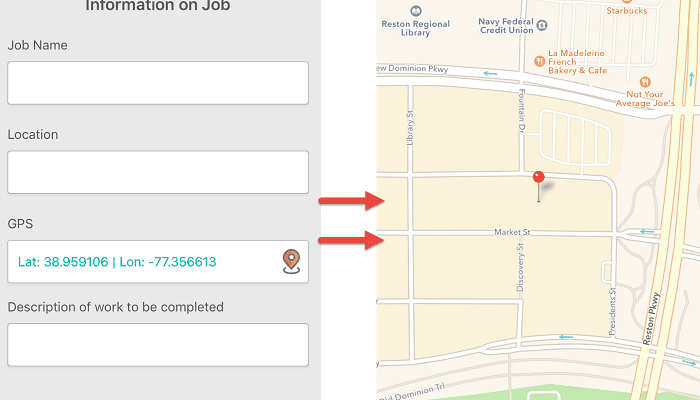
The GPS feature of GoCanvas allows for business owners and supervisors to verify not only when reports were captured, but also WHERE the data was collected. This functionality can be easily added to any of your current mobile forms using the drag and drop app builder.  And by marking the field as “required”, you can ensure that every time someone fills out the mobile form, the user will be forced to record their location. Additional field settings for the GPS field include accuracy and selecting how the coordinates collected are displayed on the final PDF report (map, lat/long, web link).

GoCanvas’s GPS functionality is a great compliment to many of the mobile forms and features that you’re already using today.

Canvas Mobile GPS

The GPS functionality gives your team even greater detail and insight into your data, as well as providing you validation of job completion. This data is also great for communicating with customers to verify proof of service or delivery. You can now easily avoid the “he said/she said” scenarios that happen when a customer says a technician didn’t show up on site or didn’t complete the service at the correct location. This alone can save you hours in time, frustration, and headaches! The GPS coordinates that are collected can also help with on-site accident reporting and the creation of custom reports to find out where the most injuries are occurring. This can help your business become more proactive with site safety, and reduce costs when it comes to future employee injury claims.

Overall, the GoCanvas GPS feature is most commonly implemented in mobile forms that are capturing field service data that is both time and location sensitive.

Examples include:

  • Crew Daily Time Sheets
  • Job Safety Analysis
  • Accident Report
  • Proof of Delivery Report
  • Daily Work Order
  • Facility Walkthrough Checklist
  • And more!

While these are just a few examples of how the GoCanvas GPS functionality can be integrated with many of the mobile forms you already use today, the ability to increase data accuracy within your business is just a few clicks away!

Try GoCanvas Free

About GoCanvas

GoCanvas® is on a mission to simplify inspections and maximize compliance. Our intuitive platform takes care of the administrative tasks, freeing our customers to focus on what truly matters – safeguarding their people, protecting their equipment, and delivering exceptional quality to their customers. 

Since 2008, thousands of companies have chosen GoCanvas as their go-to partner for seamless field operations.

Check out even more resources

Three inspection workers on job site.

The Ultimate Guide to Quality Control Inspections

Managing a construction project is a complex and stressful process. Among other things, you have to coordinate project team members, materials, and equipment and ensure that contractors are not afflicted by the potential risks and hazards present at the construction site. That said, quality means different things to different people which is why you should…

A man using GoCanvas for the digital transformation of his workflow.

Constructions Digital Transformation

Your competition is finding faster ways to capture data and get critical insights from the field into their existing systems. In short, they’re not going bigger, they’re getting smarter. In this 15-minute broadcast on the construction industry’s digital transformation, find out why the trend is to modernize workflows – and how you can stay ahead of the curve…

A electrician inspecting equipment.

See how VIP Lighting optimized efficiency with GoCanvas

VIP Lighting is a retail lighting and electrical maintenance business that services over 10,000 retail locations all over Australia and New Zealand. Before GoCanvas, VIP Lighting had two separate systems that were impossible to integrate, leading to inefficiencies. GoCanvas made it easy to integrate their systems into single, centralized platform…

Connect with an Expert Today.

We’ll help you put together the right solution for your needs.

4 Mobile Forms Every Field Service Company Should Have

4 Mobile Forms Every Field Service Company Should Have

| | |
Construction Truck with people

When it comes to the Field Service industry, time means everything. Many companies charge customers a flat rate fee instead of an hourly rate, so it’s in the best interest of the service technician to complete as many jobs per day as possible.

So how do mobile forms come into play? Efficiency!

Using mobile forms instead of paper has proven to be a faster way to collect, share, and learn from your data in real-time. GoCanvas has an app store of over 20,000 mobile form templates from various industries.

So the only question is, which forms should you get started with first?

#1.   – This form is key to getting any job done, no matter what service you are performing. With this mobile report, you have the ability to capture key data points like Time on Site, Project Images, Customer Requirements, Project Costs, and more. The best part is that you can create tasks to be assigned to technicians that are already out in the field by using GoCanvas Dispatch. The technician simply has to open up the Field Service Report on their mobile device, read the assigned dispatch, and complete the rest of the report when they arrive on the job site.

#2.   – A crucial part of any business is getting paid. But most companies still struggle with collecting payment in a timely manner. That is why the mobile Invoice form is critical for those who struggle with this issue, and for those who no longer want to wait days or weeks to get jobs processed. Another feature is the ability to collect payment instantly using our integration with Square! You can have your data flow from GoCanvas directly into your existing invoice software .

Workers Dispatching information

#3. Change Order Form – The ability to make quick changes on a job site is key. With the mobile Change Order Form and our calculation functionality, you can quickly display the costs of the proposed change to the customer and get their digital signature in seconds. A copy of the form will be sent to the customer, the back office, and to the parts supplier for immediate delivery.

#4.  Daily Time Sheet –  The hardest thing for any company to accurately capture is an employee’s work hours. The problem is that this data is usually captured on a weekly basis but rarely turned in on time. If this data isn’t turned in on time, then no one gets paid. With the mobile Daily Time Sheet form, an employee can simply input their hours each day and submit it to the office. At the end of the pay period, the office accountant can simply export every employee’s work hours into an Excel spreadsheet. We can even help you create an automated dashboard or report that neatly organizes and totals up each employee’s weekly hours for you!

Request a demo button

About GoCanvas

GoCanvas® is on a mission to simplify inspections and maximize compliance. Our intuitive platform takes care of the administrative tasks, freeing our customers to focus on what truly matters – safeguarding their people, protecting their equipment, and delivering exceptional quality to their customers. 

Since 2008, thousands of companies have chosen GoCanvas as their go-to partner for seamless field operations.

Check out even more resources

Two people in an office looking at a tablet.

Improving Your Operations with Field Service Management Software

Whether you have two or 200 employees, your business’ success depends on their hard work. Passionate, motivated team players are the difference between…

Two people in hard hats looking off camera.

Should You Connect Field Service Management Software with QuickBooks?

Field service management software has shown to increase productivity both for employees in the field and operations teams in the office. You may be wondering how field service…

Person in safety vest smiling.

How the Best Field Services Businesses Use Mobile Apps

Mobility and field service: the talk has been happening forever. The idea that real-time information improves customer service and boosts technician productivity is changing…

Connect with an Expert Today.

We’ll help you put together the right solution for your needs.

3 Reasons Why Every Electrician & Plumber Should Be Paperless in 2017

3 Reasons Why Every Electrician & Plumber Should Be Paperless in 2017

|

Plumbers and electricians are not just the men and women you call when you have an issue in your home, they are the same people who get contracted on commercial construction projects in cities and suburbs all across the world.

For these larger projects that involve permits, zoning, and large contracts it’s essential that data be properly collected and stored for documentation.

Over the years as technology has progressed, so has the complexity and speed of these construction projects. Yet, when we look at how companies process, share and analyze their data on these job sites we find that they are still using the same methods from almost a half-century ago. They are still stuck using paper!

It might seem obvious, and something you have heard a MILLION times, but using paper is negatively impacting your company’s overall efficiency.

What does this mean? Take a look at some of these figures and facts:

1.) The average company spends $80 per employee annually and loses 2 hours per day just on paperwork

2.) TechRadar reports that up to 70% of business would fail within 3 weeks if their paper records were destroyed in a fire or flood.

3.) A found that 49.6% of time spent in construction is “devoted to wasteful activities” like looking for tools, errors in communication, attempting to locate forms, etc.

There are a variety of ways that mobile tools will and currently are making an impact for Plumbers and Electricians. But when we focus in, we can clearly identify 3 primary ways that mobile tools affect a business’ bottom line.

# Renewable Energy

According to the 2015 U.S. Clean Tech Leadership Index, approximately 47% of electricity generation in the United States came from renewable sources including wind and solar. Projections for 2017 and beyond have made it clear that the shift towards renewables is not a wading fade, but a systematic change.

When it comes to the services of a Plumber or Electrician, they are not immune. Understanding of the new “high-efficiency” parts and materials that are required by government regulations are now a key for being competitive in the industry and mobile apps can help! Mobile apps can assist technicians with looking up product manuals and documentation with just a scan of a barcode, finding the solution to common questions about pricing or equipment, and even help with the calculation of common service charges!


#2 Streamlined Operations

Mobile technology is great because it allows for the sharing of data in real-time without having to worry about driving or scanning the contents to the office later. A platform like GoCanvas gives Plumbers and Electricians the ability to send and receive job orders from wherever they find themselves.

Tools like Dispatch allow the office to schedule customer appointments and assign task directly to the technician’s device out in the field. Once the technician receives the notification on their smart device, he or she can read where they need to go and begin completing the ! To track the status’ of all their tasks throughout the day/week, the office can view the Dispatch Manager online and view what has or has not been completed in real-time. No more guessing or trying to track down employees to find out if something has been completed. All the information is sent directly to your GoCanvas database.

Another great example of streamlining communication is with  With any big job, Change Orders are normal but time-consuming. With GoCanvas you can send an order, have it processed, and get paid within minutes. No need to wait around for paper invoices to make their way to everyone, GoCanvas sends it to the right people in seconds.


#3 - Foster CollaborationIn today’s highly engaged business world, Electricians and Plumbers can’t afford to work in informational bunkers. They need to have the information that they collect be communicated to the right people and systems in real-time.

An example is an Electrician completing a Work Order or mobile Invoice form that requires supervisory approval before it can be completed. How can this be done faster without paper and having to drive all the way back to the office for a signature?

Simple! With GoCanvas and our Workflow functionality, the document that was completed on the technician’s device will be transmitted to the supervisor’s device for digital signature approval and then sent to the customer in real-time. The supervisor can even add comments and reject the work order back to the original Electrician if he/she feels it is incomplete in some way.

But this is not the only way that mobile apps like GoCanvas help foster collaboration. The simple act of a dispatcher being able to create, assign and track assignments to technicians in the field is another great example. Another way is the simple ability for a technician to go out to a job site, fill out a mobile document, and be able to send a PDF copy to a customer, supervisor, and the office staff before they even start their truck to go home.

This is the essences of going mobile and fostering collaboration with GoCanvas, and how on average we increase our customers’ productivity by 30%!

Electricians + Plumbers eBook

About GoCanvas

GoCanvas® is on a mission to simplify inspections and maximize compliance. Our intuitive platform takes care of the administrative tasks, freeing our customers to focus on what truly matters – safeguarding their people, protecting their equipment, and delivering exceptional quality to their customers. 

Since 2008, thousands of companies have chosen GoCanvas as their go-to partner for seamless field operations.

Check out even more resources

Man inputting digital work order into a tablet from a work site.

How Digital Work Orders Impact Your Key Business Outcomes

Is your company still using paper sheets to manage work orders? The drawbacks of using paper forms are often hidden, making it difficult to understand the true impact of paper forms on a business…

Woman reviewing data via her mobile phone.

See How Centurion Got Amazing ROI from GoCanvas

Centurion is the largest heavy haulage provider in Australia. They deliver national supply chain solutions to the resources, energy, construction & retail sectors throughout Western Australia, Queensland & the Northern Territory…

A man reviewing data on tablet collected by GoCanvas solutions.

5 Tips to Improve How Your Business Collects Data

Companies rely on collecting data in order to operate. In a fast-changing world, companies that focus on streamlining and improving their data collection processes will be able to do more. The good news is that it’s become easier than ever for businesses of all… 

Connect with an Expert Today.

We’ll help you put together the right solution for your needs.

>