Boost Truck Fleet Efficiency and Profitability – 5 Ways Mobile Apps Can Help

Boost Truck Fleet Efficiency and Profitability – 5 Ways Mobile Apps Can Help

| |

Mobile apps are designed to make everyday tasks more efficient. You can document and file car insurance claims directly from your phone in real-time, right at the scene of the accident. With a mobile boarding pass, you can bypass the ticketing counter at the airport and go straight to your gate. You can bank with an app, book hotels with an app, and order pizza with an app.

Now, motor carriers — and any businesses that employ trucks and drivers — can experience those efficiency gains regarding inspection reports. With mobile inspection apps, carriers and drivers can trade in the burden of paper forms for the ease of mobile forms and cloud-based data through their mobile devices. But those apps don’t only increase efficiency — they also drive additional revenue. Here’s how.

When drivers and carriers enter information in mobile apps, that data is stored in the cloud. With reduced paper files, carriers can eliminate much of their physical storage including file cabinets and shelves. That means more space in the office, less clutter to work around, and an easier time accessing the information you need the minute you need it within your mobile application — especially if you’re pulled over for an inspection.

Cloud-based data storage can automate workflow and give owners and managers instant access to inspection documents, including work orders, inspection checklists, and audits and maintenance reports as soon as drivers complete them — regardless of where the driver is — providing accurate, up-to-date knowledge on all equipment.

In the short term, the benefits of those changes may seem marginal — but if you aim to grow your business, mobile technology, and a digital documentation system can help you scale efficiently and stay profitable as you expand.

We recommend creating invoices through our mobile app for Trucking Invoices for an easy way to keep track of your financials.

Drivers already work up to 70 hours in an eight-day period. For carriers to be the most profitable, however, that time must be spent driving, not fulfilling peripheral duties like completing or filing paperwork. A mobile app on a smartphone or tablet can save time and increase convenience for both the carrier and the driver.

With paper forms, drivers must fill out duplicate information every time — like vehicle make, model, year, and DOT registration number. Mobile forms, however, may be pre-populated with this kind of information, saving the driver the headache of having to fill in that information time after time and reducing the chance that they’ll get sloppy and skip portions of the forms completely. Mobile forms can also require users to fill out one field before they are able to move to the next.

The time savings can equate to additional driving time (and revenue), and completing paperwork is a win for everyone when it comes to roadside inspections, traffic stops, and especially if your truck is involved in an accident.

Even though large trucks represent only 2 percent of drivers, they’re involved in 11 percent of road fatalities. Driver error accounts for 87 percent of those accidents, and vehicle issues, such as brake problems, account for 10 percent.

If one of your trucks was involved in an accident tomorrow, would you have accurate, up-to-date information readily available to prove that your vehicles have been inspected, have received regular maintenance, and that your drivers meet all training and certification requirements?

This kind of information can be vital at the site of a crash and may be able to help exonerate your company of any alleged wrongdoing in the event of a liability suit or lawsuit.

The law requires truck fleet owners to keep records of hazardous material carriage, vehicle inspections, driver records, health management, and more. The penalties for failing to do so can be steep — ranging from fines to termination as a business entity.

Companies that don’t keep maintain the required documentation pay out millions of dollars each year. Recordkeeping violations, for example, can carry a fine of up to $1,100 per day while the violation continues, up to $11,000. Hazmat fines can stack up to $75,000 per violation.

If drivers receive a serious violation during a roadside inspection, their trucks can be placed out of service (OOS) — taking them completely off the road until the violation is remedied. And that can be an expensive delay, considering you’re losing revenue for every hour the truck is sidelined.

You also have to consider the broader impact on your business. The public can see carriers’ violations and fines on the Federal Motor Carrier Safety Administration (EFMCSA) website and too many penalties against your company could cause your customers to take their business elsewhere. Using a mobile app to keep updated, accurate, and accessible records can help you avoid those penalties and keep your business profitable.

Drivers are expected to carry and manage a long list of documents — including a driver’s license, medical examiner’s certificate, a driver’s record of duty status, documentation of an annual inspection, hazardous materials paperwork, and permit credentials.

Rather than maintaining these documents on paper, a mobile app can streamline the process, helping drivers and carriers become more efficient. On a grander scale, that can help your company become more competitive and continue to attract drivers that will stay compliant and drive profitability.

Paper forms aren’t just inconvenient. Relying on paper forms can open your truck fleet up to fines, lawsuits, and downtime. Learn more about how mobile inspection apps can benefit your business in the interactive eBook, “4 Ways Mobile Inspection Forms Can Keep Your Trucks on the Road.”Then get started by trying out GoCanvas free (no credit card or contract required). We’ll help you create your first app, whether it’s for regular inspections, maintenance logs, or managing documentation.

About GoCanvas

GoCanvas® is on a mission to simplify inspections and maximize compliance. Our intuitive platform takes care of the administrative tasks, freeing our customers to focus on what truly matters – safeguarding their people, protecting their equipment, and delivering exceptional quality to their customers. 

Since 2008, thousands of companies have chosen GoCanvas as their go-to partner for seamless field operations.

Check out even more resources

A person sits at a desk holding their phone showing a graph, while their laptop sits on the desk showing more charts and graphs.

How TE3CO Leverages Data Analytics to Unlock Business Potential

TE3CO provides mission-critical pressure relief technology and services to customers across the oil and gas industry. They employ a highly trained and capable workforce of field technicians and engineers. Before working with GoCanvas, TE3CO relied on spreadsheets and emails to manage their ticketing process but found the system time-consuming and difficult to track.

Two men in hard hats look onto a tablet.

VIP Lighting Gains Business Efficiencies with GoCanvas

VIP Lighting is a retail lighting and electrical maintenance company that services retail chains across Australia and New Zealand. The business has been operating for 25 years and now services 10,000 retail sites across both countries. Prior to joining GoCanvas in 2018, the business had multiple systems running different aspects of their technician and contractor network.

Man in a hard hat inspecting HVAC vents.

Three HVAC Maintenance Checklists that will Reduce Errors and Grow Your Bottom Line

For HVAC technicians, so many errors within their daily tasks come from using outdated paper forms while completing a job. Using these HVAC inspection checklists will prevent issues before they happen, so your technicians can collect comprehensive and consistent data at every job.

Connect with an Expert Today.

We’ll help you put together the right solution for your needs.

How Checklists Can Boost the Performance of Retail Businesses

How Checklists Can Boost the Performance of Retail Businesses

| |

The retail industry is much more complex then it seems to the outside world. The ability to efficiently manage a mid to large scale retail business in today’s marketplace is almost impossible if you don’t have the right tools. Luckily for business owners in this industry, the current tech boom has led to a variety of tools and platforms that allow for the quick collection and analysis of data in mere seconds. 

So what’s the problem?

Many retail business find themselves in situations where they either can’t afford to invest in high priced pieces of software, have staff that don’t embrace mobile technology, or are afraid of changing their internal processes after decades of doing things a certain way. A combination of all three of these factors is usually why a retail business will recognize that things aren’t running as efficiently as it should be, but don’t do anything about it. 

The key to truely embracing technology within your business is to select a platform that compliments and enhances what you are doing today. 

Canvas mobile checklist

In the Retail Industry, this means selecting a platform that helps increase your daily visibilty into the operations of your business. By selecting a solution that helps reduce the time you spend walking around checking up on things or waiting on reports to be generated, you are instantly recouping hundreds of hours every month that can be refocused on other areas of your business that need improvement.

Also, what would happen if you were able to receive a real-time report after every failed checklist? It would mean that issues would no longer go unnoticed or unresolved for days, weeks, or even months at a time. A single small issue doesn’t snowball into many big issues. And with real-time data reporting, you are able to make proactive decisions within your retail business that can have a huge impact on your employees’ productivity. 

The easist, most efficient way to get started with technology in your retail business is to analyze the different parts of your organization and identify which are most involved in data collection. The reason being is that these areas involve the most paperwork and employee time, and are most likely to be dramatically affected if a mobile data collection solution is implemented. That is why implementing mobile checklists with GoCanvas is one of the most popular ways for retail businesses to go paperless. 

GoCanvas offers a variety of mobile retail checklists that cover everything from retail store audits, cleaning checklists, daily store opening/closing checklists, and more! 

Canvas Mobile checklists

The best part about implementing the GoCanvas platform to your retail employees is that there is no IT involved,  zero coding, and is something easy for you to manage on a daily basis. When your business uses GoCanvas, it instantly allows you to convert your outdated paper processes into mobile checklists. This eliminates the need for all manual reporting on the backend since all the data collected with GoCanvas is instantly uploaded to the cloud and available for review. And since all reports can be sent to you in real-time, business decisions can be made immediately and without hesitation. 

Additional benefits and features for retail businesses include:

  • Field requirements to ensure that employees always complete their checklists
  • GPS and Image Capture allow employees to create incredibly detailed reports
  • Dropdown lists and checkboxes allow for the quick capture of accurate information
  • Schedule, assign, and manage 100’s of tasks with the Dispatch Calendar
  • GoCanvas Workflow allows for the creation of custom report approvals from employee to supervisor
  • And much more!

Mobile checklists aren’t the only form that will help improve your efficiency. Check out the basic order form app today!

Interested in learning more on how GoCanvas can give your retail business an edge in the marketplace? Click the button below!

About GoCanvas

GoCanvas® is on a mission to simplify inspections and maximize compliance. Our intuitive platform takes care of the administrative tasks, freeing our customers to focus on what truly matters – safeguarding their people, protecting their equipment, and delivering exceptional quality to their customers. 

Since 2008, thousands of companies have chosen GoCanvas as their go-to partner for seamless field operations.

Check out even more resources

business people discussing project

Gown Your Business with GoCanvas Partner Program

Join our Partner Program and gain instant access to our global network of thought leaders and industry experts enjoying shared collaboration and collective success.

Forte Supply Chain Solutions Partner Video

Partner Snapshot: Forte Supply Chain Solutions

Explore how Forte Supply Chain Solutions partnered with GoCanvas, combining in-house industry expertise with our white-label mobile forms to revolutionize their processes.

Closeup of a handshake.

GoCanvas Integrations: Streamline your Workflow

Integrate with over 1,000 software applications. Enhance your GoCanvas experience by syncing real-time data to one or all of your business tools.

Connect with an Expert Today.

We’ll help you put together the right solution for your needs.

3 Ways to Create a Mobile Work Order Form in Under 10 Minutes

3 Ways to Create a Mobile Work Order Form in Under 10 Minutes

| |
Choose a template

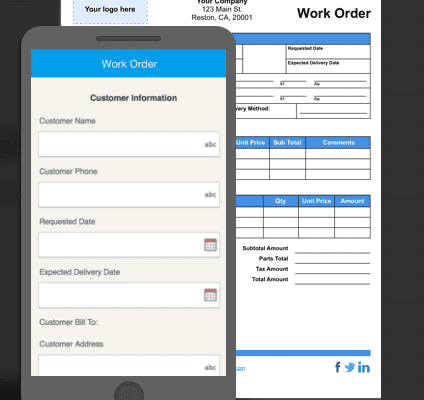
The secret to setting up the right mobile platform for your business is not by searching for the cheapest tool, but finding the one that you are able to customize, deploy, and manage yourself without the need of IT. This is why more and more companies from the Construction, Inspection, and Field Service industries are choosing GoCanvas for mobile construction work order and document management.

Still wondering if your business should make the switch to mobile work orders? Take a look at some of these stats from our clients in the Construction industry:

  • 45% of clients use GoCanvas for mobile work orders
  • 72%% of clients reported dramatic improvements in the speed of data collection and reporting
  • 78% of clients increased the productivity of their business by 10-19%+

The reason that close to 75% of GoCanvas users are able to build their first mobile form in less than a day is because of our code-free form builder and template library.

Another option is choosing one of the pre-made mobile work order forms in our Application Store of over 30,000 industry and use-case specific templates. This allows you to take your time as you find the right work order that matches your industry and use case. The best part is that you can download as many templates as you wish, test them out, and even customize them using the GoCanvas App Builder to make sure they are perfect. This option is perfect for people who don’t want start from scratch but also want to be hands-on as they build out the mobile platform for their business.

Canvas Mobile Form Builder

The last option (but best in my opinion) is to create a custom work order using the drag-and-drop, no-code builder.

This option gives you the ability to customize everything from the features, user experience, and the reports of your work order. You are able to make the work order as simple as a two screen mobile form with simple data entry fields to as complex as a 15 screen mobile form with automated calculations and conditional fields. This option allows you create a data collection experience that matches the specific job or project that your employees are undertaking.

The best part about all of these options is that there is NOT a huge time or cost investment. Your business is able to design, create, and deploy a mobile platform under a week without the need for involving IT or outside consulting services. This is ideal for any company who is looking for a boost in productivity but is afraid of investing large amounts of time and money in technology.

About GoCanvas

GoCanvas® is on a mission to simplify inspections and maximize compliance. Our intuitive platform takes care of the administrative tasks, freeing our customers to focus on what truly matters – safeguarding their people, protecting their equipment, and delivering exceptional quality to their customers. 

Since 2008, thousands of companies have chosen GoCanvas as their go-to partner for seamless field operations.

Check out even more resources

business people discussing project

Gown Your Business with GoCanvas Partner Program

Join our Partner Program and gain instant access to our global network of thought leaders and industry experts enjoying shared collaboration and collective success.

Forte Supply Chain Solutions Partner Video

Partner Snapshot: Forte Supply Chain Solutions

Explore how Forte Supply Chain Solutions partnered with GoCanvas, combining in-house industry expertise with our white-label mobile forms to revolutionize their processes.

Closeup of a handshake.

GoCanvas Integrations: Streamline your Workflow

Integrate with over 1,000 software applications. Enhance your GoCanvas experience by syncing real-time data to one or all of your business tools.

Connect with an Expert Today.

We’ll help you put together the right solution for your needs.

Feature Focus: Create Custom Reports with the PDF Designer

Feature Focus: Create Custom Reports with the PDF Designer

| |

When you go paperless, that doesn’t mean that you lose the need for reports. For many businesses, it is still extremely critical that their clients are able to receive a copy of the services that were rendered.

At GoCanvas, we developed the PDF Designer with those concerns in mind. This tool gives clients the ability to customize their output reports to replicate the style and design of their original forms without the limitations and issues of paper. The PDF Designer allows companies to create specific output reports based on each of their GoCanvas mobile forms.

Customers frequently create unique PDF reports for different types of mobile forms including:

  • Invoices
  • Timesheets
  • Work Orders
  • Job Safety Analysis (JSA)
  • and more

Similar to the GoCanvas App Builder, the PDF Designer is a simple to use tool that requires no IT or design-based knowledge. It’s an easy to use drag and drop builder that allows you to map the data from your mobile form to your PDF report. The PDF Designer automatically syncs all the data fields from the app builder so that all you have to do is simply drag the data to where you want it to show up on the PDF!

PDF Designer

Aside from just simply dragging the data fields to where you want them on the PDF, you are also able to add:

  • Social Media Icons – Facebook, Home Advisor, Google Reviews, etc
  • Images, Logos, and Graphics
  • Static Text
  • Borders
  • Background Colors
  • Hyperlinks

The best part about the PDF Designer is that we have given you a number of ways to get started in designing the perfect report.

The first way to get started is by choosing one of our five most popular form templates! These templates include a Work Order, Invoice, Inspection, Waiver, and an Estimate. This is perfect for users who are just getting started creating a new mobile form and want to save time! The template will give create the app and the output for you automatically, and give you quick headstart for tweaking anything you feel that needs to be changed.

Mobile Form Templates

The second way to get started is by using our new “Auto Layout” feature. This is an amazing feature that can take any of the forms that you have already built and give them a custom designed layout in just seconds! All you have to do is access the PDF Designer for the mobile form that you wish to create an output report. Once inside the PDF Designer, click the button that says “Auto Layout”. You will instantly see the report be created based on the data fields from the mobile form. All you will need to do is add your logo and connect any of your company’s social media accounts(if you wish).

Auto Layout

The third way to get started with the PDF Designer is by going with a blank template! Just like when you are building your first mobile form with GoCanvas, you can start with a blank slate and build things from the ground up if you prefer. As you are customizing your report from scratch, you may use the “Preview” button within the PDF Designer so that you can confirm how your creation looks and tweak things in a flash.

This is the ideal way to start if you are going to be creating a report that needs to look a very specific way, and don’t want to waste time having to deconstruct a pre-built template that doesn’t fit the design you were envisioning.

Design your PDF

And keep in mind, the 20,000+ pre-built mobile form templates in our Application Store all have professionally designed PDF reports assigned to them as well!

The biggest benefit in designing your own reports is obviously the fact that you are able to control the look, feel, and layout of your company’s information and brand.

Many services similar to GoCanvas will force your information to be placed into a generic looking document that serves only to show your information one way. With GoCanvas, we give you the power to control the way your information is presented to your customers, vendors, and internal staff. You now control how your forms are filled out, shared, and formatted with GoCanvas.

Take full advantage of this core feature of GoCanvas, and start customizing your reports today!

Burning Paper

About GoCanvas

GoCanvas® is on a mission to simplify inspections and maximize compliance. Our intuitive platform takes care of the administrative tasks, freeing our customers to focus on what truly matters – safeguarding their people, protecting their equipment, and delivering exceptional quality to their customers. 

Since 2008, thousands of companies have chosen GoCanvas as their go-to partner for seamless field operations.

Check out even more resources

business people discussing project

Gown Your Business with GoCanvas Partner Program

Join our Partner Program and gain instant access to our global network of thought leaders and industry experts enjoying shared collaboration and collective success.

Forte Supply Chain Solutions Partner Video

Partner Snapshot: Forte Supply Chain Solutions

Explore how Forte Supply Chain Solutions partnered with GoCanvas, combining in-house industry expertise with our white-label mobile forms to revolutionize their processes.

Closeup of a handshake.

GoCanvas Integrations: Streamline your Workflow

Integrate with over 1,000 software applications. Enhance your GoCanvas experience by syncing real-time data to one or all of your business tools.

Connect with an Expert Today.

We’ll help you put together the right solution for your needs.

4 Mobile Forms Every Field Service Company Should Have

4 Mobile Forms Every Field Service Company Should Have

| | |
Construction Truck with people

When it comes to the Field Service industry, time means everything. Many companies charge customers a flat rate fee instead of an hourly rate, so it’s in the best interest of the service technician to complete as many jobs per day as possible.

So how do mobile forms come into play? Efficiency!

Using mobile forms instead of paper has proven to be a faster way to collect, share, and learn from your data in real-time. GoCanvas has an app store of over 20,000 mobile form templates from various industries.

So the only question is, which forms should you get started with first?

#1.   – This form is key to getting any job done, no matter what service you are performing. With this mobile report, you have the ability to capture key data points like Time on Site, Project Images, Customer Requirements, Project Costs, and more. The best part is that you can create tasks to be assigned to technicians that are already out in the field by using GoCanvas Dispatch. The technician simply has to open up the Field Service Report on their mobile device, read the assigned dispatch, and complete the rest of the report when they arrive on the job site.

#2.   – A crucial part of any business is getting paid. But most companies still struggle with collecting payment in a timely manner. That is why the mobile Invoice form is critical for those who struggle with this issue, and for those who no longer want to wait days or weeks to get jobs processed. Another feature is the ability to collect payment instantly using our integration with Square! You can have your data flow from GoCanvas directly into your existing invoice software .

Workers Dispatching information

#3. Change Order Form – The ability to make quick changes on a job site is key. With the mobile Change Order Form and our calculation functionality, you can quickly display the costs of the proposed change to the customer and get their digital signature in seconds. A copy of the form will be sent to the customer, the back office, and to the parts supplier for immediate delivery.

#4.  Daily Time Sheet –  The hardest thing for any company to accurately capture is an employee’s work hours. The problem is that this data is usually captured on a weekly basis but rarely turned in on time. If this data isn’t turned in on time, then no one gets paid. With the mobile Daily Time Sheet form, an employee can simply input their hours each day and submit it to the office. At the end of the pay period, the office accountant can simply export every employee’s work hours into an Excel spreadsheet. We can even help you create an automated dashboard or report that neatly organizes and totals up each employee’s weekly hours for you!

Request a demo button

About GoCanvas

GoCanvas® is on a mission to simplify inspections and maximize compliance. Our intuitive platform takes care of the administrative tasks, freeing our customers to focus on what truly matters – safeguarding their people, protecting their equipment, and delivering exceptional quality to their customers. 

Since 2008, thousands of companies have chosen GoCanvas as their go-to partner for seamless field operations.

Check out even more resources

Two people in an office looking at a tablet.

Improving Your Operations with Field Service Management Software

Whether you have two or 200 employees, your business’ success depends on their hard work. Passionate, motivated team players are the difference between…

Two people in hard hats looking off camera.

Should You Connect Field Service Management Software with QuickBooks?

Field service management software has shown to increase productivity both for employees in the field and operations teams in the office. You may be wondering how field service…

Person in safety vest smiling.

How the Best Field Services Businesses Use Mobile Apps

Mobility and field service: the talk has been happening forever. The idea that real-time information improves customer service and boosts technician productivity is changing…

Connect with an Expert Today.

We’ll help you put together the right solution for your needs.

>