Release Notes: GoCanvas Windows App
At the very end of 2015 we made a strategic decision to support 3 platforms for filling out GoCanvas apps. Android, iOS and the Windows operating system. We decided to NOT support Windows Phone and Blackberry any longer. Our goal with these 3 platforms is very simple: To 100% support them. This means that all GoCanvas features (Unless not applicable) would be available across them and the design of the interface would be simple and easy to use.
We are now happy to announce that our GoCanvas Windows App is now available!

You can install this version of GoCanvas on any laptop/desktop/tablet that is running Windows 7, 8 or 10. For those of you that have been using the GoCanvas Desktop Client, this will be a massive improvement for you. There are tons of new features availabe on this version that were previously only available on iOS or Android. Here they are!
- Folders
- Table of Contents
- Grid view for loop screens
- Viewing and editing past submissions (History tab above)
- Receive dispatched Loop items
- Draw on an image you captured or pulled from your gallery
- View PDF after sync
- Departments
- Web link field
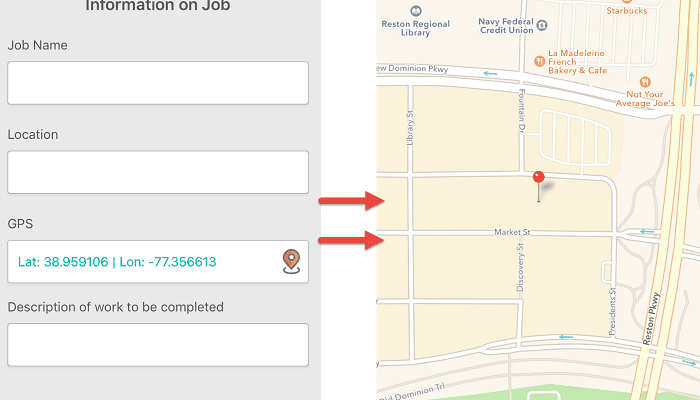
- GPS field
- Sync after tapping submit
- Blank date and time fields
Now your team members that have Windows laptops/desktops/tablets can use GoCanvas just like your Android and iOS users and get the same experience. This opens up a world of additional opportunity for your organization to save even more time using GoCanvas.
- Complete submissions on Android or iOS and edit them later with the Windows App.
- Better incorporate your office-based team members into your GoCanvas processes.
- Office-based team members can consider GoCanvas for their processes now. Human Resources forms, approval forms, request forms and more can all be filled out with the Windows App.
- Mobile users that have laptops or Surface tablets (We do NOT run on Windows RT, which is used by older Surface tablets) can now use those devices instead

Stay in Touch!
About GoCanvas
GoCanvas® is on a mission to simplify inspections and maximize compliance. Our intuitive platform takes care of the administrative tasks, freeing our customers to focus on what truly matters – safeguarding their people, protecting their equipment, and delivering exceptional quality to their customers.
Since 2008, thousands of companies have chosen GoCanvas as their go-to partner for seamless field operations.

Check out even more resources

How Digital Work Orders Impact Your Key Business Outcomes
Is your company still using paper sheets to manage work orders? The drawbacks of using paper forms are often hidden, making it difficult to understand the true impact of paper forms on a business…

See How Centurion Got Amazing ROI from GoCanvas
Centurion is the largest heavy haulage provider in Australia. They deliver national supply chain solutions to the resources, energy, construction & retail sectors throughout Western Australia, Queensland & the Northern Territory…

5 Tips to Improve How Your Business Collects Data
Companies rely on collecting data in order to operate. In a fast-changing world, companies that focus on streamlining and improving their data collection processes will be able to do more. The good news is that it’s become easier than ever for businesses of all…


.jpg)


The most successful GoCanvas partners tend to have deep industry knowledge that they use to solve real business problems, introducing GoCanvas to replace outdated processes and eliminate expensive paperwork. John Hamilton, President of JOTS Computing, who leverages his knowledge of Public Safety and GoCanvas to change the way police and firefighters capture data in the field, offered this on the GoCanvas Partner Program, “Canvas has been our number one partner in helping our men and women in Public Safety do their jobs more efficiently…It’s Click, Submit and Done!. I rarely engage with state, county or city public service executives where I can’t describe ways that GoCanvas could be deployed to streamline their existing processes.”
.png)


Owners of small- and medium-sized business find the prospect of having an Occupational Safety and Health Administration (OSHA) inspection scary, especially since the agency is now inspecting businesses from bakeries and liquor stores, to construction companies, tire stores, and performing arts companies.