Bill of Materials Form
Plan and track materials accurately every time.
Manage inventory and costs from the field with real-time updates that keep teams aligned, prevent delays or overspending, support accurate budgeting, and streamline accounting tasks.
12,000+ Companies Save Time and Money with GoCanvas





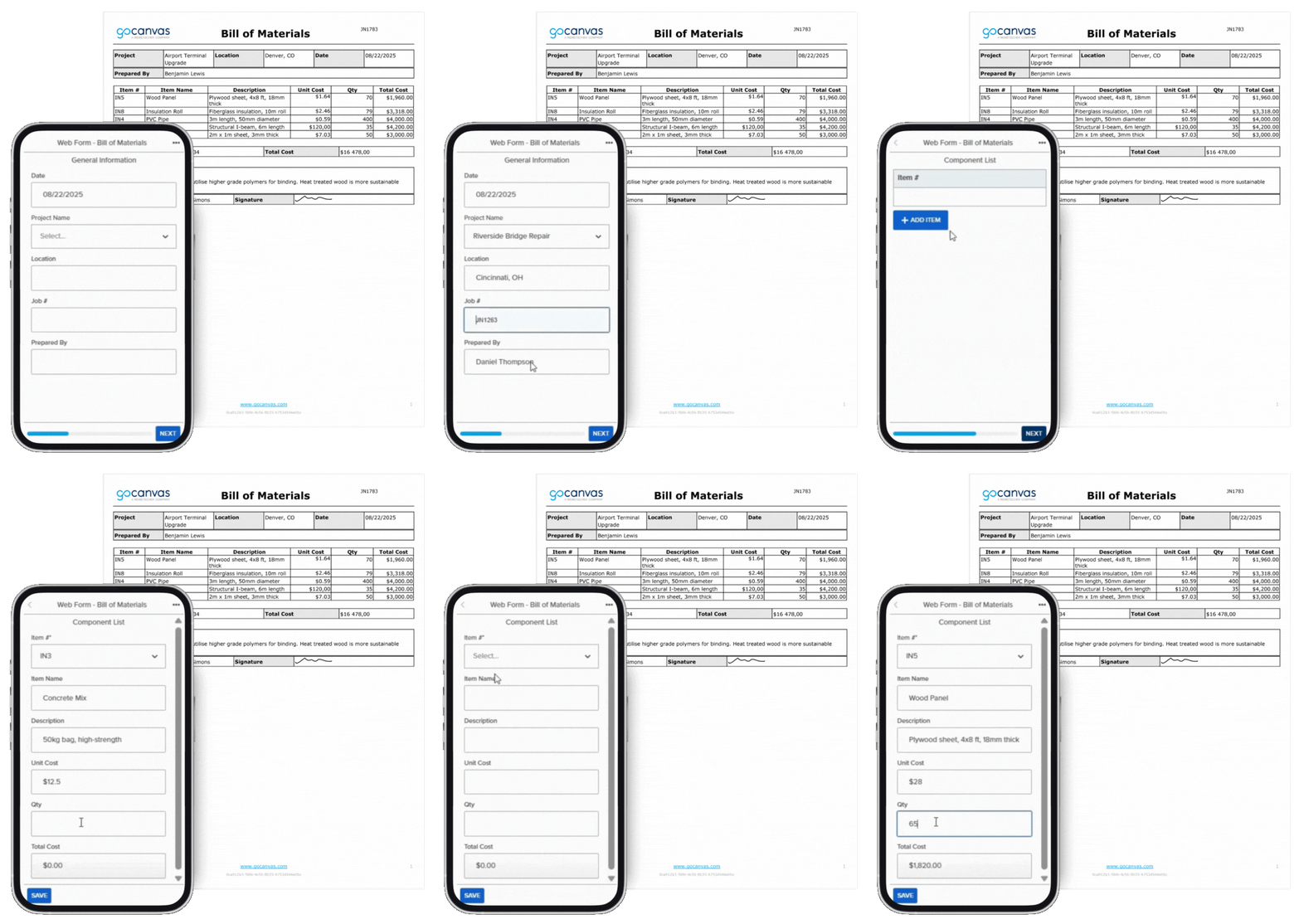
The Bill of Materials Form by GoCanvas helps teams record and manage all project materials, quantities, and costs from the field. Create and update material lists on any device to avoid shortages, over-ordering, or delays. Each form stores data securely in the cloud, allowing teams to stay aligned and maintain accurate, real-time budgets.
With integrations for QuickBooks, Google Sheets, Salesforce, and Dropbox, GoCanvas connects material tracking to your accounting systems. Keep every project organized, cost-efficient, and on schedule with digital forms that simplify inventory and budget management.
Additional Templates

Estimate
Create accurate labor and material cost estimates. Support bids and planning with reliable numbers from the field.

Work Order
Assign and monitor job tasks efficiently. Foremen use this to delegate responsibilities and track field progress in real time.

Daily Field Report
Track site progress, weather, and issues. Keep teams aligned and projects moving with a quick daily summary.
Connect with a Product Expert Today
We’ll help you put together the right solution for your needs.
Frequently asked questions
A Bill of Materials Form is a digital tool that lists every material, quantity, and cost needed for a project. With GoCanvas, teams can create and update material lists from any device to avoid shortages or overspending. It helps businesses plan accurately, stay organized, and keep projects on budget.
GoCanvas simplifies material management by centralizing all project data in one place. Field teams can enter materials, quantities, and prices directly from their mobile devices, ensuring everyone works from the same updated list. This prevents miscommunication, reduces waste, and helps track spending in real time.
Yes, the GoCanvas Bill of Materials Form integrates with tools like QuickBooks, Google Sheets, Salesforce, and Dropbox. These integrations allow data to flow automatically between your material lists, accounting, and project systems, keeping budgets and inventory up to date without manual entry.
Project managers, foremen, and procurement teams should use the GoCanvas Bill of Materials Form. It’s perfect for construction, manufacturing, and field service companies that need accurate material tracking. The form keeps everyone aligned, ensuring materials arrive on time and projects stay on schedule.
The GoCanvas Bill of Materials Form stands out with features like dropdown lists, signature capture, PDF export, and cloud sync. These tools make it easy to document, verify, and share material data instantly. It ensures accuracy, accountability, and full visibility across every stage of the project.